
Last updated on
Oct 31, 2026

Get the free Annual Unit Inspection Record
We are not affiliated with any brand or entity on this form

Fill out
Complete the form online in a simple drag-and-drop editor.

eSign
Add your legally binding signature or send the form for signing.

Share
Share the form via a link, letting anyone fill it out from any device.

Export
Download, print, email, or move the form to your cloud storage.
Why pdfFiller is the best tool for your documents and forms


End-to-end document management
From editing and signing to collaboration and tracking, pdfFiller has everything you need to get your documents done quickly and efficiently.
Accessible from anywhere
pdfFiller is fully cloud-based. This means you can edit, sign, and share documents from anywhere using your computer, smartphone, or tablet.
Secure and compliant
pdfFiller lets you securely manage documents following global laws like ESIGN, CCPA, and GDPR. It's also HIPAA and SOC 2 compliant.
What is Unit Inspection
The Annual Unit Inspection Record is a property management form used by residents and managers to document the condition of various parts of a rental unit during inspections.
pdfFiller scores top ratings on review platforms




Who needs Unit Inspection?
Explore how professionals across industries use pdfFiller.

Unit Inspection is needed by:
-
Property managers responsible for unit inspections
-
Residents living in rental properties
-
Landlords overseeing rental maintenance
-
Maintenance staff ensuring property conditions
-
Real estate agents facilitating rentals
-
Homeowners renting out their units
Comprehensive Guide to Unit Inspection
What is the Annual Unit Inspection Record?
The Annual Unit Inspection Record is a critical document used by property managers and residents to provide a thorough account of the condition of rental units. This form serves to systematically catalogue the state of various areas within a rental property, ensuring that both managers and residents have a clear understanding of any issues that may require attention.
The form plays a vital role in documenting the property's condition, which can serve as a reference point during disputes or maintenance efforts. By utilizing this form, residents and property managers can collaboratively maintain a property’s quality over time.
Purpose and Benefits of the Annual Unit Inspection Record
The primary purpose of the Annual Unit Inspection Record is to facilitate regular assessments of rental properties. Conducting inspections not only ensures optimal maintenance of rental units but also protects the interests of both residents and property managers.
-
Promotes proactive maintenance to avoid costly repairs.
-
Acts as a legal document in case of disputes regarding property conditions.
-
Fosters clear communication between residents and management regarding upkeep.
Key Features of the Annual Unit Inspection Record
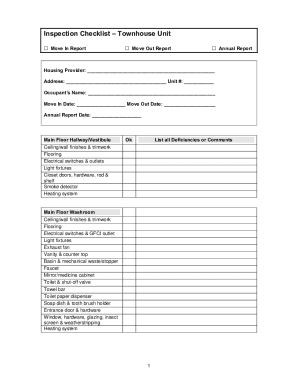
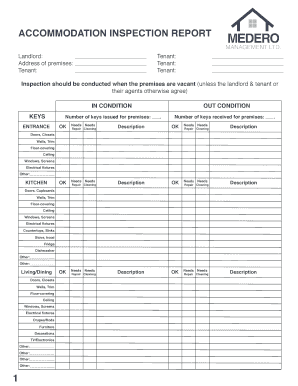
This form includes several essential sections that cover every aspect of a rental unit. Its design allows for comprehensive assessments of various areas such as kitchens, living rooms, and bathrooms.
-
Detailed sections for each area of the rental unit.
-
Signature requirements from both residents and property managers to confirm findings.
-
Checklist format that simplifies the inspection process.
Who Needs the Annual Unit Inspection Record?
The Annual Unit Inspection Record is necessary for multiple stakeholders involved in property management. Essential users of this document include residents and managers who must both sign to validate the record.
Additionally, landlords and property management companies may find this form useful, especially in scenarios that require formal documentation of property conditions during tenant turnover or dispute resolutions.
How to Fill Out the Annual Unit Inspection Record Online
Completing the Annual Unit Inspection Record online through pdfFiller is straightforward. Here’s how to get started:
-
Access the form on pdfFiller.
-
Edit the necessary sections, making sure all fields are accurately filled out.
-
Save the document and use the eSigning feature to finalize it.
Common Errors and How to Avoid Them
When filling out the Annual Unit Inspection Record, there are several common mistakes that users should be vigilant about. Awareness of these errors can ensure a smoother submission process.
-
Leaving required fields blank, which can delay processing.
-
Misunderstanding section requirements leading to incomplete information.
-
Failing to secure necessary signatures, causing the form to be invalid.
What Happens After You Submit the Annual Unit Inspection Record?
Upon submission of the Annual Unit Inspection Record, users can expect a set process for handling their entries. Here’s what you can do:
-
Await confirmation of receipt from the management.
-
Track the status of your submission through the management portal.
-
Be prepared to address any issues or amendments that may arise later on.
Security and Compliance for the Annual Unit Inspection Record
When using pdfFiller to manage the Annual Unit Inspection Record, users can rest assured about security. The platform employs robust measures to protect sensitive information.
-
Utilizes 256-bit encryption to safeguard all data.
-
Complies with essential regulations such as HIPAA and GDPR.
-
Provides a secure environment for document management, ensuring privacy during transactions.
Start Your Inspection Process with pdfFiller
Using pdfFiller for your Annual Unit Inspection Record enhances the process of completion and ensures efficient handling of your forms. Users benefit from a user-friendly interface designed for convenience.
Additionally, the platform guarantees document security and compliance, making it an ideal choice for managing property inspections.
How to fill out the Unit Inspection
-
1.To access the Annual Unit Inspection Record on pdfFiller, visit the pdfFiller website and log in to your account.
-
2.Once logged in, use the search bar to enter 'Annual Unit Inspection Record' and select the form from the results.
-
3.After opening the form, familiarize yourself with the layout, which includes sections for different areas of the rental unit.
-
4.Gather information about the unit's condition, including details for the kitchen, living room, bedrooms, bathrooms, and other specified areas.
-
5.Using pdfFiller's tools, click on each field to enter the relevant information based on your inspection findings.
-
6.Use the checkboxes for indicating conditions, and ensure you've filled out all required fields marked clearly on the form.
-
7.Once all information is filled in, review the entire form for accuracy, ensuring both the resident and manager's signatures are included.
-
8.After reviewing, navigate to the 'Save' option in pdfFiller to save your changes automatically.
-
9.You can also download the completed form or submit it directly through pdfFiller via email or other available sharing options.

Who is eligible to fill out the Annual Unit Inspection Record?
The form can be completed by both residents and property managers of a rental unit, as it requires their signatures to validate the inspection results.
Are there any deadlines for submitting the Annual Unit Inspection Record?
While the form itself does not have a specific deadline, it is advisable to complete it promptly after inspections to ensure timely documentation and maintenance follow-ups.
What methods are available for submitting the completed form?
You can submit the completed form through pdfFiller by emailing it directly or downloading it for manual submission if required. Always check for any specific submission requirements from your property management.
What supporting documents are needed when using this form?
Typically, no additional documents are required with the Annual Unit Inspection Record. However, it is beneficial to have prior inspection records or maintenance requests on hand for reference.
What are common mistakes to avoid when filling out the form?
Common mistakes include leaving required fields blank, failing to obtain both signatures, and not accurately documenting unit conditions. Always double-check for completeness before finalizing.
How long does it take to process the Annual Unit Inspection Record?
The processing time for this form typically depends on the pace of both parties reviewing and signing. Generally, it should be finalized immediately after a timely inspection.
Are there any fees associated with using this form?
Using the Annual Unit Inspection Record itself does not incur fees, but ensure you are aware of any potential costs for additional services you may select on pdfFiller.
Related Forms



Get the latest insights from our blog


If you believe that this page should be taken down, please follow our DMCA take down process
here
.
This form may include fields for payment information. Data entered in these fields is not covered by PCI DSS compliance.