
Last updated on
Oct 31, 2026

Get the free Landscaper Income and Expense Worksheet
We are not affiliated with any brand or entity on this form

Fill out
Complete the form online in a simple drag-and-drop editor.

eSign
Add your legally binding signature or send the form for signing.

Share
Share the form via a link, letting anyone fill it out from any device.

Export
Download, print, email, or move the form to your cloud storage.
Why pdfFiller is the best tool for your documents and forms


End-to-end document management
From editing and signing to collaboration and tracking, pdfFiller has everything you need to get your documents done quickly and efficiently.
Accessible from anywhere
pdfFiller is fully cloud-based. This means you can edit, sign, and share documents from anywhere using your computer, smartphone, or tablet.
Secure and compliant
pdfFiller lets you securely manage documents following global laws like ESIGN, CCPA, and GDPR. It's also HIPAA and SOC 2 compliant.
What is Landscaper Expense Worksheet
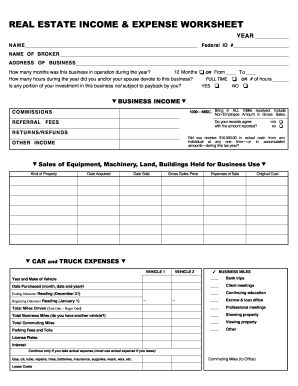
The Landscaper Income and Expense Worksheet is a financial document used by landscapers and gardeners to track business income and expenses for tax purposes.
pdfFiller scores top ratings on review platforms




Who needs Landscaper Expense Worksheet?
Explore how professionals across industries use pdfFiller.

Landscaper Expense Worksheet is needed by:
-
Landscapers managing their income and expenses
-
Gardeners looking to report financial details
-
Small business owners in the landscaping industry
-
Tax professionals assisting landscaping clients
-
Self-employed individuals in gardening services
Comprehensive Guide to Landscaper Expense Worksheet
What is the Landscaper Income and Expense Worksheet?
The Landscaper Income and Expense Worksheet is a vital financial document designed for landscapers and gardeners, aiding them in tracking their business income and expenses primarily for tax purposes. This specialized gardening expense tracker ensures that users can maintain organized financial records, which simplifies tax filing and enhances overall financial awareness.
This worksheet allows landscapers to systematically document their earnings and expenditures, facilitating better financial management. By utilizing this resource, business owners can ensure compliance with tax regulations while gaining insights into their financial performance.
Why Use the Landscaper Income and Expense Worksheet?
Accurate financial tracking is crucial for landscapers and gardeners, as it offers several benefits. A well-maintained business financial worksheet enables users to keep a clear overview of their economic activities, making tax preparation far more straightforward. This enhanced financial awareness can lead to improved decision-making and better management of resources.
By implementing this worksheet, users are empowered to keep precise records that can positively influence their businesses, especially during tax season when documents are required for filing.
Key Features of the Landscaper Income and Expense Worksheet
The Landscaper Income and Expense Worksheet includes essential sections to help users manage their finances competently. These sections generally cover gross sales and business expenses, providing a comprehensive view of the financial landscape.
-
Gross Sales: Tracks all income generated from landscaping services.
-
Business Expenses: Details all costs associated with running a landscaping business.
-
Fillable Fields: Simplifies data entry for business information and financial figures.
-
Checkboxes: Facilitates user navigation and form completion.
-
User Instructions: Clear guidance ensures accurate filling out of forms.
Who Needs the Landscaper Income and Expense Worksheet?
This worksheet is primarily beneficial for landscapers and small garden businesses. By using this small business tax form, these professionals can maintain necessary documentation for tax compliance and financial oversight.
Landscapers, whether operating on a small or large scale, will find this document essential for keeping track of their income and expenses effectively. It is a critical tool that assists in ensuring that they meet financial obligations and remain informed about their business health.
How to Fill Out the Landscaper Income and Expense Worksheet Online (Step-by-Step)
Filling out the Landscaper Income and Expense Worksheet is straightforward. Follow these steps:
-
Access the worksheet on the designated platform.
-
Enter your business name in the specified field.
-
Provide your Federal ID number in the corresponding section.
-
Input your gross sales figures and categorize all business expenses.
-
Complete any additional required fields.
-
Review the worksheet for accuracy before saving.
Common Errors and How to Avoid Them
Completing the Landscaper Income and Expense Worksheet can be prone to errors that might affect tax filing. Some common mistakes include:
-
Inaccurate financial figures: Always double-check calculations.
-
Omitted fields: Ensure every required field is filled out.
-
Misclassification of expenses: Categorize expenses correctly to avoid complications.
-
Failure to review: Conduct a thorough review of the completed worksheet.
By being vigilant and attentive, users can ensure their submissions are accurate and compliant.
How to Save, Print, and Submit the Landscaper Income and Expense Worksheet
After completing the worksheet, users should follow these steps to save, print, and submit it:
-
Choose the option to download and save the completed form as a PDF.
-
Print a hard copy for personal records and submission.
-
Submit the form electronically or as required by relevant tax authorities.
Security and Compliance When Using the Landscaper Income and Expense Worksheet
When handling sensitive documents like the Landscaper Income and Expense Worksheet, security is paramount. pdfFiller ensures data protection through 256-bit encryption and complies with both HIPAA and GDPR regulations. This commitment to privacy and data protection provides users peace of mind while managing their financial paperwork.
The Role of pdfFiller in Completing the Landscaper Income and Expense Worksheet
pdfFiller plays a crucial role in enhancing the form-filling experience for users. Its features streamline the process, offering capabilities such as eSigning, easy editing, and effective document management. With these tools, users can complete their business financial template efficiently and securely.
Final Steps After Completing the Landscaper Income and Expense Worksheet
Upon completing the worksheet, users should take several key steps. First, check for confirmation to ensure it was submitted successfully. If corrections are required after submission, users should promptly address these to maintain compliance. Additionally, it's essential to keep records securely for future reference, reinforcing the importance of good financial practices.
How to fill out the Landscaper Expense Worksheet
-
1.To access the Landscaper Income and Expense Worksheet on pdfFiller, start by visiting pdfFiller's website and searching for the form using the name provided.
-
2.Once you find the form, click on it to open the document in pdfFiller's editing interface.
-
3.Before filling out the worksheet, gather all financial records required, such as gross sales, business expenses, and any other relevant financial statements.
-
4.In the pdfFiller interface, complete the fields marked with asterisks or highlighted for attention, such as 'NAME' and 'Federal ID #'.
-
5.Make sure to accurately fill in the gross sales, business expenses, and other financial details by referencing your gathered records.
-
6.Utilize checkboxes and dropdown menus where appropriate, to ensure compliance and accuracy.
-
7.Periodically review the information you've provided to ensure each section is complete and accurate.
-
8.Once you have filled in all necessary information, double-check for any errors or omissions before finalizing the form.
-
9.To save your work, click the save option on pdfFiller, which may offer ways to save it locally or in the cloud.
-
10.If you need to submit the form, pdfFiller provides options to download it in your preferred format or submit it electronically if this feature is available.

Who needs to use the Landscaper Income and Expense Worksheet?
This worksheet is primarily for landscapers and gardeners who want to track their business income and expenses, essential for accurate tax reporting.
What information do I need to complete the worksheet?
You will need details about your business income, expenses, and any relevant financial documents to accurately fill in the worksheet.
How do I submit the completed worksheet?
After you complete the worksheet, you can save it and submit it electronically through pdfFiller or download it for postal submission, depending on your preferences.
Are there any deadlines I should be aware of?
It’s important to adhere to tax deadlines in your jurisdiction for filing income and expense forms to avoid penalties.
What common mistakes should I avoid when filling out this worksheet?
Make sure to double-check all entered financial figures and fields to prevent errors that could affect your tax reporting, like miscalculating expenses or failing to include all income.
Can I edit the form once it's completed?
Yes, pdfFiller allows you to edit the worksheet even after initially completing it, provided you have saved it in an editable format.
What happens if I make a mistake while filling out the form?
You can easily correct mistakes in pdfFiller by using the edit feature, allowing you to revise any incorrect entries before finalizing the document.
Related Forms




Get the latest insights from our blog


If you believe that this page should be taken down, please follow our DMCA take down process
here
.
This form may include fields for payment information. Data entered in these fields is not covered by PCI DSS compliance.