
Last updated on
Oct 31, 2026

Get the free Notarial Acknowledgement Form
We are not affiliated with any brand or entity on this form

Fill out
Complete the form online in a simple drag-and-drop editor.

eSign
Add your legally binding signature or send the form for signing.

Share
Share the form via a link, letting anyone fill it out from any device.

Export
Download, print, email, or move the form to your cloud storage.
Why pdfFiller is the best tool for your documents and forms


End-to-end document management
From editing and signing to collaboration and tracking, pdfFiller has everything you need to get your documents done quickly and efficiently.
Accessible from anywhere
pdfFiller is fully cloud-based. This means you can edit, sign, and share documents from anywhere using your computer, smartphone, or tablet.
Secure and compliant
pdfFiller lets you securely manage documents following global laws like ESIGN, CCPA, and GDPR. It's also HIPAA and SOC 2 compliant.
What is Notarial Form
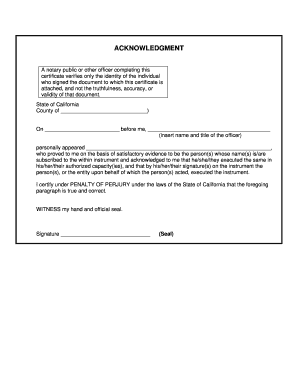
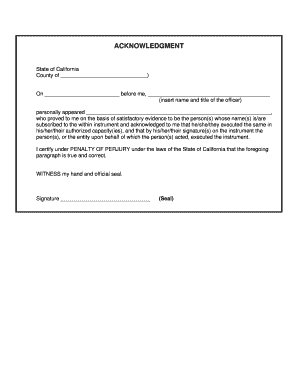
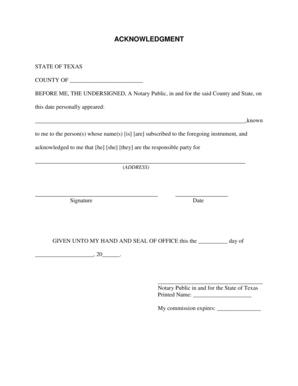
The Notarial Acknowledgement Form is a legal document used by a Notary Public to certify the authenticity of a document and the identity of the signers involved.
pdfFiller scores top ratings on review platforms




Who needs Notarial Form?
Explore how professionals across industries use pdfFiller.

Notarial Form is needed by:
-
Individuals needing document notarization
-
Businesses requiring legal document validation
-
Lawyers and legal professionals assisting clients
-
Estate planners managing wills or trusts
-
Real estate agents facilitating property transactions
-
Banks verifying identity for loan documents
Comprehensive Guide to Notarial Form
What is the Notarial Acknowledgement Form?
The Notarial Acknowledgement Form plays a crucial role in certifying the authenticity of documents and the identity of the signers involved. This legal document certification process involves a notary public who verifies not only the identities of the individuals but also their authority to sign the associated documents.
This form serves several legal purposes and is commonly utilized in various contexts, such as property transactions and legal filings. Key fields in the form include the state, county, and signatures, all essential for its validity.
Purpose and Benefits of the Notarial Acknowledgement Form
Using the Notarial Acknowledgement Form offers significant advantages when validating important documents. The notarization process is fundamental in legal transactions as it adds a layer of protection against fraud, providing legal assurance to all parties involved.
Additionally, this form streamlines the process of document acceptance, ensuring that all necessary requirements are met efficiently, which can save time and resources in legal settings.
Who Needs the Notarial Acknowledgement Form?
The Notarial Acknowledgement Form is essential for individuals and parties involved in various transactions. Notarization is necessary in situations such as real estate deals, wills, and contract signings where legal compliance is mandated.
-
Lawyers and legal professionals often require notarized documents for court filings.
-
Individuals signing legal documents to ensure authenticity and compliance.
Both signers and notaries benefit from this form, as it not only legitimizes documents but also establishes trust in the signature process.
How to Fill Out the Notarial Acknowledgement Form Online
Completing the Notarial Acknowledgement Form online via pdfFiller is a straightforward process. Begin by carefully filling out key fields such as the 'STATE OF' and 'COUNTY OF' sections.
-
Access pdfFiller and locate the Notarial Acknowledgement Form.
-
Fill in the required fields accurately, ensuring all information is correct.
-
Apply your electronic signature to authenticate your submission.
To ensure accuracy, double-check all entries before finalizing the document.
Review and Validation Checklist for the Notarial Acknowledgement Form
Before submission, conducting a thorough review of the Notarial Acknowledgement Form is essential to avoid common errors. Pay close attention to crucial elements such as signatures and dates.
-
Check for missing signatures in required fields.
-
Ensure that all dates are current and correctly formatted.
-
Verify compliance with state-specific notarization rules.
Taking these steps can prevent delays and issues with document validation.
Submission Methods for the Notarial Acknowledgement Form
Once the Notarial Acknowledgement Form is completed, various submission methods are available. You can choose to submit it through a local notary or opt for online submission, depending on your preference and jurisdiction.
-
Consider deadlines for submission specific to your area.
-
Be aware of the processing times, which can vary.
-
Ensure that documents are secure before submission.
What Happens After You Submit the Notarial Acknowledgement Form?
After submitting the Notarial Acknowledgement Form, users can typically expect a processing timeline that may vary based on the jurisdiction. To stay informed, it's important to know how to check the status of your submission.
-
Be prepared for potential follow-ups if additional information is required.
-
Understand common reasons for rejection and how to address them.
Security and Privacy Considerations for the Notarial Acknowledgement Form
Handling the Notarial Acknowledgement Form requires careful attention to security and privacy. pdfFiller implements advanced encryption and complies with both HIPAA and GDPR regulations, ensuring document security.
-
Utilize best practices for protecting personal information during the notarization process.
-
Maintain confidentiality throughout the entire documentation process.
Maximize Your Experience with pdfFiller for Notarial Acknowledgement Form
Leveraging pdfFiller enhances your experience with the Notarial Acknowledgement Form, providing an efficient platform for editing, storing, and sharing essential documents. Its user-friendly interface allows users to navigate easily while employing eSigning capabilities.
-
Explore additional features for comprehensive document management.
-
Take advantage of editing tools to ensure accuracy in your submissions.
How to fill out the Notarial Form
-
1.Access the Notarial Acknowledgement Form by navigating to pdfFiller's website and searching for the form name in the template library.
-
2.Open the form in the pdfFiller editor to view all the designated fields you need to complete.
-
3.Before starting your filling process, gather all necessary information including the state, county, and signers' identities to ensure accuracy.
-
4.Begin by filling out the 'STATE OF' and 'COUNTY OF' sections with the relevant geographic information.
-
5.Proceed to complete fields related to date and signer identification, including full names as they appear on identification documents.
-
6.Utilize pdfFiller's fillable field features to write in the signature lines and ensure you include the designated title for each signer.
-
7.Review your completed form on pdfFiller for any errors or missing information before finalizing it.
-
8.When satisfied, save your form by choosing the appropriate option on pdfFiller to download or submit it electronically as needed.
-
9.You can either send the document via email directly from pdfFiller or print it for manual submission depending on your needs.

Who is eligible to use the Notarial Acknowledgement Form?
Any individual or entity requiring document notarization can use the Notarial Acknowledgement Form. This includes personal, business, and legal transactions that require certified verification from a Notary Public.
What documents do I need to provide to use this form?
To complete the Notarial Acknowledgement Form, you typically need a valid photo ID for all signers. This ensures the Notary Public can verify identities accurately.
How do I submit the completed Notarial Acknowledgement Form?
After completing the Notarial Acknowledgement Form, you can submit it according to the requirements of the receiving agency. This may involve mailing, emailing, or providing it directly in person.
What are common mistakes to avoid when filling out this form?
Common mistakes include incomplete fields, missing signatures, or incorrect jurisdiction information. Always double-check all entries before finalizing the form to ensure accuracy.
Is there a specific timeframe to complete the Notarial Acknowledgement Form?
While there's no strict deadline for filling out this form, it's essential to do so promptly if you have time-sensitive transactions or legal matters pending to avoid any delays.
What is the processing time for notarizing this form?
The processing time for notarizing a Notarial Acknowledgement Form can vary, but typically, notarization can be done immediately if all documents and signers are present.
Can the Notarial Acknowledgement Form be used in all states?
The use of the Notarial Acknowledgement Form can vary by state, so it's essential to check local laws and regulations to ensure it meets the requirements for notarization in your state.
Related Forms



Get the latest insights from our blog


If you believe that this page should be taken down, please follow our DMCA take down process
here
.
This form may include fields for payment information. Data entered in these fields is not covered by PCI DSS compliance.