
Last updated on
Oct 19, 2026
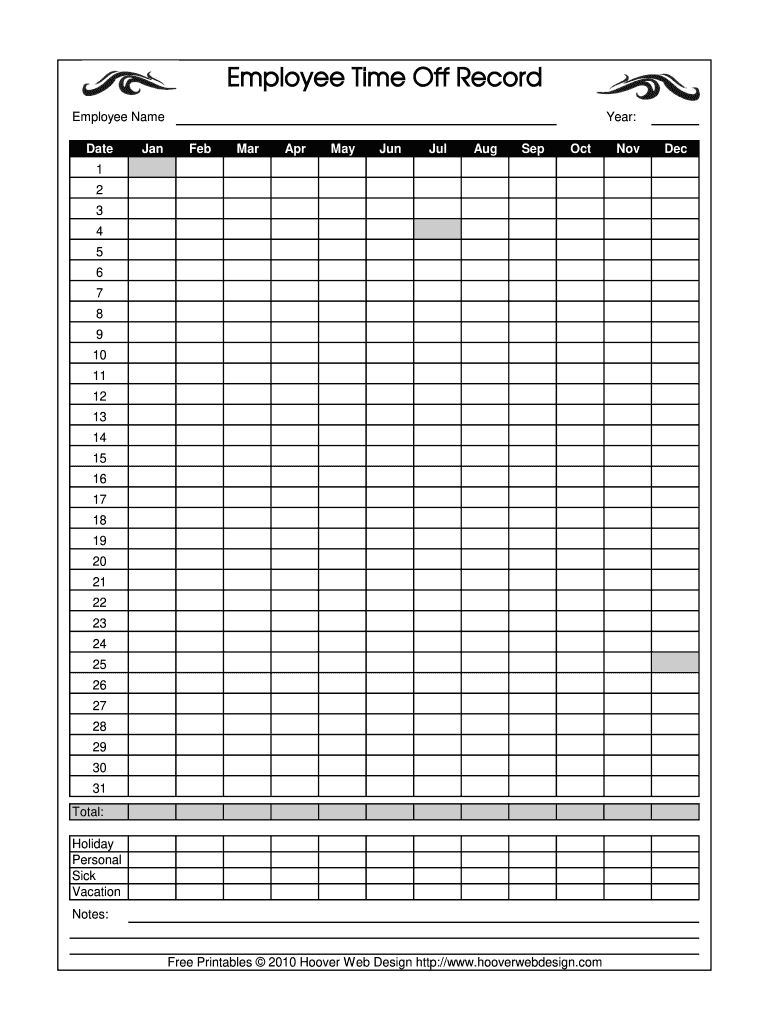
hooverwebdesign Employee Time Off Reord free printable template
We are not affiliated with any brand or entity on this form

Fill out
Complete the form online in a simple drag-and-drop editor.

eSign
Add your legally binding signature or send the form for signing.

Share
Share the form via a link, letting anyone fill it out from any device.

Export
Download, print, email, or move the form to your cloud storage.
Why pdfFiller is the best tool for your documents and forms


End-to-end document management
From editing and signing to collaboration and tracking, pdfFiller has everything you need to get your documents done quickly and efficiently.
Accessible from anywhere
pdfFiller is fully cloud-based. This means you can edit, sign, and share documents from anywhere using your computer, smartphone, or tablet.
Secure and compliant
pdfFiller lets you securely manage documents following global laws like ESIGN, CCPA, and GDPR. It's also HIPAA and SOC 2 compliant.
What is hooverwebdesign Employee Time Off Reord
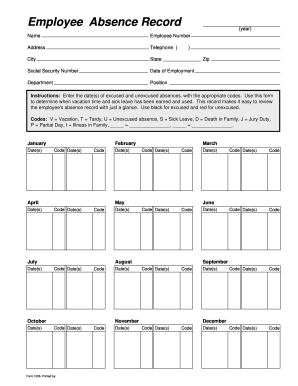
The Employee Time Off Record is a time tracking document used by employers to monitor employee leave throughout the year.
pdfFiller scores top ratings on review platforms




Who needs hooverwebdesign Employee Time Off Reord?
Explore how professionals across industries use pdfFiller.

Hooverwebdesign Employee Time Off Reord is needed by:
-
HR Managers needing to track employee leave.
-
Business owners managing workforce attendance.
-
Payroll departments calculating time-off compensation.
-
Employees seeking to record their leave accurately.
-
Team leaders monitoring team availability.
Comprehensive Guide to hooverwebdesign Employee Time Off Reord
What is the Employee Time Off Record?
The Employee Time Off Record is a crucial form for both employers and employees, designed to keep track of time off taken throughout the year. This template encompasses key fields such as employee name, year, and a monthly breakdown of time off. It is particularly valuable for monitoring various types of leave, including holiday, personal, sick, and vacation time. Utilizing an employee time off record template ensures that all aspects of time off are captured systematically.
Purpose and Benefits of the Employee Time Off Record
Employers benefit significantly from using the Employee Time Off Record, as it assists in efficient HR management by tracking employee leave. This form fosters compliance with labor laws and enhances accountability within the workforce. Moreover, both employees and employers gain from having a structured record, ensuring transparency and clarity regarding time taken off. It simplifies processes for sick leave tracking and overall employee leave management.
Key Features of the Employee Time Off Record Template
The effectiveness of the Employee Time Off Record template is attributed to its essential features. Key aspects include:
-
Fillable fields for comprehensive record-keeping, ensuring all details are easy to input.
-
Checkbox options for different types of leave, which streamline data entry and avoid confusion.
-
An additional notes section to document special circumstances or comments related to the time off.
Such features are crucial in maximizing the efficiency of leave tracking, making it easier for both employees and employers to manage time off effectively.
Who Needs the Employee Time Off Record?
The Employee Time Off Record is essential for a variety of stakeholders. Employers across various industries, including small businesses, require this form for effective management of employee leave. HR professionals rely on it to ensure that they manage personnel records accurately. Additionally, employees may find value in maintaining a personal record of their time off, enabling them to keep track of their leave entitlements.
How to Fill Out the Employee Time Off Record Online
Completing the Employee Time Off Record online through pdfFiller is a straightforward process. Follow these step-by-step instructions:
-
Access the form on pdfFiller’s platform.
-
Enter the employee name and the corresponding year in the designated fields.
-
Provide a month-by-month breakdown of time off taken for various leave types.
-
Utilize the checkboxes to indicate the specific types of leave taken.
-
Add notes in the additional section if necessary.
Be aware of common mistakes, such as omitting important details or failing to review entries before submission, to ensure accurate record-keeping.
Digital Signature and Submission Methods for the Employee Time Off Record
When it comes to signing and submitting the Employee Time Off Record, understanding the requirements is key. Digital signatures are often accepted and may differ from traditional wet signatures. Various submission methods are available, including:
-
Emailing the completed form to relevant parties.
-
Printing and submitting a hard copy.
-
Using online portals for direct submissions.
It is crucial to adhere to guidelines concerning document security and compliance throughout the submission process.
How to Download and Save Your Employee Time Off Record PDF
To download and save your completed Employee Time Off Record as a PDF, follow these instructions:
-
Once the form is filled, select the download option on pdfFiller.
-
Choose your desired file format for saving, such as PDF.
-
Organize your electronic copies in a secure folder for easy retrieval.
Maintaining data security is vital when handling important documents, ensuring that sensitive information remains protected.
What Happens After You Submit the Employee Time Off Record?
Understanding the post-submission process helps manage expectations. After submitting the Employee Time Off Record, users can expect:
-
Typical timelines for processing and receiving confirmation of the submission.
-
Information on how to check the submission status or track the record.
-
Next steps to follow in case there are issues or needs for clarification.
Being proactive in this process aids in smooth management of employee leave records.
Stay Organized and Efficient with pdfFiller
Utilizing pdfFiller for managing your Employee Time Off Record can enhance organization and efficiency. The platform's features, such as editing, eSigning, and form management, make it a practical choice for users. Adopting such secure and compliant tools for document handling ensures that records are efficiently maintained. This not only simplifies the tracking process but also aids in adhering to best practices in employee management.
How to fill out the hooverwebdesign Employee Time Off Reord
-
1.To access the Employee Time Off Record on pdfFiller, visit the pdfFiller website and log into your account.
-
2.Once logged in, use the search bar to locate 'Employee Time Off Record' and select the appropriate template.
-
3.Open the template to view the fillable fields. Begin by entering the employee's name at the designated section.
-
4.Next, input the current year in the provided field to identify the timeframe being tracked.
-
5.For each month, fill in the number of days taken off by selecting checkboxes for holidays, personal leave, sick leave, or vacation time.
-
6.If you have additional comments or special notes regarding the leave, navigate to the notes section and type your information clearly.
-
7.Once all fields are completed, review the form for accuracy, ensuring no information is missing or incorrect.
-
8.After reviewing, finalize your form by clicking on the save option. You can also download a copy to your device in PDF format.
-
9.To submit the form, utilize the 'Submit' option, which allows you to send your form electronically to the relevant department or individual.

What are the eligibility requirements for using the Employee Time Off Record?
Any employee seeking to document their time off can utilize the Employee Time Off Record, with no specific eligibility restrictions.
Are there any deadlines for submitting the Employee Time Off Record?
While no specific deadlines are noted in the metadata, it's advisable to fill out and submit the form as soon as time off is taken to ensure accurate tracking.
How can I submit the completed Employee Time Off Record?
Once completed, you can submit the form electronically through pdfFiller or print it for physical submission to your HR department or manager.
What supporting documents do I need to provide with the form?
Typically, no supporting documents are required; however, it may be helpful to include documentation for leave taken, such as doctor’s notes for sick leave.
What common mistakes should I avoid while filling out this form?
Ensure that all fields are filled accurately, especially the year and type of leave, and double-check any notes for clarity to avoid misunderstandings.
What is the processing time for the Employee Time Off Record?
Processing times may vary depending on company policies, but it is usually addressed within a week after submission.
Can I edit the Employee Time Off Record after submitting?
If edits are required after submission, please check with your HR department for their policy on amendments or re-submissions.




Related Catalogs
Get the latest insights from our blog


If you believe that this page should be taken down, please follow our DMCA take down process
here
.
This form may include fields for payment information. Data entered in these fields is not covered by PCI DSS compliance.