
Last updated on
Oct 2, 2026

Get the free Authorization to Fingerprint Form
We are not affiliated with any brand or entity on this form

Fill out
Complete the form online in a simple drag-and-drop editor.

eSign
Add your legally binding signature or send the form for signing.

Share
Share the form via a link, letting anyone fill it out from any device.

Export
Download, print, email, or move the form to your cloud storage.
Why pdfFiller is the best tool for your documents and forms


End-to-end document management
From editing and signing to collaboration and tracking, pdfFiller has everything you need to get your documents done quickly and efficiently.
Accessible from anywhere
pdfFiller is fully cloud-based. This means you can edit, sign, and share documents from anywhere using your computer, smartphone, or tablet.
Secure and compliant
pdfFiller lets you securely manage documents following global laws like ESIGN, CCPA, and GDPR. It's also HIPAA and SOC 2 compliant.
What is Fingerprint Authorization
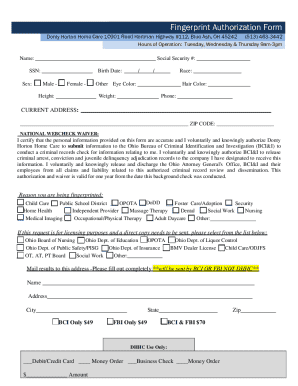
The Authorization to Fingerprint Form is a government document used by employees of the Flagler County Public Schools to provide their biometric data for background checks.
pdfFiller scores top ratings on review platforms




Who needs Fingerprint Authorization?
Explore how professionals across industries use pdfFiller.

Fingerprint Authorization is needed by:
-
Current employees of Flagler County Public Schools
-
New hires requiring background checks
-
Human Resources personnel in educational institutions
-
Administrators overseeing employee onboarding
-
Individuals involved in hiring for school districts
Comprehensive Guide to Fingerprint Authorization
What is the Authorization to Fingerprint Form?
The Authorization to Fingerprint Form serves a critical role in the employment process for individuals wishing to obtain positions at Flagler County Public Schools. This form is particularly significant as it initiates the collection of biometric data necessary for comprehensive background checks. All submissions of this form are processed by the Human Resources Department of Flagler County Public Schools, ensuring compliance with relevant regulations.
Employees must complete this form to participate in the fingerprinting process, as it verifies their identity and background. Its importance extends to fulfilling safety protocols and building a secure environment for students and staff alike.
Purpose and Benefits of the Authorization to Fingerprint Form
The primary purpose of the Authorization to Fingerprint Form is to mandate fingerprinting for employment consideration within the school district. This requirement not only streamlines the hiring process but also enhances safety, compliance, and trust within the educational environment. By providing accurate biometric data, employees contribute to effective background checks that help maintain a secure setting.
Completing the form grants employees several benefits, including the assurance that safety measures are in place and compliance with hiring regulations is achieved. This not only protects students but also positions qualified candidates for successful onboarding.
Who Needs the Authorization to Fingerprint Form?
This form is specifically needed by employees of Flagler County Public Schools pursuing positions that require background checks. Job roles such as teachers, administrative staff, and support personnel typically necessitate this process. Various employment requirements dictate the necessity of the Authorization to Fingerprint Form, ensuring that each candidate meets the appropriate standards of safety and trustworthiness.
Eligibility Criteria for Submitting the Authorization to Fingerprint Form
Eligibility to submit the Authorization to Fingerprint Form generally includes candidates seeking employment within the school district. Individuals must meet certain conditions before submission, which may vary based on job-specific requirements. Considerations such as age and any previous criminal records are also important factors, ensuring that only those qualified are able to process their applications.
How to Fill Out the Authorization to Fingerprint Form Online (Step-by-Step Guide)
Filling out the Authorization to Fingerprint Form online using pdfFiller is straightforward. Follow these steps to ensure successful completion:
-
Access the pdfFiller platform and locate the Authorization to Fingerprint Form.
-
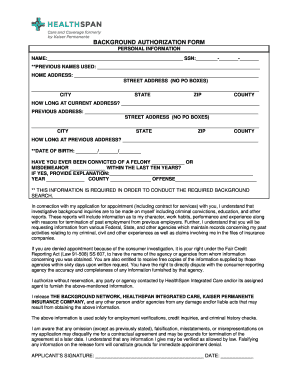
Input your personal information in the fillable fields—this includes your name, social security number, date of birth, and address.
-
Check all entries for accuracy, ensuring that all required fields are completed.
-
Submit the form electronically, or save it for printing and in-person submission.
Taking these steps will facilitate an efficient submission process, minimizing potential errors.
Common Errors and How to Avoid Them
When filling out the Authorization to Fingerprint Form, applicants may encounter several common pitfalls. Among these mistakes are missing required fields, incorrect personal information, and failure to sign the document. To avoid these errors:
-
Review the form thoroughly before submission.
-
Ensure that all necessary fields are filled out completely.
-
Double-check your entries against official documents.
Taking these precautions can help prevent delays in the processing of your background check.
Submission Methods and What to Expect After You Submit
Once the Authorization to Fingerprint Form is completed, different submission methods are available. Applicants can choose to submit the form online through pdfFiller or deliver it in person to the Human Resources office. Following submission, applicants can expect a processing time that varies depending on the volume of requests.
Tracking the status of your submission is usually possible, allowing you to stay informed about the progress of your background check.
Security and Compliance for the Authorization to Fingerprint Form
Data protection is paramount when handling the Authorization to Fingerprint Form. Ensuring the security of biometric information is a top priority. pdfFiller employs robust security measures, including 256-bit encryption and compliance with HIPAA and GDPR regulations, to safeguard sensitive documents.
These precautions help maintain the confidentiality of applicants' personal information and encourage confidence throughout the fingerprinting process.
How Using pdfFiller Streamlines Your Authorization to Fingerprint Form Process
Utilizing pdfFiller for completing the Authorization to Fingerprint Form offers numerous advantages. Key features include the ability to e-sign documents, thereby expediting the completion process, along with secure document management that keeps your information safe. These features make for a hassle-free experience when filling out the form.
Next Steps After Completing the Authorization to Fingerprint Form
After completing the Authorization to Fingerprint Form, it is crucial to keep a copy for your personal records. This documentation ensures that you have proof of your submission should you require follow-up. Depending on the results of your background check, further actions may be necessary to finalize the hiring process.
How to fill out the Fingerprint Authorization
-
1.Access the Authorization to Fingerprint Form on pdfFiller by searching for the form name in the platform’s search bar.
-
2.Once located, click on the form to open it within the pdfFiller interface.
-
3.Before you start filling out the form, gather necessary personal information such as your full name, social security number, date of birth, and address.
-
4.Begin populating the fillable fields by clicking on each box to enter your information. Use the prompts beside each field to guide you.
-
5.If needed, use the 'Instructions' section for guidance on what information is required and how to fill in specific areas.
-
6.After completing all fields, take time to review the entered information for accuracy and completeness. Check for common errors like typos or missing data.
-
7.Once reviewed, finalize your form by selecting the option to save your document or download it directly from the pdfFiller platform.
-
8.You can also submit the completed form directly via pdfFiller, or download it to print and hand in to your HR department.

Who is eligible to fill out the Authorization to Fingerprint Form?
Employees of Flagler County Public Schools are eligible to fill out the Authorization to Fingerprint Form. This includes both current employees and new hires required to undergo background checks.
What information is required to complete the form?
You will need to provide personal information such as your full name, social security number, date of birth, and address. Ensure you have all required data before beginning to complete the form.
How do I submit the completed Authorization to Fingerprint Form?
You can submit the completed form either electronically through pdfFiller or by downloading it to print and submitting it in person to your Human Resources Department. Ensure that you follow any specific submission guidelines provided by your school district.
Is there a fee associated with the fingerprinting process?
Yes, the Authorization to Fingerprint Form involves a fee for the fingerprinting process. The exact amount may vary, so check with your Human Resources department for details.
What are some common mistakes to avoid when filling out this form?
Ensure that all fields are filled out accurately and completely. Common mistakes include missing essential information like social security numbers or making typographical errors. Review your entries thoroughly before final submission.
How long does it take to process the Authorization to Fingerprint Form?
Processing time can vary, but typically, once submitted along with biometric data, it can take a few days to a couple of weeks. For exact timelines, contact your HR department for specific information.
What should I do if I need help completing the form?
If you need assistance with the Authorization to Fingerprint Form, consider reaching out to your HR department for guidance. They can provide information on how to fill it out correctly and answer any specific questions you may have.
Related Forms





Related Catalogs
Get the latest insights from our blog


If you believe that this page should be taken down, please follow our DMCA take down process
here
.
This form may include fields for payment information. Data entered in these fields is not covered by PCI DSS compliance.