
Last updated on
Nov 7, 2026
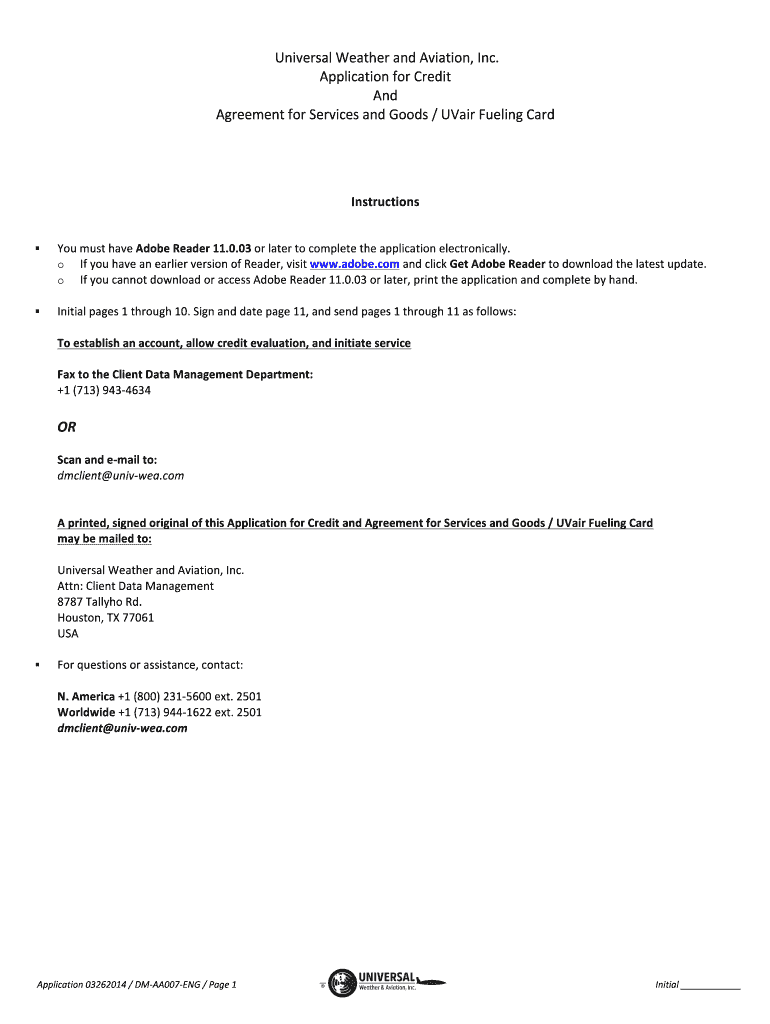
UWA DM-AA007-ENG 2014-2026 free printable template
pdfFiller is not affiliated with any government organization

Fill out
Complete the form online in a simple drag-and-drop editor.

eSign
Add your legally binding signature or send the form for signing.

Share
Share the form via a link, letting anyone fill it out from any device.

Export
Download, print, email, or move the form to your cloud storage.
Why pdfFiller is the best tool for your documents and forms


End-to-end document management
From editing and signing to collaboration and tracking, pdfFiller has everything you need to get your documents done quickly and efficiently.
Accessible from anywhere
pdfFiller is fully cloud-based. This means you can edit, sign, and share documents from anywhere using your computer, smartphone, or tablet.
Secure and compliant
pdfFiller lets you securely manage documents following global laws like ESIGN, CCPA, and GDPR. It's also HIPAA and SOC 2 compliant.
What is UWA DM-AA007-ENG
The Universal Weather and Aviation Credit Application is a business form used by companies to apply for credit and access fueling services through the UVair Fueling Card.
pdfFiller scores top ratings on review platforms




Who needs UWA DM-AA007-ENG?
Explore how professionals across industries use pdfFiller.

UWA DM-AA007-ENG is needed by:
-
Businesses seeking credit for aviation services
-
Companies requiring fueling services through UVair
-
Accounting departments managing vendor contracts
-
Aviation service providers looking for credit agreements
-
Finance teams preparing financial statements
Comprehensive Guide to UWA DM-AA007-ENG
What is the Universal Weather and Aviation Credit Application?
The Universal Weather and Aviation Credit Application enables businesses to apply for credit specifically for fueling and aviation services. This application serves as a gateway for organizations looking to utilize the UVair Fueling Card, streamlining access to necessary aviation resources. Universal Weather and Aviation, Inc. plays a critical role in facilitating the processing and approval of these applications.
Purpose and Benefits of the Credit Application
The credit application allows businesses to gain access to essential services, including aviation fueling. By leveraging the UVair Fueling Card, companies can efficiently manage fuel services and streamline their payment processes. An approved credit line also offers several advantages, such as enhanced financial flexibility and improved vendor relationships.
Key Features of the Universal Weather and Aviation Credit Application
This essential form includes specific fields that gather crucial details from applicants, such as their legal name, estimated credit requested, and financial statements. The Universal Weather and Aviation Credit Application is designed to be electronic and fillable, which enhances user experience through its usability. Applicants are required to sign and submit the completed form to the Client Data Management Department for further processing.
-
Full Legal Name of Applicant
-
Estimated Credit Requested Per Month
-
Signature Lines
Who Needs the Universal Weather and Aviation Credit Application?
The primary audience for this application consists of businesses within the aviation sector. This includes a range of entities, such as charter services and flight schools, that stand to benefit significantly from applying. It's also essential for applicants to provide trade references and financial statements to support application approval.
How to Fill Out the Universal Weather and Aviation Credit Application Online (Step-by-Step)
-
Visit the Universal Weather and Aviation website to access the application form.
-
Complete all mandatory fields, including your legal name and estimated credit request.
-
Review your entries for accuracy to avoid common pitfalls, such as missing information.
-
Sign the form electronically and ensure all required documentation is attached.
-
Submit the completed application to the designated Client Data Management Department.
Review and Validation Checklist for Your Application
Before you submit your application, utilize this checklist to ensure everything is in order:
-
Verify that all fields are completed accurately.
-
Confirm that financial statements are attached.
-
Check that trade references are included.
Following this checklist enhances your chances of a successful application submission.
Submission Methods and Delivery
Once you have completed the application, you have several methods for submission. Applications can be submitted electronically through pdfFiller, ensuring convenience and security. Expect processing times to vary, and applicants will receive confirmation upon receipt of their submission.
What Happens After You Submit the Universal Weather and Aviation Credit Application?
After submission, Universal Weather and Aviation will begin the review process. Applicants can anticipate potential next steps, including approval notifications or additional requests for information. Monitoring the status of your application ensures you remain informed throughout the review period.
Security and Compliance in Handling Applications
Document security is paramount during the application process. pdfFiller employs robust security measures, including 256-bit encryption, to safeguard sensitive information. Applicants can be reassured of their privacy and compliance with data protection standards, facilitating a secure application experience.
Transform Your Credit Application Experience with pdfFiller
Utilizing pdfFiller can significantly enhance the application process, making it seamless and user-friendly. This platform allows for easy filling, signing, and submission of forms, providing additional functionalities like document editing and management. Engage with pdfFiller to streamline your credit application experience.
How to fill out the UWA DM-AA007-ENG
-
1.Access pdfFiller and search for the 'Universal Weather and Aviation Credit Application' form. Ensure you are logged into your account for seamless editing.
-
2.Open the form in pdfFiller's interface, where you will see multiple fillable fields and clear instructions on the document.
-
3.Gather necessary applicant information, including the full legal name, estimated credit requested per month, financial statements, and trade references before starting to fill out the form.
-
4.Carefully navigate through the fillable fields. Click on each section to enter the required information. Use the toolbar to adjust or format your entries as needed.
-
5.For more accuracy, check your information against the instructions provided, ensuring you complete each required field before submission.
-
6.Once you've completed the form, review your entries carefully. Use the preview function to check for any errors or omissions.
-
7.If everything looks good, save your completed form in pdfFiller. You can download it in various formats, or submit it directly if the platform allows.
-
8.For submission, consider sending it via email to the Client Data Management Department, or follow the submission method specified in the form's guidelines.

Who is eligible to submit the Universal Weather and Aviation Credit Application?
This application is intended for businesses that apply for credit to access fueling services through the UVair Fueling Card. Applicants should have relevant financial documentation and information ready.
What supporting documents are required with the application?
Applicants need to provide detailed financial statements, trade references, and any specific documents requested in the application instructions to support their credit request.
How do I submit the completed application form?
Once filled out, you can submit the completed form by emailing it directly to the Client Data Management Department or following any submission protocols indicated in the form's instructions.
Are there deadlines for submitting the application?
Deadlines may vary based on your service requirements. It’s advisable to check with Universal Weather and Aviation directly or review the submission instructions for specific deadlines.
What common mistakes should I avoid when filling out the form?
Common mistakes include incomplete fields, missing signatures, and incorrect financial statements. Double-check all information and follow the form's instructions closely to avoid these issues.
How long does it take to process the credit application?
Processing times can vary. Typically, applicants can expect a response within a few business days, but it's best to confirm with Universal Weather and Aviation for their specific timelines.
Can I save my progress while filling out the application on pdfFiller?
Yes, pdfFiller allows you to save your progress so you can return to the application later. Make sure to save any changes before exiting the platform.
Related Forms




Get the latest insights from our blog


If you believe that this page should be taken down, please follow our DMCA take down process
here
.
This form may include fields for payment information. Data entered in these fields is not covered by PCI DSS compliance.