
Last updated on
Oct 31, 2026
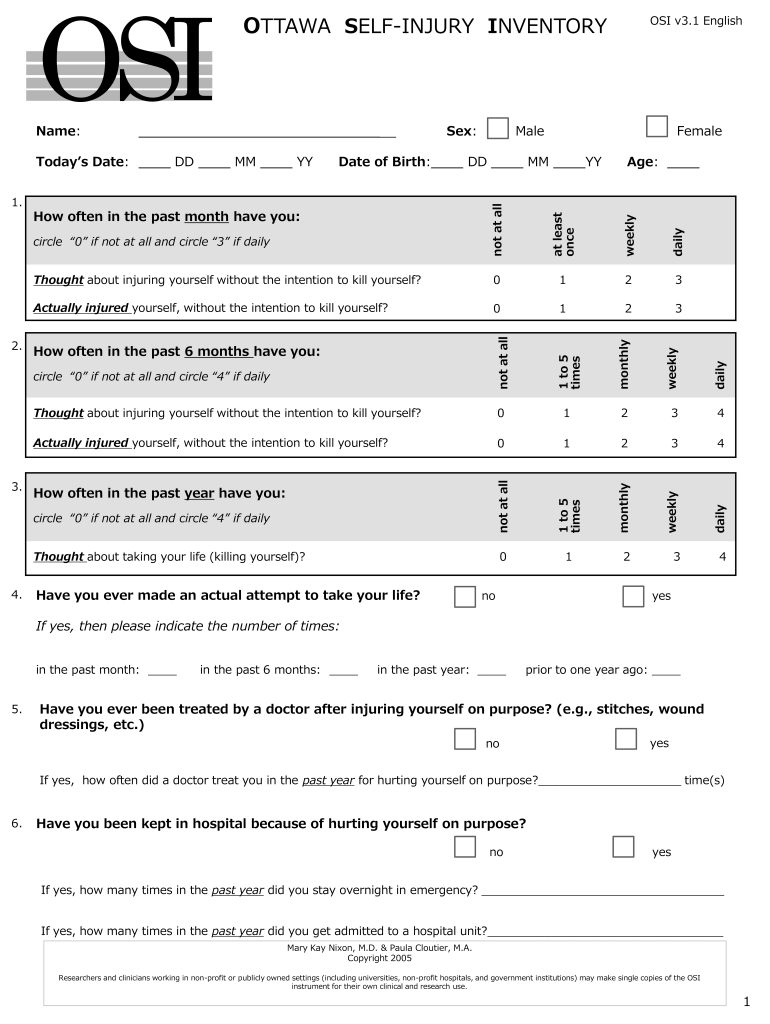
Get the free Ottawa Self-Injury Inventory OSI v3.1
We are not affiliated with any brand or entity on this form

Fill out
Complete the form online in a simple drag-and-drop editor.

eSign
Add your legally binding signature or send the form for signing.

Share
Share the form via a link, letting anyone fill it out from any device.

Export
Download, print, email, or move the form to your cloud storage.
Why pdfFiller is the best tool for your documents and forms


End-to-end document management
From editing and signing to collaboration and tracking, pdfFiller has everything you need to get your documents done quickly and efficiently.
Accessible from anywhere
pdfFiller is fully cloud-based. This means you can edit, sign, and share documents from anywhere using your computer, smartphone, or tablet.
Secure and compliant
pdfFiller lets you securely manage documents following global laws like ESIGN, CCPA, and GDPR. It's also HIPAA and SOC 2 compliant.
What is Ottawa Self-Injury Tool
The Ottawa Self-Injury Inventory OSI v3.1 is a clinical assessment tool used by healthcare professionals to evaluate patients' self-injurious behaviors.
pdfFiller scores top ratings on review platforms




Who needs Ottawa Self-Injury Tool?
Explore how professionals across industries use pdfFiller.

Ottawa Self-Injury Tool is needed by:
-
Mental health professionals for patient assessments
-
Clinical psychologists conducting self-harm evaluations
-
Healthcare providers developing treatment plans
-
Counselors focusing on self-injury issues
-
Researchers studying self-injury behaviors
-
Patients reporting their self-injury experiences
Comprehensive Guide to Ottawa Self-Injury Tool
What is the Ottawa Self-Injury Inventory OSI v3.1?
The Ottawa Self-Injury Inventory (OSI) v3.1 serves as a clinical assessment tool designed specifically for evaluating self-injurious behavior among patients. This form plays a significant role in mental health assessments by assisting healthcare professionals in understanding self-injury patterns, which is crucial for effective treatment planning.
Self-injurious behavior encompasses a range of actions that individuals may engage in, often as a coping mechanism in response to emotional distress. The OSI v3.1 provides insights that are vital for mental health practitioners aiming to assess the underlying motivations and triggers associated with these behaviors.
Purpose and Benefits of the Ottawa Self-Injury Inventory OSI v3.1
The primary purpose of the OSI v3.1 is to facilitate the identification of the frequency, methods, and motivations behind self-injury among patients. By utilizing this assessment tool, healthcare professionals can develop tailored treatment plans that address individual patient needs more effectively.
Moreover, the OSI v3.1 enhances communication between patients and clinicians. It fosters a better understanding of self-harming behaviors, ultimately leading to more effective interventions.
Key Features of the Ottawa Self-Injury Inventory OSI v3.1
The OSI v3.1 is equipped with several important attributes that support its use as a clinical self-injury questionnaire. It includes:
-
Multiple fillable fields allowing for comprehensive responses.
-
Checkboxes to facilitate quick input of information.
-
Clear instructions to guide users in completing the form.
-
Sections that focus on thoughts, actions, and triggers related to self-injury.
-
A user-friendly design that encourages patient self-reporting.
Who Needs the Ottawa Self-Injury Inventory OSI v3.1?
The OSI v3.1 is particularly beneficial for specific populations, such as adolescents and individuals with a history of self-harming behaviors. It serves as an essential tool for mental health professionals, counselors, and emergency care providers who need to assess self-injurious behavior effectively.
Additionally, this inventory is typically used in various contexts, including clinical settings, counseling sessions, and emergency departments where immediate evaluation is critical.
How to Fill Out the Ottawa Self-Injury Inventory OSI v3.1 Online (Step-by-Step)
Filling out the OSI v3.1 online through pdfFiller is a straightforward process. Follow these steps to complete the form:
-
Access the OSI v3.1 form on the pdfFiller platform.
-
Fill in your personal information in the designated fields.
-
Indicate the frequency of self-injury incidents using the provided checkboxes.
-
Detail the methods employed and motivations behind your actions.
-
Review all entered information to ensure accuracy before submission.
Make sure to provide thorough and honest responses, as this information is essential for your clinician's assessment.
Review and Validation Checklist for the Ottawa Self-Injury Inventory OSI v3.1
Before submitting the OSI v3.1, utilize the following checklist to validate the completeness and accuracy of your form:
-
Ensure all fields are filled out completely.
-
Double-check for any misunderstandings of instructions.
-
Confirm the clarity of your answers, as this aids clinician assessment.
Security and Compliance for the Ottawa Self-Injury Inventory OSI v3.1
When handling sensitive health information, it is crucial to understand the security measures available. pdfFiller employs 256-bit encryption to ensure that your data remains protected. Moreover, the platform is compliant with HIPAA regulations, providing further assurance of data confidentiality.
To maintain privacy during the e-signing and submission process, follow the instructions provided on the platform. This helps safeguard your sensitive information throughout the entire procedure.
Submitting the Ottawa Self-Injury Inventory OSI v3.1: What You Need to Know
Once you have filled out the OSI v3.1, you can submit it in several ways. Here are the options available:
-
Electronically submit the completed form via pdfFiller.
-
Print the form and hand-deliver it to your healthcare provider.
After submission, you can expect a processing time, and it is advisable to confirm that your form was received. Understanding how to track submissions and any potential follow-up actions is also essential for ensuring effective communication with your clinician.
Engage with pdfFiller for Your Ottawa Self-Injury Inventory OSI v3.1 Needs
pdfFiller offers a user-friendly interface that simplifies the process of filling out the OSI v3.1. The platform not only ensures document security but also allows you to edit forms easily as needed.
Start utilizing the OSI v3.1 form on pdfFiller today, and benefit from its comprehensive capabilities designed for your convenience and peace of mind.
How to fill out the Ottawa Self-Injury Tool
-
1.To access the Ottawa Self-Injury Inventory OSI v3.1 on pdfFiller, go to the homepage and use the search bar to find the form by typing 'Ottawa Self-Injury Inventory OSI v3.1'.
-
2.Once located, click on the form to open it in pdfFiller's editing interface.
-
3.Before starting the completion process, gather necessary information regarding your self-injurious behaviors, including frequency, triggers, and specific methods used.
-
4.Navigate through the form using the toolbar, clicking on each fillable field to enter your responses.
-
5.For fields that require checkboxes, click to select the appropriate options that reflect your experiences.
-
6.Review your completed responses periodically by scrolling through the entire form to ensure all sections are filled accurately.
-
7.After ensuring that all information is correct and complete, you can finalize the form by clicking the 'Finish' or 'Submit' button provided in the interface.
-
8.To save or download your form, look for the 'Download' or 'Save' option in the top right corner and choose your preferred file format.
-
9.If you need to submit the form to a healthcare provider, use the 'Email' functionality to send it directly from pdfFiller.

Who is eligible to use the Ottawa Self-Injury Inventory OSI v3.1?
This form is intended for use by individuals experiencing self-injurious behaviors, typically under the guidance of healthcare professionals who assess mental health.
Are there any special requirements for completing this form?
There are no special requirements; however, users should provide honest and thorough responses based on their self-injurious experiences to ensure accurate assessment.
How do I submit the completed OSI v3.1 form?
You can submit the completed form via pdfFiller by using the email function to send it to your designated healthcare provider directly from the platform.
What are common mistakes to avoid when filling out the OSI v3.1?
Avoid leaving any required fields blank, rushing through the questions without careful consideration, and overlooking the instructions for checkboxes and scales.
How long does it take to complete the Ottawa Self-Injury Inventory OSI v3.1?
The completion time varies by individual, but users typically spend around 15-30 minutes to fill out the form thoroughly, ensuring comprehensive responses.
What should I do if I have questions while completing the form?
If you encounter any uncertainties, consider discussing them with your healthcare professional or using pdfFiller's available help resources for guidance.
Is notarization required for the OSI v3.1 form?
No, notarization is not required for the Ottawa Self-Injury Inventory OSI v3.1, making it easier for individuals to use it without additional steps.
Related Forms





Get the latest insights from our blog


If you believe that this page should be taken down, please follow our DMCA take down process
here
.
This form may include fields for payment information. Data entered in these fields is not covered by PCI DSS compliance.