
Last updated on
Nov 8, 2026

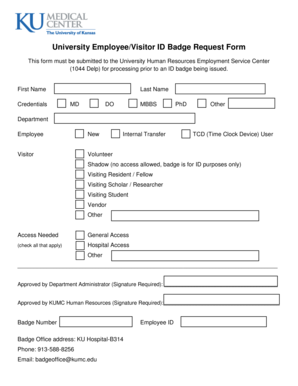
TX Hire-In Slip Badge Request Form 2014-2026 free printable template
pdfFiller is not affiliated with any government organization

Fill out
Complete the form online in a simple drag-and-drop editor.

eSign
Add your legally binding signature or send the form for signing.

Share
Share the form via a link, letting anyone fill it out from any device.

Export
Download, print, email, or move the form to your cloud storage.
Why pdfFiller is the best tool for your documents and forms


End-to-end document management
From editing and signing to collaboration and tracking, pdfFiller has everything you need to get your documents done quickly and efficiently.
Accessible from anywhere
pdfFiller is fully cloud-based. This means you can edit, sign, and share documents from anywhere using your computer, smartphone, or tablet.
Secure and compliant
pdfFiller lets you securely manage documents following global laws like ESIGN, CCPA, and GDPR. It's also HIPAA and SOC 2 compliant.
What is TX Hire-In Slip Badge Request Form
The Dow Chemical Badge Request Form is a vendor registration document used by Dow Chemical to verify and authorize access for employees and subcontractors at Texas Operations.
pdfFiller scores top ratings on review platforms




Who needs TX Hire-In Slip Badge Request Form?
Explore how professionals across industries use pdfFiller.

TX Hire-In Slip Badge Request Form is needed by:
-
Dow Chemical employees requiring access badges
-
Subcontractors seeking entry authorization
-
Company representatives validating employee identities
-
Hiring managers onboarding new employees
-
HR personnel processing security clearances
Comprehensive Guide to TX Hire-In Slip Badge Request Form
What is the Dow Chemical Badge Request Form?
The Dow Chemical Badge Request Form is essential for verifying and authorizing access to Dow Chemical facilities for employees, ex-employees, and subcontractors. This form plays a crucial role in employee verification, enabling authorized personnel to access various locations while maintaining security at Texas Operations. By ensuring that only compliant individuals gain entry, the form significantly contributes to the overall safety and integrity of operations within the company.
Purpose and Benefits of the Dow Chemical Badge Request Form
The primary purpose of the Dow Chemical Badge Request Form is to facilitate the secure and efficient processing of access requests. This form ensures that all personnel comply with safety regulations and legal requirements. Key benefits include:
-
Enhanced safety compliance for every personnel involved.
-
A more streamlined badge request process that reduces wait times.
-
Proper access facilitation for both employees and subcontractors.
Who Needs the Dow Chemical Badge Request Form?
Several groups are required to fill out the Dow Chemical Badge Request Form to obtain access to restricted areas. This includes:
-
Current employees seeking access to company facilities.
-
Ex-employees who may need temporary access.
-
Subcontractors and their representatives who require site access.
Compliance is critical for anyone needing facility access, with Company Representatives often being the point of contact for submissions.
Eligibility Criteria for the Dow Chemical Badge Request Form
To complete the Dow Chemical Badge Request Form, applicants must meet specific criteria. Key requirements include:
-
Providing necessary personal information and relevant documentation.
-
Adhering to legal and safety compliance standards.
-
Meeting any specific qualifications or obtaining necessary approvals before submission.
How to Fill Out the Dow Chemical Badge Request Form Online (Step-by-Step)
Filling out the Dow Chemical Badge Request Form online is straightforward. Follow these steps:
-
Access the online form and read the instructions carefully.
-
Fill out the required fields, ensuring all information is accurate.
-
Select appropriate options in the checkboxes where needed.
-
Sign the form electronically before submission.
-
Review all entries for completeness and correctness.
Submission Methods for the Dow Chemical Badge Request Form
Completed Dow Chemical Badge Request Forms can be submitted through various methods, including:
-
Online submission via the designated platform.
-
Mailing the printed form to the specified department.
-
Hand-delivering the form to the relevant office.
Applicants should be aware of processing times and deadlines, as well as any potential fees associated with submissions.
Security and Compliance for the Dow Chemical Badge Request Form
Security and compliance are paramount when submitting the Dow Chemical Badge Request Form. Key points include:
-
Data protection measures ensure personal information is handled safely.
-
Compliance with regulations such as HIPAA and GDPR is mandatory.
-
Utilization of pdfFiller guarantees safe document management.
Common Errors and How to Avoid Them When Filling the Form
To ensure a smooth submission process, applicants should be aware of common errors, such as:
-
Missing required signatures from applicants.
-
Leaving fields incomplete, which may delay processing.
-
Entering incorrect information that violates compliance standards.
Double-checking entries before submission can help avoid these pitfalls.
What Happens After You Submit the Dow Chemical Badge Request Form?
After submitting the Dow Chemical Badge Request Form, applicants can expect the following:
-
Confirmation of submission and tracking capabilities provided.
-
A timeline for processing and notification about next steps.
-
Potential follow-up inquiries based on the outcomes of the application.
Get Started with pdfFiller for Seamless Form Completion
Utilizing pdfFiller to complete the Dow Chemical Badge Request Form offers numerous advantages, including:
-
User-friendly interface for online form filling and eSigning.
-
Features designed for efficient document management, including editing and annotation.
-
Easy access to fill out the form directly through the platform.
How to fill out the TX Hire-In Slip Badge Request Form
-
1.To access the Dow Chemical Badge Request Form on pdfFiller, visit the pdfFiller website and use the search bar to locate the form by its name.
-
2.Once found, click on the form link to open it in the pdfFiller interface.
-
3.Before completing the form, ensure you gather all necessary information such as employee details and compliance documents.
-
4.Navigate through the form's fields, filling in the required personal information accurately, such as the employee’s name and any compliance checks.
-
5.Make sure to check the relevant boxes provided, like confirming safety compliance by clicking '☐ YES' or '☐ NO'.
-
6.Proceed to add the required signatures. Ensure that both the employee and authorized company representative sign the document as required.
-
7.After filling in all the fields and checking for accuracy, review the form carefully for any missing information or errors.
-
8.Once satisfied with the completion of the form, you can save it directly to your pdfFiller account or download it as a PDF to keep on your device.
-
9.If submission is necessary, follow the provided guidelines on how to submit the form electronically or in print, depending on your requirements.

Who is eligible to fill out the Dow Chemical Badge Request Form?
The form can be filled out by current employees, former employees, or subcontractors needing access to Dow Chemical operations in Texas. All parties must confirm their identity and compliance requirements.
Is there a deadline for submitting the badge request form?
While specific deadlines may not be indicated in the metadata, it's advisable to submit the form as soon as possible to ensure timely processing of access requests for security clearance.
What methods are available for submitting the completed form?
The completed Dow Chemical Badge Request Form can be submitted electronically via pdfFiller's submission options or printed out for physical submission as required by your company’s policies.
What supporting documents are required with the form?
Typically, you may need to provide identification and documentation that verifies compliance with safety regulations, depending on your role and the access requested.
What common mistakes should I avoid while filling out this form?
Ensure all personal information is accurate and complete. Common mistakes include forgetting to sign the form or failing to check the compliance boxes, which can delay processing.
How long does it take to process the badge request form?
Processing times can vary, but typically you can expect a response within a few business days. It's important to submit your form well in advance of when access is needed.
What should I do if I encounter issues while completing the form?
If you face difficulties while using pdfFiller or have questions about the form, it’s best to reach out to your HR department or the designated contact for assistance.
Related Forms

Related Catalogs
Get the latest insights from our blog


If you believe that this page should be taken down, please follow our DMCA take down process
here
.
This form may include fields for payment information. Data entered in these fields is not covered by PCI DSS compliance.