
Last updated on
Oct 29, 2026

FL Service Request Form - Lee County 2010-2026 free printable template
pdfFiller is not affiliated with any government organization

Fill out
Complete the form online in a simple drag-and-drop editor.

eSign
Add your legally binding signature or send the form for signing.

Share
Share the form via a link, letting anyone fill it out from any device.

Export
Download, print, email, or move the form to your cloud storage.
Why pdfFiller is the best tool for your documents and forms


End-to-end document management
From editing and signing to collaboration and tracking, pdfFiller has everything you need to get your documents done quickly and efficiently.
Accessible from anywhere
pdfFiller is fully cloud-based. This means you can edit, sign, and share documents from anywhere using your computer, smartphone, or tablet.
Secure and compliant
pdfFiller lets you securely manage documents following global laws like ESIGN, CCPA, and GDPR. It's also HIPAA and SOC 2 compliant.
What is FL Service Request Form - Lee County
The Lee County Temporary Disconnect Re-Connect Form is a utility service document used by customers in Lee County, Florida, to request the temporary disconnection and reconnection of their utility services.
pdfFiller scores top ratings on review platforms




Who needs FL Service Request Form - Lee County?
Explore how professionals across industries use pdfFiller.

FL Service Request Form - Lee County is needed by:
-
Lee County utility customers seeking temporary disconnection
-
Landlords managing rental properties requiring service changes
-
Business owners needing utility adjustments during seasonal closures
-
Residents planning short-term relocations needing service updates
-
Property management companies handling utility requests for tenants
Comprehensive Guide to FL Service Request Form - Lee County
What is the Lee County Temporary Disconnect Re-Connect Form?
The Lee County Temporary Disconnect Re-Connect Form is a key document used by utility customers in Florida, specifically in Lee County. This form empowers account holders to request a temporary disconnection of their utility services, as well as the reconnection once they are ready to resume service. It is crucial for managing utility services during significant life events such as travel or home renovations.
-
The form serves to maintain continuous utility service management by allowing users to temporarily suspend their services.
-
Its application is essential for preventing unnecessary utility disconnections during expected absences.
-
Lee County residents are advised to utilize this form to easily navigate their utility needs.
Purpose and Benefits of the Lee County Temporary Disconnect Re-Connect Form
Filing the Lee County Temporary Disconnect Re-Connect Form offers several significant benefits. It plays a critical role in ensuring that utility services align with users' temporary living situations. By understanding its purpose, individuals can make informed decisions about maintaining their services during transitions.
-
This form helps prevent unnecessary utility disconnections, allowing users to enjoy peace of mind during temporary absences.
-
It simplifies the management of utility services, giving users direct control over their accounts.
-
Timely submissions can reduce costs and avert issues related to service interruptions or reconnection fees.
Who Needs the Lee County Temporary Disconnect Re-Connect Form?
Identifying who should complete the Lee County Temporary Disconnect Re-Connect Form can streamline its usage. Generally, various individuals and circumstances indicate the need for this form, whether for personal convenience or necessity.
-
Homeowners and renters alike may find themselves needing this form during vacations, renovations, or extended absences.
-
Landlords may also be included, as understanding the impact on tenants is vital for managing utility accounts.
-
It's crucial for landlords to communicate with tenants if the utility account is in the landlord’s name to avoid service disruptions.
Eligibility Criteria for the Lee County Temporary Disconnect Re-Connect Form
To successfully utilize the Lee County Temporary Disconnect Re-Connect Form, users must meet specific eligibility criteria. Understanding these requirements helps ensure compliance and prevents unnecessary complications.
-
Account holders must provide valid information, such as the name on the account and account number.
-
Considerations for joint accounts and multiple users are essential when submitting the form.
-
Submissions made under false pretenses can have serious legal implications.
How to Fill Out the Lee County Temporary Disconnect Re-Connect Form Online (Step-by-Step)
Filling out the Lee County Temporary Disconnect Re-Connect Form online requires careful attention to detail. The following steps guide users in completing the form accurately to avoid delays.
-
Gather necessary information including your account number, service address, and the name on the account.
-
Access the online form via the designated portal.
-
Complete the required fields, ensuring accuracy in the provided information.
-
Double-check all details for errors before submission to avoid common mistakes.
-
Submit the form and confirm that you receive a submission acknowledgment.
Common Errors and How to Avoid Them
Addressing frequent mistakes when submitting the Lee County Temporary Disconnect Re-Connect Form can save users time and frustration. Awareness of these errors can lead to successful submissions and prompt processing.
-
Commonly overlooked fields often include service address or disconnect dates.
-
Validating all information before hitting ‘submit’ is crucial for error prevention.
-
Utilizing tips for correcting errors promptly can facilitate quick resolutions.
Submission Methods and Delivery of the Lee County Temporary Disconnect Re-Connect Form
Understanding how to submit the completed Lee County Temporary Disconnect Re-Connect Form is essential for a smooth process. Users have various options that they can choose from to ensure their forms reach the right department efficiently.
-
Available submission methods include online submissions, in-person drop-offs, and mail options.
-
Users should look for confirmation of submission to ensure their requests are received.
-
Estimated processing times vary, so it's wise to check for updates post-submission.
Security and Compliance for the Lee County Temporary Disconnect Re-Connect Form
Data privacy and document security are critical when filling out the Lee County Temporary Disconnect Re-Connect Form. Understanding the protective measures in place can alleviate concerns about sensitive information.
-
pdfFiller ensures secure handling of user data, employing 256-bit encryption protocols.
-
Compliance with relevant regulations such as HIPAA and GDPR provides an added layer of security.
-
Users should maintain personal information security by following best practices when filing online.
Sample or Example of a Completed Lee County Temporary Disconnect Re-Connect Form
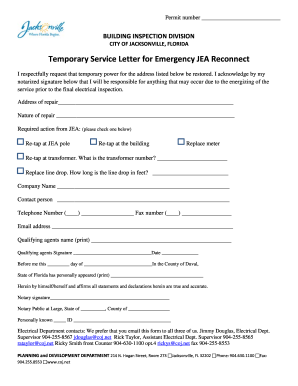
Having a visual reference can significantly aid users in completing the Lee County Temporary Disconnect Re-Connect Form accurately. A sample form provides a practical guide to avoid errors.
-
The example highlights each section filled out correctly, offering clarity on expectations.
-
Annotations can pinpoint common mistakes to steer clear of when completing the actual form.
-
Utilizing a sample when filling out your form can lead to a smoother completion process.
Get Started with pdfFiller for Your Lee County Temporary Disconnect Re-Connect Form
Leveraging pdfFiller for the Lee County Temporary Disconnect Re-Connect Form enhances the filling experience. Being familiar with the platform's features can streamline the process significantly.
-
pdfFiller simplifies form filling and eSigning, making the process efficient and user-friendly.
-
Explore additional features like document conversion and annotating options provided by pdfFiller.
-
Consider creating an account or exploring the services to ensure a seamless filing experience.
How to fill out the FL Service Request Form - Lee County
-
1.Visit pdfFiller and log in to your account or create a new one if you do not have an account.
-
2.In the search bar, type 'Lee County Temporary Disconnect Re-Connect Form' and select it from the results.
-
3.Once the form opens, carefully review the fields that need to be completed, ensuring you have all necessary information at hand.
-
4.Prepare the required details, including your account number, name on the account, driver's license number, service address, disconnect date, reconnect date, temporary phone number, and temporary mailing address.
-
5.Begin filling out the form by clicking on the fields to enter your information. Use pdfFiller's tools to easily navigate between sections.
-
6.Double-check that all fields are filled correctly, and pay attention to any special instructions indicated on the form.
-
7.Once completed, review your entries for accuracy. Ensure all required information is provided and is correct.
-
8.After verifying your form, save your progress via the 'Save' option to avoid losing any data.
-
9.Choose to download the completed form or submit it directly through pdfFiller. Follow submission guidelines for your utilities provider.

Who is eligible to use the Lee County Temporary Disconnect Re-Connect Form?
Any utility customer in Lee County, Florida, holding an account with local utilities can use this form to request temporary disconnection and reconnection of services.
What information do I need to complete the form?
You will need your account number, the name on the account, driver's license number, service address, disconnect and reconnect dates, a temporary phone number, and a temporary mailing address.
How do I submit the completed form?
Once you finish filling out the form on pdfFiller, you can either download it for your records or submit it directly to your utility provider following their specific submission procedures.
Are there any deadlines for submitting this form?
It is advisable to submit the form at least a week prior to your desired disconnect date to ensure timely processing. Check with your utility provider for any specific deadlines.
What are common mistakes to avoid when filling out the form?
Ensure that all fields are completed accurately, especially key information like account numbers and dates. Double-check spelling and data entry to prevent delays in processing.
How long does it take to process the form?
Processing times can vary, but typically, requests may take several business days. It’s important to submit your request early to avoid disruptions in service.
Is notarization required for this form?
No, notarization is not required for the Lee County Temporary Disconnect Re-Connect Form. Just ensure the account holder signs it.
Related Forms




Get the latest insights from our blog



If you believe that this page should be taken down, please follow our DMCA take down process
here
.
This form may include fields for payment information. Data entered in these fields is not covered by PCI DSS compliance.