
Last updated on
Oct 31, 2026

Get the free Window & Door Order Form
We are not affiliated with any brand or entity on this form

Fill out
Complete the form online in a simple drag-and-drop editor.

eSign
Add your legally binding signature or send the form for signing.

Share
Share the form via a link, letting anyone fill it out from any device.

Export
Download, print, email, or move the form to your cloud storage.
Why pdfFiller is the best tool for your documents and forms


End-to-end document management
From editing and signing to collaboration and tracking, pdfFiller has everything you need to get your documents done quickly and efficiently.
Accessible from anywhere
pdfFiller is fully cloud-based. This means you can edit, sign, and share documents from anywhere using your computer, smartphone, or tablet.
Secure and compliant
pdfFiller lets you securely manage documents following global laws like ESIGN, CCPA, and GDPR. It's also HIPAA and SOC 2 compliant.
What is Order Form
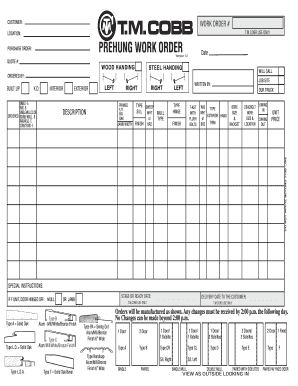
The Window & Door Order Form is a purchase order template used by customers to place specific orders for windows and doors.
pdfFiller scores top ratings on review platforms




Who needs Order Form?
Explore how professionals across industries use pdfFiller.

Order Form is needed by:
-
Homeowners looking to replace windows or doors
-
Contractors needing to order materials for construction
-
Architects specifying details for projects
-
Interior designers selecting products for clients
-
Retail businesses managing product inventory
Comprehensive Guide to Order Form
What is the Window & Door Order Form?
The Window & Door Order Form serves as a vital tool for customers to efficiently place orders for windows and doors. This form allows users to detail their specific requirements, ensuring clarity in the ordering process. Key fields included in the form consist of item details such as type, size, and quantity, among others, enabling accurate processing of each order.
This comprehensive form streamlines communication between customers and suppliers, ultimately facilitating smooth transactions and enhanced customer satisfaction.
Purpose and Benefits of the Window & Door Order Form
-
Each order can be customized to meet unique specifications.
Additionally, the form supports accuracy by ensuring that all necessary details are included before submission, making it an essential resource for anyone looking to purchase new windows and doors.
Key Features of the Window & Door Order Form
This order form includes several critical features designed to enhance user experience:
-
Fillable fields for specifying window and door characteristics, such as style and type.
-
Sections dedicated to special instructions and customization requests.
-
User-friendly layout to facilitate quick and easy completion.
These features collectively empower users to tailor their orders perfectly, ensuring that all specifications are captured accurately.
Who Needs the Window & Door Order Form?
The Window & Door Order Form is particularly beneficial for two primary user groups:
-
Homeowners aiming to order new windows and doors for residential projects.
-
Contractors and builders who need precise specifications for client projects.
By catering to these audiences, the form plays a crucial role in the ordering process, helping both individuals and professionals ensure their requirements are met efficiently.
How to Fill Out the Window & Door Order Form Online (Step-by-Step)
Filling out the Window & Door Order Form online is straightforward. Follow these steps for an effective submission:
-
Access the online form through your preferred document platform.
-
Enter required details in the specified fields, including sizes, types, and colors.
-
Review the information to ensure all specifications are accurate.
-
Submit the form through the provided channels.
By adhering to this guide, users can efficiently complete and submit their orders, thereby enhancing the buying experience.
Common Errors and How to Avoid Them When Ordering Windows and Doors
While completing the Window & Door Order Form, customers may encounter several common mistakes:
-
Misentering quantities or sizes can lead to inaccurate orders.
-
Forgetting to include special instructions that could affect order fulfillment.
To prevent these issues, it's crucial to review all entries before submitting the form. A careful double-check can save time and resources by ensuring that the details are correct from the outset.
Submission Methods and Delivery of the Window & Door Order Form
Once the Window & Door Order Form is completed, customers have multiple submission options:
-
Submit the form online for immediate processing.
-
Email the completed form to the designated recipient.
-
Deliver a physical copy if necessary.
Upon submission, customers can expect timely updates regarding the status of their orders, including expected delivery timelines.
Security and Compliance When Using the Window & Door Order Form
Data security is paramount when utilizing the Window & Door Order Form, particularly given the sensitive nature of order information. pdfFiller offers robust security features, including:
-
256-bit encryption to safeguard data integrity.
-
Compliance with privacy regulations such as SOC 2 Type II, HIPAA, and GDPR.
These measures ensure that users can trust the platform with their documentation and personal information throughout the ordering process.
How to Access and Download the Window & Door Order Form as a PDF
To access and download the Window & Door Order Form as a PDF, follow these steps:
-
Visit pdfFiller’s official site and navigate to the form.
-
Select the download option to save the form to your device.
-
Print the completed form or save it for future reference.
These quick steps allow users to have the form readily available for their ordering needs.
Efficiently Manage Your Order with pdfFiller
Utilizing pdfFiller’s features can significantly improve your order management process. Notable capabilities include:
-
Cloud-based editing tools for real-time adjustments.
-
eSigning options to expedite approval processes.
By leveraging these tools, users can ensure a seamless experience from order placement to final delivery, prioritizing ease of use and security throughout.
How to fill out the Order Form
-
1.To access the Window & Door Order Form on pdfFiller, visit the pdfFiller website and log in to your account.
-
2.Use the search bar to find the form by typing 'Window & Door Order Form'. Click on the form from the search results to open it.
-
3.Familiarize yourself with the layout of the form, noting the sections for item details, quantities, sizes, and special instructions.
-
4.Gather all necessary information before starting to fill out the form. This includes the type of window or door, series, style, color, glass type, grid type, mulling type, hinge type, screen type, and dimensions.
-
5.Begin filling in the fields by clicking on each blank space. Input your details in the spaces provided, ensuring accuracy and clarity.
-
6.For options with checkboxes, simply click on the box to select the desired options. Make sure to review your choices.
-
7.If you need to add additional notes or instructions, use the special instructions section at the bottom of the form.
-
8.After completing the form, review all entries to ensure correctness and completeness. Look for any missing information or discrepancies.
-
9.Once satisfied, utilize the save option to store the document securely on pdfFiller or select the download option to save it locally as a PDF.
-
10.If you wish to submit the form directly from pdfFiller, click on the submit button and follow the prompts to send it electronically.

Who is eligible to use the Window & Door Order Form?
Anyone needing to place an order for windows and doors can use this form, including homeowners, contractors, and architects.
Are there deadlines for submitting the Window & Door Order Form?
Deadlines may vary by company policy. Check with the supplier for specific timing requirements for your order to ensure timely delivery.
How do I submit the Window & Door Order Form?
You can submit the form electronically via pdfFiller or manually print and send it to your supplier. Ensure all requirements are completed before submission.
What supporting documents are required with the form?
Typically, no supporting documents are required; however, confirm with your supplier if they request additional documentation.
What are common mistakes to avoid when filling the form?
Ensure all fields are completed accurately, double-check dimensions, and avoid using abbreviations that may confuse.
How long does it take to process the Window & Door Order Form?
Processing time can vary based on the supplier's workflow. Generally, expect a few business days; confirm with your provider.
What if I need to make changes after submitting the form?
If you need to revise your order, contact your supplier directly to request changes. Keep a copy of your submission for reference.
Related Forms





Get the latest insights from our blog


If you believe that this page should be taken down, please follow our DMCA take down process
here
.
This form may include fields for payment information. Data entered in these fields is not covered by PCI DSS compliance.