
Last updated on
Nov 9, 2026
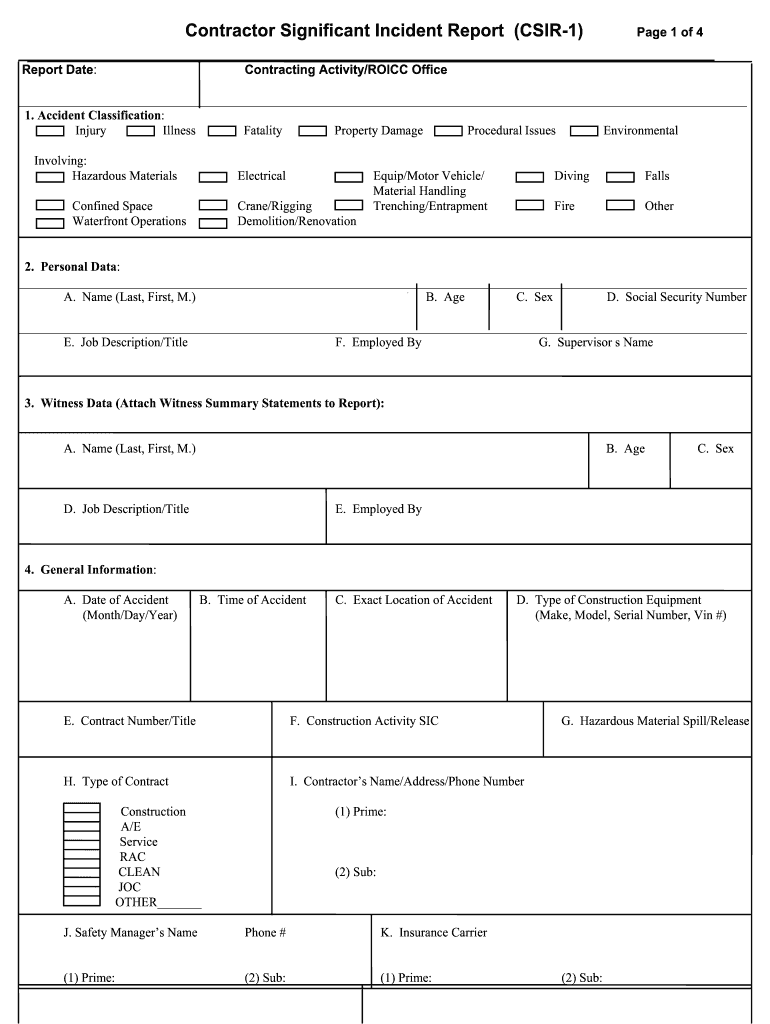
CSIR-1 free printable template
pdfFiller is not affiliated with any government organization

Fill out
Complete the form online in a simple drag-and-drop editor.

eSign
Add your legally binding signature or send the form for signing.

Share
Share the form via a link, letting anyone fill it out from any device.

Export
Download, print, email, or move the form to your cloud storage.
Why pdfFiller is the best tool for your documents and forms


End-to-end document management
From editing and signing to collaboration and tracking, pdfFiller has everything you need to get your documents done quickly and efficiently.
Accessible from anywhere
pdfFiller is fully cloud-based. This means you can edit, sign, and share documents from anywhere using your computer, smartphone, or tablet.
Secure and compliant
pdfFiller lets you securely manage documents following global laws like ESIGN, CCPA, and GDPR. It's also HIPAA and SOC 2 compliant.
What is CSIR-1
The Contractor Significant Incident Report (CSIR-1) is a business form used by contractors to document and report significant incidents involving contractors for compliance and safety improvement.
pdfFiller scores top ratings on review platforms




Who needs CSIR-1?
Explore how professionals across industries use pdfFiller.

CSIR-1 is needed by:
-
Contractors involved in construction projects
-
Safety and Occupational Health Officers
-
Contracting Officers overseeing compliance
-
Project managers responsible for safety documentation
-
Human resource departments handling incident reports
-
Legal teams reviewing accident-related documentation
Comprehensive Guide to CSIR-1
What is the Contractor Significant Incident Report (CSIR-1)?
The Contractor Significant Incident Report (CSIR-1) is a crucial tool designated for documenting contractor incidents. This form plays a significant role in ensuring compliance with safety regulations, capturing vital information about incidents that may impact worker safety and organizational liability. Typically, the CSIR-1 is filled out by the Report Preparer, Contracting Officer, and Safety and Occupational Health Officer, each having a specific contribution to the completeness of the report.
Purpose and Benefits of the Contractor Significant Incident Report (CSIR-1)
The primary purpose of the CSIR-1 is to serve as a preventative measure against future incidents through effective documentation practices. This report benefits organizations in maintaining detailed safety records, which demonstrates compliance with regulatory standards. Moreover, a properly filled CSIR-1 is essential for legal and insurance matters, ensuring organizations are well-prepared during incident investigations.
Key Features of the Contractor Significant Incident Report (CSIR-1)
The CSIR-1 form is designed with several key components that facilitate effective incident reporting. Notable features include:
-
Fillable fields and checkboxes that guide users through the information collection process.
-
Essential information fields such as "Report Date," "Name," and "Signature," which are crucial for accountability.
-
Requirement for signatures from relevant officials, ensuring the report's validity and official status.
Who Needs the Contractor Significant Incident Report (CSIR-1)?
Several stakeholders are involved in the completion and submission of the CSIR-1. These roles include:
-
Report Preparer: Responsible for initial documentation of the incident.
-
Contracting Officer: Ensures contractual obligations regarding safety are being met.
-
Safety and Occupational Health Officer: Monitors compliance with safety regulations and practices.
Collaboration among these roles is essential for effective incident reporting and to promote workplace safety.
How to Fill Out the Contractor Significant Incident Report (CSIR-1) Online (Step-by-Step)
Filling out the CSIR-1 form online can be efficiently managed by following these steps:
-
Access the CSIR-1 form via pdfFiller.
-
Complete common fields such as accident details, involved personnel, and corrective actions.
-
Utilize the pdfFiller tools for easy editing and electronic signatures.
-
Review all entries for accuracy and completeness before submission.
Taking the time to ensure that each field is correctly filled will streamline the incident reporting process.
Common Errors and How to Avoid Them When Completing the CSIR-1
When completing the CSIR-1, users often encounter common errors. Some frequent mistakes include:
-
Missing signatures, which can render the report incomplete.
-
Inadequate descriptions of incidents, leaving out essential details.
To avoid these pitfalls, users should double-check that all necessary fields are filled and signatures obtained before submitting the form.
What Happens After You Submit the Contractor Significant Incident Report (CSIR-1)?
Once the CSIR-1 is submitted, the next steps typically involve processing the report. Users can expect:
-
Follow-up notifications if further information is required.
-
A specified timeframe for processing incidents and providing feedback.
Maintaining accurate records of the submitted forms is critical for reference during follow-up actions.
Security and Compliance for the Contractor Significant Incident Report (CSIR-1)
Users can rest assured that their data is handled securely during the incident reporting process. Key security features include:
-
256-bit encryption to protect sensitive information.
-
Compliance with regulations such as HIPAA and GDPR, ensuring that personal and organizational data is safeguarded.
It is essential for organizations to adhere to federal and state reporting requirements to maintain compliance.
Utilizing pdfFiller for Your Contractor Significant Incident Report Needs
pdfFiller simplifies the preparation and submission of the Contractor Significant Incident Report. Users can benefit from:
-
Easy editing, eSigning, and submitting forms directly in the cloud.
-
Cloud-based storage for easy management and access to reports.
By leveraging pdfFiller's capabilities, users can efficiently handle their reporting needs and ensure a smooth incident reporting process.
How to fill out the CSIR-1
-
1.Access and open the Contractor Significant Incident Report (CSIR-1) form on pdfFiller by searching for its name in the platform's search bar.
-
2.Once the form is open, navigate through the fillable fields on the document interface. Click on each field to enter relevant information.
-
3.Gather necessary information before starting the form, including personal data of the involved parties, witness data, a detailed accident description, causal factors, training details, and corrective actions taken.
-
4.Begin filling out the fields starting with 'Report Date' and continue through each section to ensure no field is left blank.
-
5.Utilize the checkboxes and follow explicit instructions provided within the form for a comprehensive submission.
-
6.Once you have completed all fields, take the time to review the information for accuracy. Confirm that all required signatures are included.
-
7.After reviewing, you can save your progress or download the completed form in your preferred format. Choose the submission method outlined in your organization's guidelines.

Who is eligible to complete the Contractor Significant Incident Report?
Any individual or entity involved in a significant incident involving contractors can complete the CSIR-1 form. This typically includes report preparers, contracting officers, and safety officers.
What is the deadline for submitting the CSIR-1 report?
While the exact deadline may vary, it is advisable to submit the Contractor Significant Incident Report as soon as possible following an incident to ensure timely compliance and safety reviews.
How should I submit the completed CSIR-1 form?
The completed form can be submitted electronically through pdfFiller or printed and submitted via standard mail. Ensure to follow your organization's submission guidelines.
What supporting documents are required with the CSIR-1 form?
Supporting documents may include witness statements, photographs of the incident site, and any related training records. Check your organization's requirements to ensure compliance.
What are common mistakes to avoid when filling out the CSIR-1 form?
Common mistakes include missing required signatures, incomplete fields, and errors in incident descriptions. Double-check all entries before submission to minimize mistakes.
What is the typical processing time for a CSIR-1 report?
Processing times can vary depending on the organization and incident complexity. Generally, allow a few weeks for thorough review and any necessary follow-up actions.
Are there any fees associated with submitting the CSIR-1 form?
There are typically no fees associated with the CSIR-1 form submission itself; however, costs may be incurred during the incident investigation or reporting processes.
Related Forms



Related Catalogs
Get the latest insights from our blog



If you believe that this page should be taken down, please follow our DMCA take down process
here
.
This form may include fields for payment information. Data entered in these fields is not covered by PCI DSS compliance.