
Last updated on
Oct 2, 2026
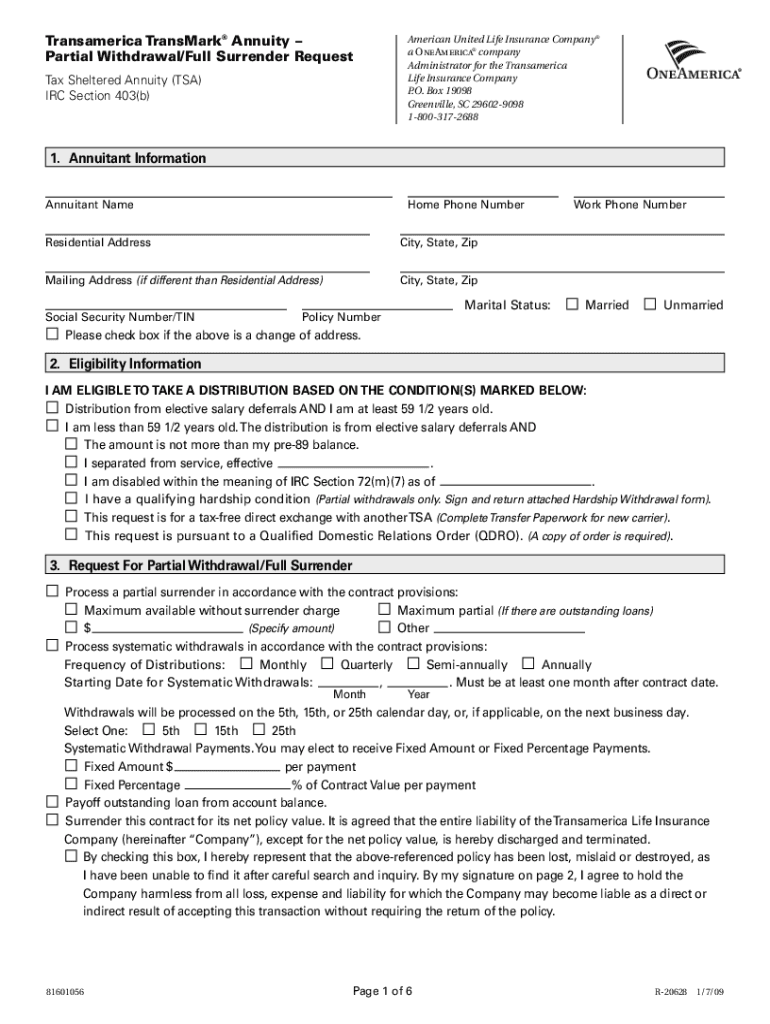
Transamerica R-20628 2009-2026 free printable template
pdfFiller is not affiliated with any government organization

Fill out
Complete the form online in a simple drag-and-drop editor.

eSign
Add your legally binding signature or send the form for signing.

Share
Share the form via a link, letting anyone fill it out from any device.

Export
Download, print, email, or move the form to your cloud storage.
Why pdfFiller is the best tool for your documents and forms


End-to-end document management
From editing and signing to collaboration and tracking, pdfFiller has everything you need to get your documents done quickly and efficiently.
Accessible from anywhere
pdfFiller is fully cloud-based. This means you can edit, sign, and share documents from anywhere using your computer, smartphone, or tablet.
Secure and compliant
pdfFiller lets you securely manage documents following global laws like ESIGN, CCPA, and GDPR. It's also HIPAA and SOC 2 compliant.
What is Transamerica R-20628
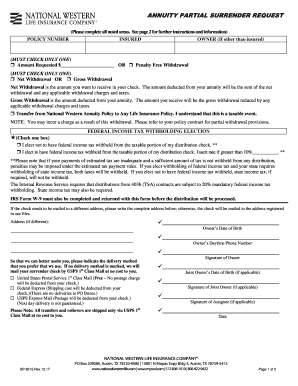
The Oceanview Annuity Partial Withdrawal Form is a financial document used by annuity contract owners to request partial withdrawals or full surrenders of their annuities.
pdfFiller scores top ratings on review platforms




Who needs Transamerica R-20628?
Explore how professionals across industries use pdfFiller.

Transamerica R-20628 is needed by:
-
Annuity contract owners seeking a partial withdrawal
-
Joint owners involved in the annuity contract
-
Spouses of annuity contract owners needing to sign
-
Financial advisors assisting clients with withdrawals
-
Tax professionals guiding clients on withdrawal implications
Comprehensive Guide to Transamerica R-20628
What is the Oceanview Annuity Partial Withdrawal Form?
The Oceanview Annuity Partial Withdrawal Form is a crucial document used by annuity contract owners to formally request either a partial withdrawal or full surrender of their annuity funds. This form not only serves to initiate the withdrawal process but also ensures that all relevant parties—owners, joint owners, and spouses (if applicable)—sign the document, affirming their consent and understanding. By completing the form, annuity holders can manage their financial needs efficiently while adhering to legal requirements.
This form is essential for individuals seeking to access a portion of their investment without fully liquidating their annuity contract, facilitating financial flexibility in times of need.
Purpose and Benefits of the Oceanview Annuity Partial Withdrawal Form
The Oceanview Annuity Partial Withdrawal Form provides significant advantages for users. Most notably, it allows contract holders to access funds while retaining a portion of their investment, thereby maintaining potential future income streams. This financial flexibility plays a critical role in addressing immediate financial needs without permanently forfeiting their annuity benefits.
Additionally, the form also includes considerations for tax implications. When filling out the partial surrender form, users must be mindful of how withdrawals will affect their taxable income, ensuring they conform to IRS and Iowa state regulations. This awareness helps prevent unexpected tax liabilities and ensures compliance with financial regulations.
Who Needs the Oceanview Annuity Partial Withdrawal Form?
The Oceanview Annuity Partial Withdrawal Form is designed for a specific audience consisting of the owner, joint owner, and spouse of the annuity contract. All parties listed must sign the document to confirm their agreement with the withdrawal request. The form is relevant in scenarios where any of these stakeholders wish to access funds, reflecting their collective decisions concerning the annuity contract.
Eligibility criteria may vary, but generally, it is essential for these individuals to be listed on the contract, as their signatures are legally binding in the process of requesting funds.
How to Fill Out the Oceanview Annuity Partial Withdrawal Form Online
Completing the Oceanview Annuity Partial Withdrawal Form online requires careful attention to detail. Here’s a simplified step-by-step guide:
-
Start by entering the contract information, including the contract number and name of the owner.
-
Provide distribution election details to specify how much you wish to withdraw.
-
Fill in your preferred income tax withholding options, ensuring you understand the implications of your selections.
-
Make sure that all required checkboxes and certifications, particularly regarding taxpayer identification, are appropriately checked.
Review all entries for accuracy before submission to avoid common pitfalls and ensure a smooth processing experience.
Submission Methods for the Oceanview Annuity Partial Withdrawal Form
After completing the Oceanview Annuity Partial Withdrawal Form, users have several methods for submission. The acceptable submission methods include:
-
Online submission through the dedicated portal.
-
Mailing the completed form to Oceanview Life and Annuity Company.
Each submission method may have different processing times, typically ranging from a few days to several weeks depending on the method chosen. It is advisable to inquire about any fees associated with the submission and to track the form to ensure confirmation of receipt.
Common Errors and How to Avoid Them
When filling out the Oceanview Annuity Partial Withdrawal Form, users often encounter several common errors. To mitigate these mistakes, consider the following tips:
-
Double-check that all required fields, including signatures, are filled correctly.
-
Pay attention to date fields to avoid submitting an outdated or incorrect form.
-
Verify that tax withholding preferences are clearly stated to prevent misunderstandings.
By following these best practices prior to submission, users can significantly reduce the likelihood of delays or rejections of their withdrawal requests.
Security and Compliance with the Oceanview Annuity Partial Withdrawal Form
Handling sensitive financial information through the Oceanview Annuity Partial Withdrawal Form requires utmost attention to security and compliance. It is essential to understand the measures in place to protect personal data, including encryption technologies and compliance with privacy standards.
pdfFiller employs 256-bit encryption and adheres to SOC 2 Type II, HIPAA, and GDPR compliance, ensuring that user information is safeguarded throughout the process. This robust security framework provides users with confidence in the privacy of their sensitive details, particularly when submitting forms online.
Using pdfFiller to Simplify Completing the Oceanview Annuity Partial Withdrawal Form
pdfFiller streamlines the process of filling out and submitting the Oceanview Annuity Partial Withdrawal Form, offering an array of helpful features. Users can easily:
-
Edit text and images directly on the form.
-
Utilize eSigning capabilities for secure and quick signing.
-
Access the form from any browser without the need for downloads.
This platform encourages a user-friendly experience, allowing individuals to manage their financial forms seamlessly and securely.
Sample of a Completed Oceanview Annuity Partial Withdrawal Form
Providing a visual guide enhances understanding of how to correctly complete the Oceanview Annuity Partial Withdrawal Form. A sample form filled out correctly would include:
-
Name of the owner and contract number accurately recorded.
-
Clear representation of the desired withdrawal amount and tax withholding preferences.
-
All required signatures accompanied by the appropriate dates.
By replicating these details on their own forms, users can effectively navigate the submission process while ensuring compliance with all requirements.
How to fill out the Transamerica R-20628
-
1.To access the Oceanview Annuity Partial Withdrawal Form on pdfFiller, go to the site and search for the form using its name.
-
2.Once located, click on the form to open it in the pdfFiller editor.
-
3.Before starting, gather necessary information such as your annuity contract number, personal details, and income tax withholding preferences.
-
4.Use the fillable fields to enter your contract information and select your distribution election details.
-
5.Make sure to fill in the fields labeled 'Contract Number Name of Owner' and any required checkboxes.
-
6.Review the completed form thoroughly for accuracy, ensuring all necessary signatures are included.
-
7.Once satisfied, save your progress on pdfFiller, and choose to download the completed form as a PDF.
-
8.To finalize your submission, follow the instructions for either sending it electronically or printing it for mailing to Oceanview Life and Annuity Company.

Who is eligible to use the Oceanview Annuity Partial Withdrawal Form?
Any owner or joint owner of an Oceanview annuity contract can use this form. It is also necessary for a spouse to sign if applicable. Ensure your contract details are ready when filling out the form.
Is there a deadline for submitting the withdrawal form?
While there is no specific deadline for the Oceanview Annuity Partial Withdrawal Form, it is recommended to submit it as soon as you have all necessary information to avoid delays in processing your withdrawal.
What submission methods are available for the withdrawal form?
The completed Oceanview Annuity Partial Withdrawal Form can be submitted either electronically through pdfFiller or printed for mailing. Make sure to follow the submission guidelines provided by Oceanview Life and Annuity Company.
Are any supporting documents required with this form?
Supporting documents are typically not required with the Oceanview Annuity Partial Withdrawal Form; however, you may be asked for identification or additional documentation based on your specific request.
What are common mistakes to avoid when filling out the form?
Common mistakes include failing to sign the form, leaving required fields blank, or not including joint owner or spouse signatures when necessary. Always double-check your entries for accuracy.
How long does it take to process the partial withdrawal request?
Processing times for the Oceanview Annuity Partial Withdrawal Form can vary, but allow for several business days. Confirm with Oceanview Life and Annuity Company for specific timelines related to your request.
What should I do if I have questions about my withdrawal options?
If you have questions regarding your withdrawal options or the form itself, consult with a financial advisor or contact Oceanview Life and Annuity Company directly for assistance.
Related Content
Related Forms





Get the latest insights from our blog



If you believe that this page should be taken down, please follow our DMCA take down process
here
.
This form may include fields for payment information. Data entered in these fields is not covered by PCI DSS compliance.