
Last updated on
Oct 19, 2026

Get the free Frozen Section Consultation Request Form
We are not affiliated with any brand or entity on this form

Fill out
Complete the form online in a simple drag-and-drop editor.

eSign
Add your legally binding signature or send the form for signing.

Share
Share the form via a link, letting anyone fill it out from any device.

Export
Download, print, email, or move the form to your cloud storage.
Why pdfFiller is the best tool for your documents and forms


End-to-end document management
From editing and signing to collaboration and tracking, pdfFiller has everything you need to get your documents done quickly and efficiently.
Accessible from anywhere
pdfFiller is fully cloud-based. This means you can edit, sign, and share documents from anywhere using your computer, smartphone, or tablet.
Secure and compliant
pdfFiller lets you securely manage documents following global laws like ESIGN, CCPA, and GDPR. It's also HIPAA and SOC 2 compliant.
What is Frozen Section Report
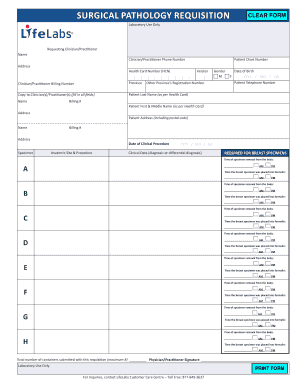
The Frozen Section Consultation Request Form is a document used by healthcare professionals to request and document frozen section consultations during surgical procedures.
pdfFiller scores top ratings on review platforms




Who needs Frozen Section Report?
Explore how professionals across industries use pdfFiller.

Frozen Section Report is needed by:
-
Surgeons requiring immediate pathology assessment
-
Pathologists conducting intraoperative consultations
-
Healthcare administrators managing surgical protocols
-
Medical professionals involved in patient care
-
Operating room staff coordinating surgical activities
Comprehensive Guide to Frozen Section Report
What is the Frozen Section Consultation Request Form?
The Frozen Section Consultation Request Form is an essential document used in surgical settings. Its primary purpose is to facilitate efficient communication between surgical teams and pathology labs, ensuring that immediate assessments are requested effectively. By using the frozen section consultation form, healthcare providers can streamline the process of obtaining crucial pathology insights during surgery for optimal patient care.
Purpose and Benefits of the Frozen Section Consultation Form
The use of the frozen section consultation form plays a critical role in surgical environments. It allows for immediate assessment requests that can significantly influence patient outcomes. When pathology consultations are efficiently processed, the surgical team can make informed decisions promptly, thereby enhancing the overall success of the procedure.
Key Features of the Frozen Section Consultation Request Form
This form includes several essential fields designed to ensure clarity in requests. Key components include the date, surgeon's name, the anatomic site of the specimen, and pertinent clinical history. Accurate documentation of consultations is vital, as it provides a clear record that can improve communication and outcomes in surgical pathology.
Who Needs the Frozen Section Consultation Request Form?
Several healthcare professionals rely on the frozen section consultation request form, particularly surgeons and pathologists. It becomes necessary in various situations, such as during complex surgeries where rapid pathology evaluation is crucial. The form is pivotal for ensuring that the medical consultation process is smooth and effective.
How to Fill Out the Frozen Section Consultation Request Form Online (Step-by-Step)
Completing the frozen section consultation request form online is straightforward. Here’s a step-by-step guide using pdfFiller:
-
Access the form on pdfFiller.
-
Enter the date and surgeon's name in the designated fields.
-
Provide details regarding the anatomic site of the specimen.
-
Include the reason for the consult and pertinent clinical history.
-
Double-check all entries for accuracy before submission.
Common Errors and How to Avoid Them
Users frequently make several mistakes when filling out the frozen section consultation form. Common errors include incomplete fields and inaccurate patient information. To minimize these mistakes, it is advisable to double-check each completed form for accuracy before submission, ensuring that every required section is addressed thoroughly.
Where to Submit the Frozen Section Consultation Request Form
Once filled out, the frozen section consultation request form can be submitted via various methods. Healthcare providers can choose between electronic submissions and traditional paper forms. Specific locations for submission include hospitals and pathology labs, ensuring that requests reach the appropriate parties without delay.
Security and Compliance for the Frozen Section Consultation Request Form
When handling sensitive documents like the frozen section consultation request form, security is paramount. pdfFiller employs robust security measures, including 256-bit encryption, to protect confidential patient information. Compliance with regulatory standards such as HIPAA and GDPR further ensures that patient data privacy is maintained throughout the process.
What Happens After You Submit the Frozen Section Consultation Request Form?
Upon submission of the frozen section consultation request form, there are specific processes in place to handle the requests. Typically, healthcare providers can expect a confirmation of submission along with an estimated processing time. The surgical team will receive updates regarding report generation and any necessary communication once the pathology findings are available.
Why Use pdfFiller for the Frozen Section Consultation Request Form?
Utilizing pdfFiller for the frozen section consultation request form offers numerous benefits. Users can easily edit, fill out, and electronically sign the form, all while maintaining document security. The platform ensures that sensitive information is handled with care, making it a viable option for managing pathology lab requests efficiently.
How to fill out the Frozen Section Report
-
1.Access the Frozen Section Consultation Request Form on pdfFiller by searching for the form name or navigating to the healthcare forms section.
-
2.Open the form by clicking on it in your dashboard, which will display the interactive fillable fields.
-
3.Gather necessary information such as the date of the procedure, surgeon's name, anatomic site of the specimen, and the reason for consultation before starting.
-
4.Begin filling out the form by entering information in each field. Use the side toolbar in pdfFiller to navigate easily between sections.
-
5.Make sure to provide detailed information in the pertinent clinical history section to aid the pathologist in making timely decisions.
-
6.Once all fields are completed, review the form for accuracy. Use pdfFiller’s preview feature to ensure all information is correct.
-
7.Finalize the form by clicking on the ‘Save’ button to store your completed document electronically on your pdfFiller account.
-
8.You can download the completed form to your computer or submit it directly to the pathology lab through pdfFiller’s submission options.

Who is eligible to use the Frozen Section Consultation Request Form?
Healthcare professionals such as surgeons and pathologists are typically eligible to use the Frozen Section Consultation Request Form, particularly during surgical procedures requiring immediate pathology evaluations.
What supporting documents do I need to submit with this form?
Typically, you may not need additional supporting documents with the Frozen Section Consultation Request Form. However, relevant clinical notes or prior patient records may be helpful for pathologists.
How do I submit the Frozen Section Consultation Request Form?
You can submit the Frozen Section Consultation Request Form electronically through pdfFiller. Make sure to check the specific submission guidelines provided by your institution or the pathology lab.
What common mistakes should I avoid while filling out the form?
Common mistakes include incomplete fields, incorrect anatomic site information, and failure to provide a clear reason for the consultation. Always double-check your entries before submission.
Is there a deadline for submitting the Frozen Section Consultation Request Form?
While specific deadlines may vary by institution, it is essential to submit the form as soon as the decision for a frozen section is made. Ensure timely communication to facilitate prompt pathology review.
How long does it take to process the Frozen Section Consultation Request Form?
Processing times vary but typically range from a few minutes to a couple of hours, depending on the lab's workload and the complexity of the case. Early submission helps expedite the process.
What happens if the form is not completed correctly?
If the Frozen Section Consultation Request Form is not completed correctly, it may delay pathology evaluation and lead to miscommunication in the surgical setting. Always ensure accuracy.
Related Forms




Get the latest insights from our blog


If you believe that this page should be taken down, please follow our DMCA take down process
here
.
This form may include fields for payment information. Data entered in these fields is not covered by PCI DSS compliance.