
Last updated on
Nov 9, 2026
Canada BCGEU FA-80 2008-2026 free printable template
We are not affiliated with any brand or entity on this form

Fill out
Complete the form online in a simple drag-and-drop editor.

eSign
Add your legally binding signature or send the form for signing.

Share
Share the form via a link, letting anyone fill it out from any device.

Export
Download, print, email, or move the form to your cloud storage.
Why pdfFiller is the best tool for your documents and forms


End-to-end document management
From editing and signing to collaboration and tracking, pdfFiller has everything you need to get your documents done quickly and efficiently.
Accessible from anywhere
pdfFiller is fully cloud-based. This means you can edit, sign, and share documents from anywhere using your computer, smartphone, or tablet.
Secure and compliant
pdfFiller lets you securely manage documents following global laws like ESIGN, CCPA, and GDPR. It's also HIPAA and SOC 2 compliant.
What is Canada BCGEU FA-80
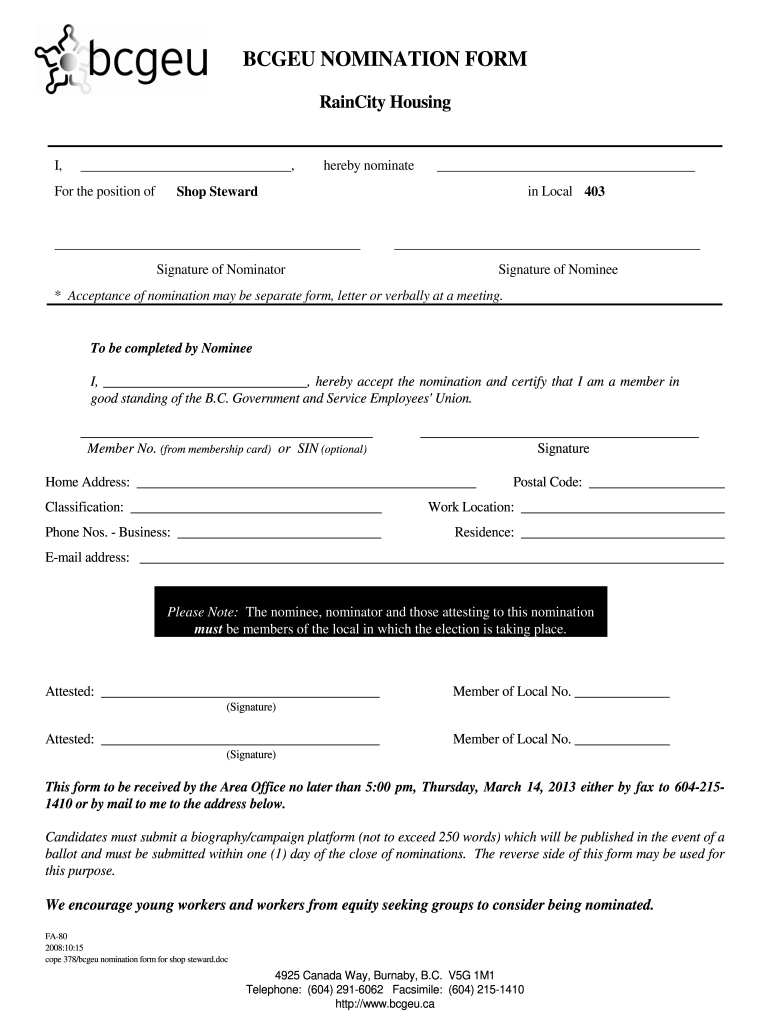
The BCGEU Shop Steward Nomination Form is a document used by union members to nominate and accept candidates for the Shop Steward position in Local 403 of the BC Government and Service Employees' Union.
pdfFiller scores top ratings on review platforms




Had difficult at first but after talking to you staff, if found out what I was doing wrong and it went like clockwork
It a great tool to modify, improve or design new PDF files with logic flow to follow.
Who needs Canada BCGEU FA-80?
Explore how professionals across industries use pdfFiller.

Canada BCGEU FA-80 is needed by:
-
Union members looking to nominate a Shop Steward
-
Nominees for the Shop Steward position
-
Attesters verifying the nomination process
-
Local union representatives overseeing nominations
-
Individuals interested in understanding the nomination process for a union role
Comprehensive Guide to Canada BCGEU FA-80
What is the BCGEU Shop Steward Nomination Form?
The BCGEU Shop Steward Nomination Form serves as a crucial document in the nomination process for Shop Stewards in Local 403 of the BC Government and Service Employees' Union. This form plays a significant role in ensuring a transparent and democratic selection of candidates. Key roles involved in this process are the Nominator, who proposes the candidate, the Nominee, who is the individual being nominated, and the Attester, who verifies the nomination.
Purpose and Benefits of the BCGEU Shop Steward Nomination Form
The primary purpose of the BCGEU Shop Steward Nomination Form is to facilitate the nomination of candidates for the position of Shop Steward. Nominating a Shop Steward provides several benefits to the union, such as promoting democratic participation within Local 403 and ensuring that various voices are represented. The form is essential for maintaining an organized process, and proper submission can bolster the nominee's campaign by showcasing community support.
Who Needs the BCGEU Shop Steward Nomination Form?
This form should be filled out by potential nominees seeking to run for the Shop Steward position, along with their nominators. Both the Nominator and the Nominee must understand their responsibilities in this process, and the Attester plays a critical role in validating nominations. This form is specifically relevant for union members in Local 403, who are seeking to contribute actively to their community.
Eligibility Criteria for the BCGEU Shop Steward Nomination Form
To fill out the BCGEU Shop Steward Nomination Form, certain eligibility criteria must be met. Nominators and nominees must be active members of the union, demonstrating a commitment to union values and responsibilities. The Attester must also fulfill specific requirements to validate that the nomination process adheres to internal guidelines. This layer of oversight ensures the integrity of the nominations within Local 403.
How to Fill Out the BCGEU Shop Steward Nomination Form Online (Step-by-Step)
Filling out the BCGEU Shop Steward Nomination Form correctly is vital for a successful nomination process. Here are the steps to complete the form:
-
Access the online form through the designated platform.
-
Enter personal information accurately, including contact details.
-
Provide required signatures from the Nominator, Nominee, and Attester.
-
Submit a biography and campaign platform in the designated field.
-
Double-check entries for any common mistakes before submission.
Required Documents and Supporting Materials for the Nomination Process
When submitting the BCGEU Shop Steward Nomination Form, specific documents are required to support the nomination. Essential documents include a biography detailing the nominee's background and a comprehensive campaign platform. It is crucial to provide accurate and honest information, as these documents play an integral role in the evaluation process. Here are tips for preparing supporting materials:
-
Clearly outline qualifications and experiences in the biography.
-
Ensure the campaign platform reflects the issues important to union members.
Submission Methods and Deadlines for the BCGEU Shop Steward Nomination Form
The BCGEU Shop Steward Nomination Form can be submitted through various methods, both online and offline. It is essential to adhere to submission deadlines to ensure eligibility for the nomination process. After submitting the form, candidates should track the status of their nomination to confirm receipt and processing. Missed deadlines may jeopardize a candidate's chances of running for the position.
Security and Compliance for the BCGEU Shop Steward Nomination Form
When handling the BCGEU Shop Steward Nomination Form, document security and privacy are paramount. pdfFiller employs advanced security measures such as encryption and compliance with standards like SOC 2 Type II, HIPAA, and GDPR. Users can be assured that their personal data is protected throughout the nomination process, ensuring confidentiality and integrity of submissions.
Common Errors and How to Avoid Them When Submitting the BCGEU Shop Steward Nomination Form
To increase the chances of a successful submission, it's essential to be aware of common errors. Frequent issues include missing required signatures or providing incorrect personal information. To avoid these pitfalls, always double-check forms before submission and utilize pdfFiller’s features for an error-free experience. A thorough review can save time and enhance the application’s credibility.
Experience a Streamlined Nomination Process with pdfFiller
Utilizing pdfFiller for the BCGEU Shop Steward Nomination Form brings numerous benefits, including an easy-to-use platform tailored for filling out forms securely. With features designed for document management and eSigning, users can navigate the nomination process efficiently. Embrace pdfFiller to ensure a seamless experience from filling out the form to final submission.
How to fill out the Canada BCGEU FA-80
-
1.Access the BCGEU Shop Steward Nomination Form by visiting pdfFiller and searching for the form title.
-
2.Once located, open the form by clicking on it from your document list.
-
3.Familiarize yourself with the form layout, noting the sections for signatures and personal information.
-
4.Gather necessary information, including the names and contact details of the nominator, nominee, and attester, before filling out the form.
-
5.Start entering the required information in the designated fields by clicking on each text box.
-
6.Ensure all names match any official identification to avoid discrepancies.
-
7.After filling out all fields, review the information carefully for accuracy and completeness.
-
8.Pay close attention to the signature fields, ensuring that you understand who needs to sign and in what order.
-
9.Utilize the instruction section included within the form for guidance on submitting any additional documents like a biography or campaign platform.
-
10.Once completed, save your work frequently to prevent data loss.
-
11.Finalize your form by checking each field once more and ensuring all required signatures are included.
-
12.To save or download the form, select the appropriate option in the pdfFiller interface.
-
13.If submitting online, follow the on-screen prompts to finalize submission and confirm your process has been completed successfully.

Who is eligible to use the BCGEU Shop Steward Nomination Form?
The form is intended for union members of Local 403 who wish to nominate candidates for the Shop Steward position, as well as for nominees themselves.
What is the deadline for submitting the nomination form?
While specific deadlines are not mentioned, it is important to submit the form before the official nomination deadline set by the BCGEU. Check with your local union representatives for accurate dates.
How should I submit the completed nomination form?
You can submit the completed form electronically through pdfFiller or print it and manually submit it to your local union office as per the submission guidelines provided.
What supporting documents are required with the nomination form?
Along with the form, you may need to submit a biography or campaign platform of the nominee. Check for specific document requirements outlined by the BCGEU.
What common mistakes should I avoid when completing this form?
Ensure all signatures are present and correctly gathered. Double-check that all required fields are filled in completely and accurately to avoid processing delays.
How long does it take to process the nomination form?
Processing times can vary, but typically forms are processed within a few weeks, depending on the volume of submissions and the internal procedures of the BCGEU.
Can I edit my submission after it is submitted?
Once submitted, modifications may not be permitted. If you need to make changes, contact your local union office for guidance on how to proceed.
Related Forms




Get the latest insights from our blog


If you believe that this page should be taken down, please follow our DMCA take down process
here
.
This form may include fields for payment information. Data entered in these fields is not covered by PCI DSS compliance.