
Last updated on
Oct 7, 2026

Get the free Student Assignment Submission Form
We are not affiliated with any brand or entity on this form

Fill out
Complete the form online in a simple drag-and-drop editor.

eSign
Add your legally binding signature or send the form for signing.

Share
Share the form via a link, letting anyone fill it out from any device.

Export
Download, print, email, or move the form to your cloud storage.
Why pdfFiller is the best tool for your documents and forms


End-to-end document management
From editing and signing to collaboration and tracking, pdfFiller has everything you need to get your documents done quickly and efficiently.
Accessible from anywhere
pdfFiller is fully cloud-based. This means you can edit, sign, and share documents from anywhere using your computer, smartphone, or tablet.
Secure and compliant
pdfFiller lets you securely manage documents following global laws like ESIGN, CCPA, and GDPR. It's also HIPAA and SOC 2 compliant.
What is Submission Form
The Student Assignment Submission Form is a document used by students to submit their essays, assignments, or projects to the Department of Sociology.
pdfFiller scores top ratings on review platforms




Who needs Submission Form?
Explore how professionals across industries use pdfFiller.

Submission Form is needed by:
-
Students of Sociology Programs
-
University Faculty Members
-
Academic Administrators
-
Course Instructors
-
Educational Institutions
-
Academic Advisors
Comprehensive Guide to Submission Form
What is the Student Assignment Submission Form?
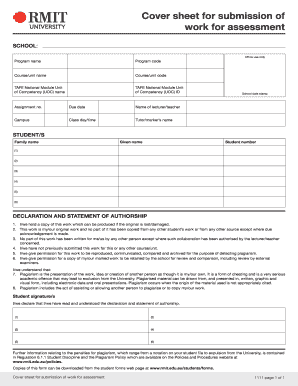
The Student Assignment Submission Form is a crucial tool for students, enabling them to submit their essays, assignments, or projects efficiently to the Department of Sociology. This academic submission form ensures students can document their submissions formally.
The form requires a declaration of originality, accompanied by a student's signature, to affirm the authenticity of their work. Incorporating the student's name, ID number, and course of study, this comprehensive form is essential for a smooth submission process.
Purpose and Benefits of the Student Assignment Submission Form
The primary purpose of the Student Assignment Submission Form is to ensure proper and systematic submission of assignments to the Department of Sociology. By providing a structured approach to submissions, it facilitates tracking and enhances accountability for the work submitted by students.
Utilizing this sociology project form not only streamlines the submission process but also serves as a record for both students and faculty, ensuring that all assignments are properly accounted for and managed.
Key Features of the Student Assignment Submission Form
This academic submission form includes several essential components designed to streamline the submission process. Key features include:
-
Name of the student
-
ID number
-
Course of study
-
Year of study
-
Lecturer's name
-
Date of submission
-
A signature line for the originality declaration
These fillable fields ensure that all necessary information is collected efficiently while maintaining a standard format for submissions.
Who Needs the Student Assignment Submission Form?
The Student Assignment Submission Form is intended primarily for university students enrolled in the Sociology Department, although it can also benefit students in other disciplines. Each student is responsible for accurately completing the form to ensure that their assignments are properly submitted and recognized.
This emphasis on students' responsibilities underlines the importance of using the submission form correctly and provides clarity in the submission process.
Information You'll Need to Gather for the Student Assignment Submission Form
Before filling out the Student Assignment Submission Form, students should gather the following information:
-
Student ID number
-
Course name
-
Lecturer’s name
-
Date of submission
Accurate information is essential for successful submissions, ensuring that all details are correct will help avoid complications during processing.
How to Fill Out the Student Assignment Submission Form Online (Step-by-Step)
Filling out the Student Assignment Submission Form online using pdfFiller involves several simple steps:
-
Access the form through the pdfFiller platform.
-
Complete each fillable field with accurate information.
-
Review the originality statement and ensure to sign it.
-
Submit the form electronically.
-
Save or print a copy for your records.
Utilizing pdfFiller’s intuitive tools will enhance the efficiency of your form completion while ensuring that all necessary components are addressed.
Common Mistakes and How to Avoid Them
When filling out the Student Assignment Submission Form, students often make common errors, such as:
-
Forgetting to sign the originality declaration
-
Providing incorrect student ID or course details
-
Omitting important information
To avoid these pitfalls, it is advisable to double-check all entries before submission, ensuring that every detail is accurate.
Security and Compliance for the Student Assignment Submission Form
pdfFiller prioritizes the security of sensitive information when handling the Student Assignment Submission Form. Its robust security measures, including 256-bit encryption, protect personal data throughout the submission process.
Moreover, pdfFiller is compliant with industry standards such as SOC 2 Type II, HIPAA, and GDPR regulations, ensuring that all academic submissions are handled with the utmost care and confidentiality.
After Submission: What Happens Next?
Upon submitting the Student Assignment Submission Form, students can expect a confirmation process that verifies their submission was received. Details regarding tracking of submissions will also be provided.
If additional information or corrections are necessary, students will be informed of the next steps to take, ensuring that their assignments are processed smoothly.
The Advantages of Using pdfFiller for Your Student Assignment Submission
Choosing pdfFiller for completing the Student Assignment Submission Form offers numerous advantages, including:
-
User-friendly interface, making form filling easy and efficient
-
Enhanced security features to protect personal information
-
The ability to save and manage forms within the platform
These benefits position pdfFiller as a go-to tool for students looking for reliable assistance in their academic submission process.
How to fill out the Submission Form
-
1.To access the Student Assignment Submission Form on pdfFiller, visit the website and type 'Student Assignment Submission Form' in the search bar.
-
2.Click on the appropriate link to open the form in the pdfFiller interface.
-
3.Before starting, gather all necessary information such as your full name, ID number, course of study, year, lecturer's name, and submission date.
-
4.Begin filling out the form by clicking on the respective fields. Enter your name, ID number, and course of study accurately.
-
5.Next, fill in your year of study and the lecturer's name to ensure proper routing of your submission.
-
6.When you reach the 'Date of Submission' field, select the date you are submitting the form.
-
7.After completing all fields, review the document carefully to ensure no mistakes are present.
-
8.Locate the signature line to add your electronic signature, confirming the originality of your work.
-
9.Once satisfied with the filled document, save your work on pdfFiller to avoid losing any information.
-
10.You can download the completed form or submit it directly through pdfFiller by selecting the submission method that fits your requirements.

What are the eligibility requirements for submitting the form?
Any student enrolled in Sociology courses is eligible to submit the Student Assignment Submission Form as part of their assignment completion process.
Are there any deadlines for submitting the assignment form?
Submission deadlines for the Student Assignment Submission Form typically align with assignment due dates. Always check your syllabus or course guidelines for specific deadlines.
What methods are available for submitting the form?
The Student Assignment Submission Form can be submitted digitally through pdfFiller or physically in person, depending on your department's requirements.
What supporting documents are required for this submission?
Generally, the Student Assignment Submission Form does not require additional documents, but you may need to attach supporting materials or project documents as per your course guidelines.
What common mistakes should I avoid when completing the form?
Ensure all fields are filled out accurately and completely, avoid spelling mistakes, and remember to sign the form to confirm originality.
How long will it take to process my submission?
Processing times for the Student Assignment Submission Form can vary. Typically, you should receive feedback or confirmation within a week, depending on departmental workload.
Can I edit the form after submission?
Once submitted, editing the Student Assignment Submission Form may not be possible. Check with your instructor or administrator on how to proceed with any necessary edits.
Related Forms




Get the latest insights from our blog


If you believe that this page should be taken down, please follow our DMCA take down process
here
.
This form may include fields for payment information. Data entered in these fields is not covered by PCI DSS compliance.