
Last updated on
Oct 31, 2026

Western Teamsters Welfare Trust Enrollment and/or Change Participant Data Form 2011 free printab...
pdfFiller is not affiliated with any government organization

Fill out
Complete the form online in a simple drag-and-drop editor.

eSign
Add your legally binding signature or send the form for signing.

Share
Share the form via a link, letting anyone fill it out from any device.

Export
Download, print, email, or move the form to your cloud storage.
Why pdfFiller is the best tool for your documents and forms


End-to-end document management
From editing and signing to collaboration and tracking, pdfFiller has everything you need to get your documents done quickly and efficiently.
Accessible from anywhere
pdfFiller is fully cloud-based. This means you can edit, sign, and share documents from anywhere using your computer, smartphone, or tablet.
Secure and compliant
pdfFiller lets you securely manage documents following global laws like ESIGN, CCPA, and GDPR. It's also HIPAA and SOC 2 compliant.
What is Western Teamsters Welfare Trust Enrollment and/or Change Participant Data Form
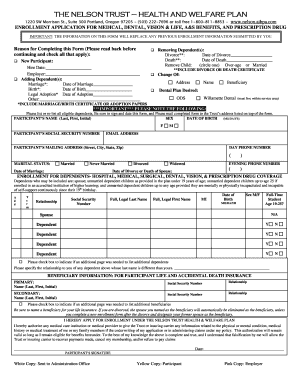
The Western Teamsters Welfare Trust Participant Data Form is a healthcare enrollment document used by participants to enroll or update their and their dependents' information for healthcare benefits.
pdfFiller scores top ratings on review platforms




Who needs Western Teamsters Welfare Trust Enrollment and/or Change Participant Data Form?
Explore how professionals across industries use pdfFiller.

Western Teamsters Welfare Trust Enrollment and/or Change Participant Data Form is needed by:
-
Healthcare benefits participants
-
Dependents of healthcare participants
-
Employers offering healthcare plans
-
Insurance administrators
-
Human resources personnel
-
Individuals needing to update healthcare information
Comprehensive Guide to Western Teamsters Welfare Trust Enrollment and/or Change Participant Data Form
What is the Western Teamsters Welfare Trust Participant Data Form?
The Western Teamsters Welfare Trust Participant Data Form serves to enroll or update participant and dependent information essential for healthcare benefits. This form is a crucial element in ensuring that both participants and their dependents receive the appropriate medical coverage. Required information includes personal data such as Social Security Number, date of birth, and specific details about dependents.
Purpose and Benefits of the Western Teamsters Welfare Trust Participant Data Form
Timely enrollment and updates through the Western Teamsters Welfare Trust Participant Data Form are vital for maintaining effective healthcare benefits. By using this form, participants can secure a variety of benefits for themselves and their dependents. Completing the form guarantees proper coverage, allowing families to access necessary medical services without complications.
Who Needs the Western Teamsters Welfare Trust Participant Data Form?
The intended audience for this form includes participants enrolled in the Western Teamsters Welfare Trust as well as their eligible dependents. Individuals should fill out the form if they are themselves participants or if they need to update information concerning dependents, particularly in cases involving divorced or separated parents.
How to Fill Out the Western Teamsters Welfare Trust Participant Data Form Online (Step-by-Step)
-
Access the form through pdfFiller.
-
Utilize the fillable fields to enter required information.
-
Review the information for accuracy before submitting.
pdfFiller simplifies the process by offering online features that allow users to easily navigate and fill out the form, ensuring all information is accurately captured and ready for submission.
Field-by-Field Instructions for the Western Teamsters Welfare Trust Participant Data Form
This section provides detailed explanations of the required fields in the form. Key areas include the Social Security Number and dependent information, which must be filled out carefully. Participants should be aware of common pitfalls that could lead to delays, such as missing information or errors in sensitive sections.
Review and Validation Checklist
-
Ensure all required fields are completed.
-
Check for accuracy in Social Security Numbers and dates of birth.
-
Validate dependent information for correctness.
A thorough review of these elements helps participants avoid common errors that could result in delays or rejection of the form.
How to Submit the Western Teamsters Welfare Trust Participant Data Form
The completed form can be submitted through various methods. Participants may choose online payment options or deliver the form physically to the designated office. Be mindful of any associated fees, deadlines, and expected processing times to ensure timely enrollment or updates.
What Happens After You Submit the Western Teamsters Welfare Trust Participant Data Form?
After submission, participants will receive confirmation of their application. They can also check their application status through designated channels. Typical processing times may vary, and participants should anticipate when they can expect updates regarding their enrollment or changes.
Security and Compliance for the Western Teamsters Welfare Trust Participant Data Form
Protecting personal information during the submission of this form is critical. pdfFiller employs robust security measures to ensure data is safeguarded, maintaining compliance with various regulations such as HIPAA and GDPR. This commitment to privacy and data protection is essential for all users concerned about their sensitive information.
Leverage pdfFiller for Your Western Teamsters Welfare Trust Participant Data Form Needs
pdfFiller enhances the user experience by streamlining the filling and submission processes. Utilizing its many features can lead to a more efficient and less stressful experience when completing the Western Teamsters Welfare Trust Participant Data Form.
How to fill out the Western Teamsters Welfare Trust Enrollment and/or Change Participant Data Form
-
1.To access the Western Teamsters Welfare Trust Participant Data Form on pdfFiller, visit the official pdfFiller website and use the search bar to find the specific form by typing its name.
-
2.Once you locate the form, click on it to open it in the pdfFiller interface where you can start editing.
-
3.Before filling in the form, gather all necessary information such as your Social Security Number, date of birth, and any dependent details to ensure accurate completion.
-
4.Navigate through the blank fields and checkboxes available in the form. Click on each field to enter your personal information, ensuring to follow the explicit instructions provided within the form.
-
5.Pay special attention to sections that may require the completion of additional data, particularly regarding insurance details and dependent children from divorced or separated parents.
-
6.After filling out all required fields, thoroughly review the form to confirm all information is accurate and complete. Make sure the 'Participant must complete this in FULL' message is adhered to.
-
7.Finalize the form by obtaining the necessary signature from the participant. Ensure that the signature section is clearly completed and legible.
-
8.Once satisfied with the form, save your changes within pdfFiller. You have the option to download the completed form to your device or submit it directly through systems provided by Northwest Administrators, Inc.

Who is eligible to fill out the Western Teamsters Welfare Trust Participant Data Form?
Eligibility to fill out this form is primarily for participants enrolled in the Western Teamsters Welfare Trust seeking healthcare benefits for themselves and their dependents.
Is there a deadline for submitting the Participant Data Form?
While specific deadlines are not mentioned, it is advisable to submit the form as soon as possible to ensure timely enrollment or updates to healthcare benefits.
How do I submit the Western Teamsters Welfare Trust Participant Data Form?
After completing the form, you can submit it by either downloading it for mailing to Northwest Administrators, Inc. or following the submission procedures outlined on pdfFiller.
What supporting documents do I need to provide with the Participant Data Form?
Typically, no additional documents are required with the form, but ensure all requested personal and dependent information is accurately filled out to prevent any delays in processing.
What common mistakes should I avoid when filling out the form?
Avoid leaving any required fields blank and ensure the participant's signature is included. Double-check all inputs for accuracy, particularly Social Security Numbers and dependent details.
How long does it take to process the form once submitted?
Processing times may vary, but generally, allow 4-6 weeks for the review and updating of healthcare benefit information after the form is submitted.
What if I need help completing the form?
If you need assistance, refer to the instructions included within the form or contact Northwest Administrators, Inc. for additional guidance on completing the Western Teamsters Welfare Trust Participant Data Form.
Western Teamsters Welfare Trust Enrollment and/or Change Participant Data Form Form Versions
Related Content
Related Forms



Get the latest insights from our blog


If you believe that this page should be taken down, please follow our DMCA take down process
here
.
This form may include fields for payment information. Data entered in these fields is not covered by PCI DSS compliance.