
Last updated on
Oct 31, 2026
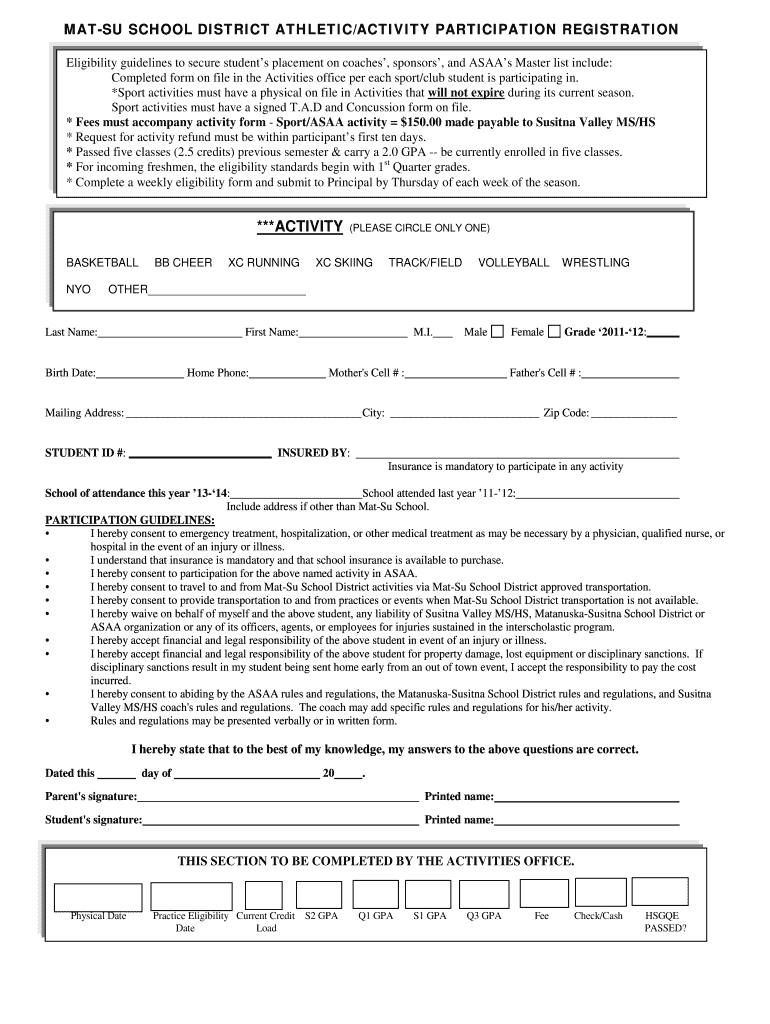
Mat-Su School District AthleticActivity Participation Registration free printable template
We are not affiliated with any brand or entity on this form

Fill out
Complete the form online in a simple drag-and-drop editor.

eSign
Add your legally binding signature or send the form for signing.

Share
Share the form via a link, letting anyone fill it out from any device.

Export
Download, print, email, or move the form to your cloud storage.
Why pdfFiller is the best tool for your documents and forms


End-to-end document management
From editing and signing to collaboration and tracking, pdfFiller has everything you need to get your documents done quickly and efficiently.
Accessible from anywhere
pdfFiller is fully cloud-based. This means you can edit, sign, and share documents from anywhere using your computer, smartphone, or tablet.
Secure and compliant
pdfFiller lets you securely manage documents following global laws like ESIGN, CCPA, and GDPR. It's also HIPAA and SOC 2 compliant.
What is Mat-Su School District AthleticActivity Participation Registration
The Mat-Su School District Athletic Activity Registration is a form used by students and parents in Alaska to register for school sports and activities.
pdfFiller scores top ratings on review platforms




Who needs Mat-Su School District AthleticActivity Participation Registration?
Explore how professionals across industries use pdfFiller.

Mat-Su School District AthleticActivity Participation Registration is needed by:
-
Parents of students participating in school activities
-
Students enrolling in sports programs
-
Athletic coaches and staff at Mat-Su School District
-
School administrators processing registrations
-
Health professionals conducting physical examinations
-
Sponsors or volunteers supporting school sports
Comprehensive Guide to Mat-Su School District AthleticActivity Participation Registration
What is the Mat-Su School District Athletic Activity Registration?
The Mat-Su School District Athletic Activity Registration is a vital form designed for students in Alaska who wish to participate in sports and other associated activities. This registration serves to streamline the process for engagement in school-sponsored athletic programs while collecting essential personal information.
-
This form outlines the necessary details for students, covering their participation in various sports and activities.
-
It gathers important personal information, including student name, birthdate, and emergency contact details.
-
Completion of the form requires parental consent and signatures from both student and parent to ensure compliance with participation requirements.
Benefits of Completing the Mat-Su School District Athletic Activity Registration
Filling out the Mat-Su School District Athletic Activity Registration offers several significant advantages for students and their families. By ensuring proper registration, families facilitate a smoother entry into school sports.
-
This registration confirms that students are legally permitted to participate in athletic and school activities.
-
It provides critical medical and emergency contact information necessary during activities.
-
The form supports adherence to school district guidelines and policies, ensuring a safe environment for student engagement.
Essential Features of the Mat-Su School District Athletic Activity Registration Form
The registration form includes multiple critical components necessary for successful submission. Understanding these features is essential for parents and students completing the form.
-
Required fields encompass student name, birthdate, and home phone number.
-
Checkboxes allow students to select their desired activities easily.
-
Signature lines for both the student and parent are included to validate consent and acknowledgment.
Who Should Use the Mat-Su School District Athletic Activity Registration?
This registration form is primarily intended for parents and students involved in school sports activities. Identifying the appropriate users is crucial for effective completion.
-
Parents seeking to enroll their children in school sports and activities must complete the form.
-
Students intending to participate in athletic programs need to submit their information accurately.
-
Both parent and student are required to provide signatures, confirming their roles in the registering process.
Filling Out the Mat-Su School District Athletic Activity Registration Step-by-Step
Completing the registration form online requires attention to detail and a structured approach. Following a systematic guide ensures that all information is accurately submitted.
-
Start by entering personal information in the designated fields, including last name, first name, and birthdate.
-
Gather necessary documents and information beforehand using a pre-filing checklist to streamline the process.
-
Be aware of common errors, like incomplete fields or missing signatures, to ensure successful submission.
Understanding the Submission Process for the Mat-Su School District Athletic Activity Registration
Submitting the registration form is a straightforward process if you follow the outlined methods correctly. Understanding the submission process is vital for timely registration.
-
Submission can occur through various methods, including online and in-person options.
-
Be mindful of deadlines, as late submissions may incur additional fees.
-
A confirmation email will be sent after submission, including instructions for tracking the registration status.
Safety and Compliance Considerations for the Mat-Su School District Athletic Activity Registration
The registration form also emphasizes safety and legal compliance, crucial for safeguarding sensitive information. Understanding these considerations is essential for all form handlers.
-
The form adheres to privacy and data protection standards for sensitive personal information.
-
Compliance with HIPAA and GDPR regulations is maintained when handling data.
-
pdfFiller implements security measures to ensure safe document management, providing peace of mind for users.
How pdfFiller Simplifies the Mat-Su School District Athletic Activity Registration Process
pdfFiller significantly enhances the experience of filling out and managing registration forms. This platform offers several features that streamline the process for users.
-
Users can create and edit forms directly in their browsers, eliminating the need for downloads.
-
The benefits of e-signatures facilitate swift approval and validation of the completed registration form.
-
Sharing and submitting the filled form can be done directly from the platform, simplifying the final steps.
Follow-Up Actions After Submitting the Mat-Su School District Athletic Activity Registration
After submitting the registration form, users should be aware of the next steps to ensure their registration is processed effectively. Keeping track of the process is key.
-
Check the status of the submission through the provided confirmation link or method.
-
If necessary, guidance will be available for correcting or amending the registration information.
-
Upon approval, families can expect further instructions regarding upcoming activities and participation details.
Your Next Steps to Complete the Mat-Su School District Athletic Activity Registration
Utilizing pdfFiller for the registration process can significantly enhance the overall experience. Here’s how to get started efficiently.
-
The benefits of using pdfFiller for filling out the registration form should not be overlooked, as it simplifies every step.
-
Visit pdfFiller now to initiate the registration process online, leveraging easy-to-use features.
-
Rest assured that security is a priority, providing safe access to your documents throughout the process.
How to fill out the Mat-Su School District AthleticActivity Participation Registration
-
1.To access the Mat-Su School District Athletic Activity Registration form, visit pdfFiller and search for the form by its name or upload it if you have a copy.
-
2.Open the form and take a moment to familiarize yourself with the layout and available fillable fields.
-
3.Before starting, gather all necessary information, including the student’s full name, birth date, home phone number, and any required health details.
-
4.Begin filling in the personal information fields. Click on each box to enter data, ensuring accuracy to avoid delays.
-
5.Moving through the form, check the box or select the activities the student wishes to participate in.
-
6.Both the parent and student must sign the form. Navigate to the signature fields and follow the on-screen prompts to add signatures electronically.
-
7.Once all sections are completed, review the form thoroughly to ensure all information is correct and complete, checking for any missed fields.
-
8.After finalization, locate the save or submit options within pdfFiller. You can either save a copy to your device, download it as a PDF, or submit it directly if submission options are available.
-
9.If submitting online, ensure that any required documents accompanying the form are included per instructions provided by the school.

What are the eligibility requirements for using this form?
Students must be registered in the Mat-Su School District and meet any specific requirements outlined for each sport or activity, including medical examinations and parental consent.
Is there a deadline for submitting the Athletic Activity Registration form?
Typically, forms should be submitted before the start of the sports season. Check with the school district for specific deadlines related to each activity.
How can I submit the completed form?
You can submit the form through pdfFiller either by downloading it and sending it via email to the school or using an integrated submission option if available.
What supporting documents are required with this form?
Alongside the registration form, a recent physical examination report and, if applicable, payment for participation fees may be required. Always refer to the school’s guidelines for specifics.
What are common mistakes to avoid when filling out the form?
Common mistakes include missing signatures, failing to provide accurate personal information or activity selections, and neglecting to review the form for completeness prior to submission.
How long will it take to process my registration?
Processing times may vary depending on the period of submission and the school district’s schedule. Generally, allow at least a week for processing and confirmation.
Can this form be filled out online?
Yes, you can fill out the Mat-Su School District Athletic Activity Registration online using pdfFiller, which provides tools for easy data entry and electronic signing.
Related Forms



Get the latest insights from our blog


If you believe that this page should be taken down, please follow our DMCA take down process
here
.
This form may include fields for payment information. Data entered in these fields is not covered by PCI DSS compliance.