
Last updated on
Oct 31, 2026

Get the free Personal Data Form
We are not affiliated with any brand or entity on this form

Fill out
Complete the form online in a simple drag-and-drop editor.

eSign
Add your legally binding signature or send the form for signing.

Share
Share the form via a link, letting anyone fill it out from any device.

Export
Download, print, email, or move the form to your cloud storage.
Why pdfFiller is the best tool for your documents and forms


End-to-end document management
From editing and signing to collaboration and tracking, pdfFiller has everything you need to get your documents done quickly and efficiently.
Accessible from anywhere
pdfFiller is fully cloud-based. This means you can edit, sign, and share documents from anywhere using your computer, smartphone, or tablet.
Secure and compliant
pdfFiller lets you securely manage documents following global laws like ESIGN, CCPA, and GDPR. It's also HIPAA and SOC 2 compliant.
What is Polish Personal Form
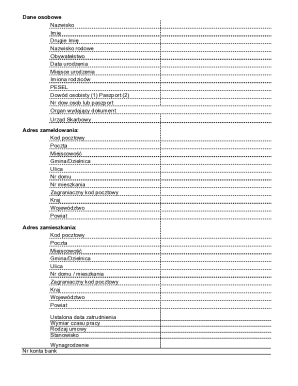
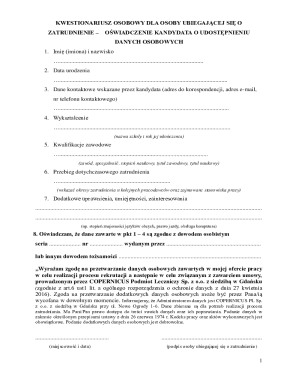
The Personal Data Form is a type of personal affidavit used by employees in Poland to collect detailed personal information required for employment purposes.
pdfFiller scores top ratings on review platforms




So far so good - probably better when I get the hang of it.
This program is so easy to use...any document can be converted in to a fillable form, and even saved as a Word doc. Really love this program!
Who needs Polish Personal Form?
Explore how professionals across industries use pdfFiller.

Polish Personal Form is needed by:
-
Human resources departments in Poland
-
Employees applying for jobs
-
Contract workers requiring personal data submission
-
Recruitment agencies in Poland
-
Government agencies handling employment records
-
Legal experts specializing in personal data compliance
Comprehensive Guide to Polish Personal Form
What is the Personal Data Form?
The Personal Data Form serves a crucial role in collecting essential personal information from individuals in Poland. This form is primarily used to gather details such as name, date of birth, personal ID number, and citizenship. Its main functions include standardizing the data collection process and ensuring compliance with Polish employment laws.
-
Overview of the form's main functions includes collecting data for HR purposes.
-
Typical uses involve onboarding new employees within Polish organizations.
-
Providing accurate information is essential for legal and regulatory compliance.
Purpose and Benefits of the Personal Data Form
The Personal Data Form is vital for both employees and employers, offering several advantages. By standardizing how employee information is collected, it streamlines various HR processes.
-
Standardization improves efficiency and reduces errors during data entry.
-
It validates personal and employment data to ensure accuracy.
-
This form simplifies the onboarding process for new hires, enhancing their experience.
Key Features of the Personal Data Form
This form contains essential sections that facilitate the collection of accurate personal information. Key fields include the individual's name, date of birth, personal ID, and citizenship.
-
Essential fields also cover tax ID number and contact information.
-
A declaration section confirms that the data aligns with the individual’s ID documents.
-
Mandatory signatures are required from both the employee and the person receiving the form.
Who Needs the Personal Data Form?
The primary users of the Personal Data Form include new employees, HR personnel, and management teams. This form becomes mandatory in various scenarios, especially during the hiring process.
-
New employees must complete the form as part of their onboarding.
-
HR personnel utilize the form to maintain accurate employee records.
-
Certain state-specific regulations in Poland dictate when this form is necessary.
How to Fill Out the Personal Data Form Online (Step-by-Step)
Completing the Personal Data Form accurately online requires attention to detail. Follow these steps for effective submission.
-
Gather all necessary information, including personal IDs and contact details.
-
Fill out each section of the form carefully, verifying data accuracy.
-
Utilize tools available within pdfFiller to assist with form completion.
Common Errors and How to Avoid Them
When filling out the Personal Data Form, users should be vigilant to avoid common mistakes that can lead to issues later on.
-
Frequent errors include incorrect ID numbers or incomplete fields.
-
Double-checking each entry ensures accuracy and reduces submissions errors.
-
Review the entire filled-out form thoroughly before submitting it.
Submitting the Personal Data Form: Methods and Requirements
Submitting the completed Personal Data Form can be done in several ways, depending on organizational guidelines.
-
Options include online submission, in-person delivery, or mailing the form.
-
Supporting documents, such as proof of identity, may be required.
-
Be aware of deadlines for submission and subsequent procedures following submission.
Security and Compliance when Handling the Personal Data Form
Given the sensitivity of the information collected, security and compliance are paramount when handling the Personal Data Form.
-
pdfFiller provides robust security measures, including 256-bit encryption.
-
Compliance with GDPR and other regulations is maintained to protect personal data.
-
Users can trust that their sensitive information is secure throughout the process.
Utilizing pdfFiller for Your Personal Data Form Needs
pdfFiller enhances the user experience when working with the Personal Data Form through its advanced features.
-
Editing and form-filling capabilities simplify the document preparation process.
-
eSigning and sharing options offer convenient ways to manage the form.
-
Consider trying pdfFiller's range of features for seamless document management.
How to fill out the Polish Personal Form
-
1.To access the Personal Data Form, visit the pdfFiller website and use the search bar to find the form by its name.
-
2.Once you find the form, click on it to open it in the pdfFiller interface for editing.
-
3.Before completing the form, gather all necessary information, including your name, parents' names, date of birth, citizenship, personal ID number, tax ID number, contact phone, residence address, education details, previous employment, additional skills, family status, and military service details.
-
4.Begin filling out the form by clicking into the fields. Use the text boxes to type your information.
-
5.For checkboxes, simply click to select or deselect as applicable. Make sure to complete all required fields marked with an asterisk.
-
6.Review your entries thoroughly to ensure accuracy. Pay special attention to sections that require declarations of consistency with your ID document.
-
7.Once you have filled out the necessary sections, look for a 'Save' or 'Finalize' button. Click this to make sure all your changes are recorded.
-
8.If needed, utilize the built-in review features to check for any missed fields or validation errors.
-
9.After finalizing the form, you can download it or choose to directly submit it using the provided submission options through pdfFiller.

Who is eligible to fill out the Personal Data Form?
The Personal Data Form is primarily intended for employees and individuals applying for jobs in Poland who need to provide personal information for employment verification.
What is the deadline for submitting the Personal Data Form?
There is typically no strict deadline for submission; however, it is advisable to submit the form promptly to avoid delays in employment processing.
How can I submit the Personal Data Form?
You can submit the Personal Data Form directly through pdfFiller by downloading it after completion and emailing it or uploading it to the relevant HR portal as instructed by your employer.
What supporting documents are required with the Personal Data Form?
Commonly required supporting documents include a copy of your ID, proof of residency, and any additional qualifications that are relevant to your employment application.
What are common mistakes to avoid when filling out the form?
Ensure all fields are correctly filled, especially mandatory ones. Avoid inaccuracies in names, IDs, and other personal details, as this could lead to complications in processing.
How long does processing take once the Personal Data Form is submitted?
Processing times can vary. Expect a few days to a couple of weeks, depending on the employer's HR department workflow and response times.
Is notarization required for this Personal Data Form?
No, notarization is not required for the Personal Data Form; it must be signed by both the employee and the person receiving the form.
Related Forms

Get the latest insights from our blog


If you believe that this page should be taken down, please follow our DMCA take down process
here
.
This form may include fields for payment information. Data entered in these fields is not covered by PCI DSS compliance.