
Last updated on
Oct 30, 2026

WI McFarland School District Ticket Sales Report Form 1995-2026 free printable template
pdfFiller is not affiliated with any government organization

Fill out
Complete the form online in a simple drag-and-drop editor.

eSign
Add your legally binding signature or send the form for signing.

Share
Share the form via a link, letting anyone fill it out from any device.

Export
Download, print, email, or move the form to your cloud storage.
Why pdfFiller is the best tool for your documents and forms


End-to-end document management
From editing and signing to collaboration and tracking, pdfFiller has everything you need to get your documents done quickly and efficiently.
Accessible from anywhere
pdfFiller is fully cloud-based. This means you can edit, sign, and share documents from anywhere using your computer, smartphone, or tablet.
Secure and compliant
pdfFiller lets you securely manage documents following global laws like ESIGN, CCPA, and GDPR. It's also HIPAA and SOC 2 compliant.
What is WI McFarland School District Ticket Sales Report Form
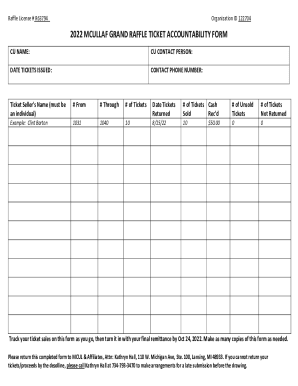
The Ticket Sales Report Form is a financial document used by ticket sellers to record and report the sales of tickets for an event for financial reconciliation purposes.
pdfFiller scores top ratings on review platforms




Who needs WI McFarland School District Ticket Sales Report Form?
Explore how professionals across industries use pdfFiller.

WI McFarland School District Ticket Sales Report Form is needed by:
-
Event organizers managing ticket sales.
-
Financial accountants for event reconciliation.
-
Ticket sellers responsible for reporting sales.
-
Nonprofit organizations selling tickets.
-
Corporate event planners overseeing ticketing.
Comprehensive Guide to WI McFarland School District Ticket Sales Report Form
What is the Ticket Sales Report Form?
The Ticket Sales Report Form is an essential document used for recording event ticket sales efficiently. Its primary function lies in accurately capturing the number of tickets sold for any given event, including both adult and student categories. This form plays a critical role in financial reconciliation and accountability, enabling organizers to maintain precise records of sales.
This form ensures that all data regarding event ticket sales is collected systematically, providing invaluable insights into revenue generation and financial reporting for events.
Purpose and Benefits of the Ticket Sales Report Form
The Ticket Sales Report Form is designed to streamline the process of tracking sales and managing finances for ticket sellers and event organizers. By utilizing this form, users improve their compliance with financial regulations and enhance accountability throughout the ticket-selling process.
One of the significant benefits of adopting this structured format is that it simplifies reporting, making it easier for organizers to collate and analyze sales data without confusion.
Key Features of the Ticket Sales Report Form
This form includes several user-friendly features that contribute to its effectiveness. Key fields incorporated in the form comprise the number of tickets sold, total receipts, and pricing details. A signature requirement from ticket sellers adds a layer of authentication, ensuring that records are verified.
In addition, the form contains sections dedicated to cash balance and deposit tracking, which further facilitate comprehensive financial management during events.
Who Needs the Ticket Sales Report Form?
Ticket sellers and event organizers are the primary users of the Ticket Sales Report Form. Various scenarios necessitate the use of this form, including fundraising events, school events, and other gatherings where ticket sales occur. Stakeholders involved in the financial reconciliation process also benefit from utilizing this report, as it fosters collaboration and transparency.
How to Fill Out the Ticket Sales Report Form Online
Filling out the Ticket Sales Report Form online is a straightforward process. Using pdfFiller, users can complete each section of the form efficiently. The steps involved include:
-
Accessing the form through the pdfFiller platform.
-
Inputting the number of tickets sold and their corresponding prices.
-
Entering total sales receipts and any additional notes required.
For accurate data entry, users should ensure that they validate their entries by double-checking each field before submission.
Review and Validation Checklist for the Ticket Sales Report Form
To maintain accuracy, users should follow a checklist prior to submitting the Ticket Sales Report Form. Essential items to verify include:
-
Confirming all required signatures are present.
-
Double-checking total receipts and cash balances.
Users are encouraged to look for common errors, such as mismatched totals, and to ensure that all calculations are correct before submission.
Submission Methods and Delivery for the Ticket Sales Report Form
Users have multiple options to submit the completed Ticket Sales Report Form. Available submission methods include:
-
Sending via email.
-
Physical mail deliveries.
-
Direct uploads through online platforms.
It is important to be aware of any submission deadlines relevant to specific events, ensuring timely processing of the forms.
Security and Compliance for the Ticket Sales Report Form
Users can rest assured regarding the safety of their data when utilizing the Ticket Sales Report Form. pdfFiller implements robust security measures to protect sensitive information, including:
-
256-bit encryption for data protection.
-
Compliance with privacy regulations such as HIPAA and GDPR.
The confidentiality of ticket sales data is paramount, and pdfFiller prioritizes safeguarding user information during the entire process.
What Happens After You Submit the Ticket Sales Report Form?
After submitting the Ticket Sales Report Form, users can expect a clear processing timeline. Tracking the status of submissions is made simple, allowing users to stay informed. Potential outcomes following submission may include receiving confirmations or guidance on next steps, ensuring all parties are aligned.
Leverage pdfFiller for Your Ticket Sales Report Form Needs
Utilizing pdfFiller for completing and managing your Ticket Sales Report Form brings numerous advantages. The platform offers an easy-to-use interface, enabling seamless editing, eSigning, and secure document management. By prioritizing convenience, pdfFiller simplifies the ticket sales reporting process, making it more efficient and effective for users.
How to fill out the WI McFarland School District Ticket Sales Report Form
-
1.Access pdfFiller and log in to your account or create one if necessary.
-
2.In the search bar, enter 'Ticket Sales Report Form' to locate the specific document.
-
3.Click on the form to open it in the pdfFiller interface for editing.
-
4.Begin by gathering necessary information such as the number of tickets sold, ticket prices, and total receipts before filling the form.
-
5.Fill in the fields with accurate data: number of tickets sold, price per ticket, and total gate receipts.
-
6.Complete the section requiring signatures from all ticket sellers to validate the report.
-
7.Verify the accuracy of each entry and ensure all required fields are filled in correctly.
-
8.Once satisfied with the data submitted, utilize the review function to double-check your entries for completeness.
-
9.Save your work as you progress by clicking the save icon to avoid losing data.
-
10.When finished, use the download option if you need a copy saved locally or utilize the submit function if you need to send it directly.

Who needs to fill out the Ticket Sales Report Form?
This form needs to be filled out by ticket sellers and event organizers responsible for reporting ticket sales for events.
What is the purpose of the Ticket Sales Report Form?
The purpose of this form is to record and report the sales of tickets for financial reconciliation and to provide an accurate accounting of total revenue generated from ticket sales.
Are there any eligibility requirements to use this form?
There are no specific eligibility requirements to use the Ticket Sales Report Form, although it is typically used by event organizers and ticket sellers.
What supporting documents do I need to complete this form?
You will need information on the number of tickets sold, price per ticket, and total gate receipts. Gathering receipts and cash deposit records may also be helpful.
How should I submit the completed Ticket Sales Report Form?
The completed form can be submitted electronically through pdfFiller if preferred, or printed and submitted in person or via email as per your event's requirements.
What are common mistakes to avoid when filling out this form?
Common mistakes include entering incorrect ticket sales data or failing to obtain necessary signatures from all ticket sellers. Double-checking entries can help prevent errors.
What is the typical processing time for this form?
Processing time may vary based on the submission method. Electronic submissions can be reviewed and processed quickly, whereas printed forms may take longer depending on the organization’s review policies.
Related Forms





Related Catalogs
Get the latest insights from our blog


If you believe that this page should be taken down, please follow our DMCA take down process
here
.
This form may include fields for payment information. Data entered in these fields is not covered by PCI DSS compliance.