
Last updated on
Nov 7, 2026
Get the free Contract Compliance Form
pdfFiller is not affiliated with any government organization

Fill out
Complete the form online in a simple drag-and-drop editor.

eSign
Add your legally binding signature or send the form for signing.

Share
Share the form via a link, letting anyone fill it out from any device.

Export
Download, print, email, or move the form to your cloud storage.
Why pdfFiller is the best tool for your documents and forms


End-to-end document management
From editing and signing to collaboration and tracking, pdfFiller has everything you need to get your documents done quickly and efficiently.
Accessible from anywhere
pdfFiller is fully cloud-based. This means you can edit, sign, and share documents from anywhere using your computer, smartphone, or tablet.
Secure and compliant
pdfFiller lets you securely manage documents following global laws like ESIGN, CCPA, and GDPR. It's also HIPAA and SOC 2 compliant.
What is Compliance Form
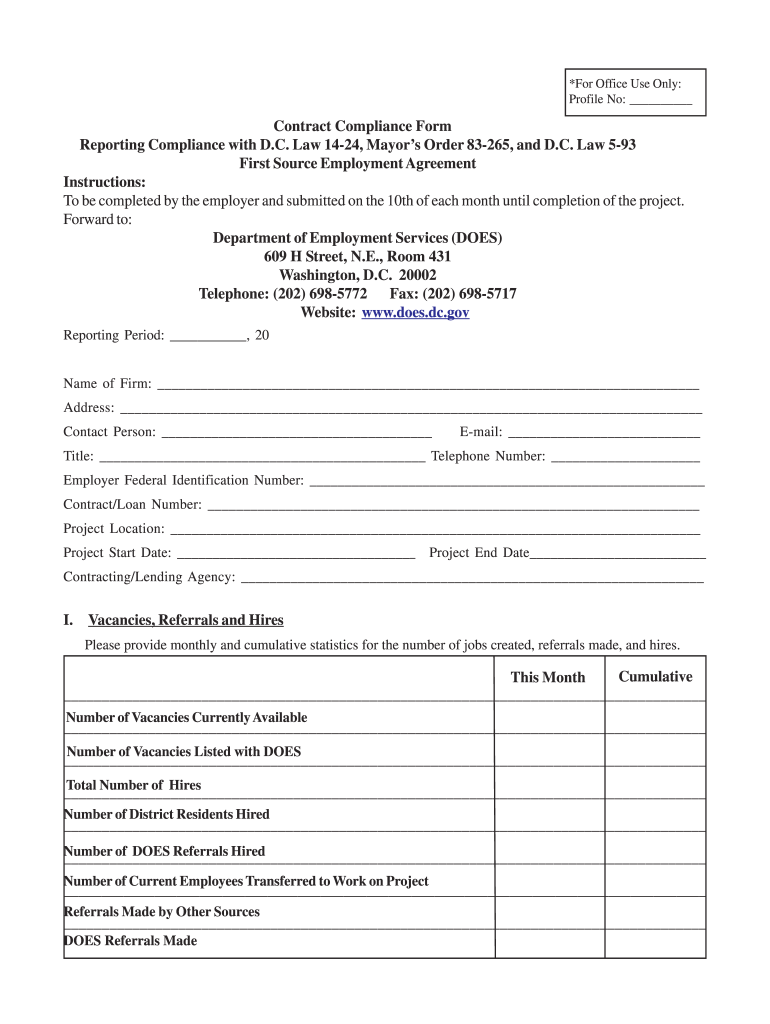
The Contract Compliance Form is an employment document used by employers in Washington D.C. to report compliance with local employment laws.
pdfFiller scores top ratings on review platforms




Who needs Compliance Form?
Explore how professionals across industries use pdfFiller.

Compliance Form is needed by:
-
Employers operating in Washington D.C.
-
Human resources professionals seeking compliance documentation.
-
Business owners under the first source agreement.
-
Contract managers requiring record-keeping for workforce changes.
-
Legal teams ensuring adherence to local regulations.
Comprehensive Guide to Compliance Form
What is the Contract Compliance Form?
The Contract Compliance Form serves as a critical tool for employers in Washington D.C. to demonstrate compliance with local employment laws, specifically under D.C. Law 14-24 and Mayor’s Order 83-265. This form ensures adherence to regulations while reporting on employment practices.
This compliance form is essential for documenting various aspects of workforce management, including details on vacancies, hires, and referrals. Employers must complete this form accurately, providing specific information as required by local laws.
Purpose and Benefits of the Contract Compliance Form
The primary purpose of the Contract Compliance Form is to fulfill legal obligations inherent in employment regulations in Washington D.C. By utilizing this form, employers enhance transparency in their employment practices, which can help build trust with employees and authorities.
Employers gain numerous benefits from maintaining compliance through this form. Notably, it aids in tracking workforce metrics, including employee hires and referral sources, which can optimize workforce management strategies.
Who Needs the Contract Compliance Form?
The Contract Compliance Form is mandatory for all employers operating in Washington D.C. Industries significantly affected include government contractors and businesses receiving specific city contracts. Understanding eligibility criteria is crucial for compliance.
Employers must ensure that the form is signed appropriately, with designated individuals within the organization responsible for completing and reviewing the form's content. Fulfilling compliance responsibilities is key to avoiding potential legal repercussions.
How to Fill Out the Contract Compliance Form Online (Step-by-Step)
Filling out the Contract Compliance Form online requires careful attention to detail. Here are steps to complete the form accurately:
-
Access the form through the designated platform, such as pdfFiller.
-
Proceed to fill in required fields, ensuring all information is accurate.
-
Utilize checkboxes where required and validate entries as per instructions.
-
Review all sections for completeness before submitting the form.
-
Utilize the fillable features provided by pdfFiller for ease of use.
Common Errors and How to Avoid Them
While completing the Contract Compliance Form, users may encounter common errors that can lead to submissions being returned. Recognizing these errors is vital for successful completion:
-
Missing required information can lead to processing delays.
-
Incorrect formatting of dates and other fields can cause rejections.
-
Neglecting to review the validation checklist may result in overlooked issues.
To avoid these pitfalls, implementing a review strategy before submission can be beneficial. Consistently checking entries against a validation checklist ensures the form is complete and accurate.
Submission Methods and What Happens After You Submit
Submitting the Contract Compliance Form to the Department of Employment Services (DOES) can be done through various methods. Employers should follow the outlined procedures for electronic submission to ensure timely processing. Confirmation and tracking options may also be available following submission.
Post-submission, employers may encounter several potential outcomes. Timelines for approvals or rejections can vary, making it essential to keep communication lines open with the DOES for follow-up.
Security and Compliance for the Contract Compliance Form
Security is a top priority when filling out the Contract Compliance Form. Using platforms like pdfFiller ensures data protection through robust security features. These include HIPAA and GDPR compliance, providing peace of mind for employers handling sensitive information.
Employers are encouraged to adopt secure eSigning processes to safeguard both employer and employee data. Understanding how information is protected reinforces the importance of compliance practices.
How to Download, Save, and Print the Contract Compliance Form PDF
Managing the Contract Compliance Form digitally involves several steps. Employers may follow these instructions to ensure proper handling:
-
Download the form in your preferred file format from the platform.
-
Save the file in a designated location for easy access.
-
Print the form correctly, ensuring all details are legible.
Maintaining copies for record-keeping is crucial for compliance and future reference.
Sample or Example of a Completed Contract Compliance Form
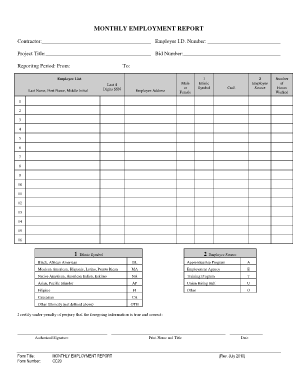
Studying a sample of a completed Contract Compliance Form can provide valuable insights. A visual example typically includes annotations explaining the purpose of each field.
Reviewing this kind of sample helps users understand the kind of information required and supports accurate completion for their own submissions.
Maximize Your Form Filing Experience with pdfFiller
Employers looking to simplify their documentation processes can benefit from utilizing pdfFiller. The platform allows for seamless editing and completion of the Contract Compliance Form. With features like cloud storage and eSigning, users can enjoy convenient access to their documents.
Creating an account with pdfFiller enhances security and streamlines the documentation process, offering a user-friendly experience for employers focused on compliance.
How to fill out the Compliance Form
-
1.Access the Contract Compliance Form on pdfFiller by searching for it in the template library or uploading your own document if necessary.
-
2.Open the form within the pdfFiller interface, utilizing the fillable fields to easily navigate the required sections.
-
3.Gather necessary information such as your firm’s name, address, and specific details regarding vacancies, hires, referrals, and workforce changes.
-
4.Carefully fill in each blank field accurately, using the instructions provided in the document to ensure compliance with D.C. laws.
-
5.Once all fields are completed, thoroughly review your entries for accuracy and completeness, ensuring all required information is included.
-
6.To finalize the document, check for the signature line, and electronically add your signature if required by the form.
-
7.Save your progress within pdfFiller, and choose the option to download, email, or submit the form directly to the Department of Employment Services as needed.

Who is required to complete the Contract Compliance Form?
Employers in Washington D.C. who are subject to local employment laws, including those under the first source agreement, must complete this form to demonstrate compliance.
What is the deadline for submitting the Contract Compliance Form?
The form must be submitted monthly to the Department of Employment Services. It is essential to adhere to submission deadlines to avoid penalties.
How should the Contract Compliance Form be submitted?
The completed form can be submitted electronically through pdfFiller or directly to the appropriate agency as required. Make sure to follow submission guidelines carefully.
What supporting documents are required when submitting this form?
While the Contract Compliance Form itself is the primary document needed, it's advisable to retain any records related to hires, referrals, and other compliance support for reference.
What are common mistakes to avoid when filling out this form?
Common mistakes included missing required fields, inaccurate information, and failing to sign the form. Review all entries carefully before submission.
How long does it take to process the submitted form?
Processing times can vary based on agency workload, but typically, you can expect a response or confirmation from the Department of Employment Services within a few weeks.
Is notarization required for the Contract Compliance Form?
No, notarization is not required for the Contract Compliance Form. However, it must be signed by the employer to be valid.
Related Content
Related Forms


Related Catalogs
Get the latest insights from our blog


If you believe that this page should be taken down, please follow our DMCA take down process
here
.
This form may include fields for payment information. Data entered in these fields is not covered by PCI DSS compliance.