
Last updated on
Oct 19, 2026

Get the free Spelling Test Form
We are not affiliated with any brand or entity on this form

Fill out
Complete the form online in a simple drag-and-drop editor.

eSign
Add your legally binding signature or send the form for signing.

Share
Share the form via a link, letting anyone fill it out from any device.

Export
Download, print, email, or move the form to your cloud storage.
Why pdfFiller is the best tool for your documents and forms


End-to-end document management
From editing and signing to collaboration and tracking, pdfFiller has everything you need to get your documents done quickly and efficiently.
Accessible from anywhere
pdfFiller is fully cloud-based. This means you can edit, sign, and share documents from anywhere using your computer, smartphone, or tablet.
Secure and compliant
pdfFiller lets you securely manage documents following global laws like ESIGN, CCPA, and GDPR. It's also HIPAA and SOC 2 compliant.
What is Spelling Test
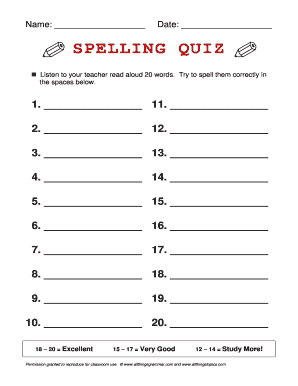
The Spelling Test Form is an educational document used by educators and students to record names and test dates for spelling assessments.
pdfFiller scores top ratings on review platforms




Who needs Spelling Test?
Explore how professionals across industries use pdfFiller.

Spelling Test is needed by:
-
Teachers organizing spelling tests
-
Students participating in spelling assessments
-
Parents assisting students with tests
-
School administrators managing testing procedures
-
Educational institutions requiring assessment documentation
Comprehensive Guide to Spelling Test
What is the Spelling Test Form?
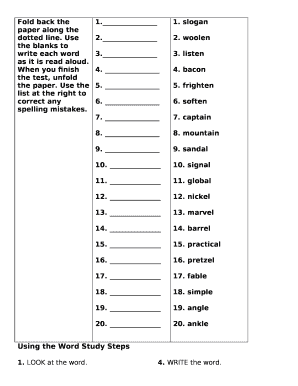
The Spelling Test Form serves as a crucial educational tool, designed to facilitate student assessments effectively. This form not only captures essential details such as names and dates but also identifies the type of spelling test—whether it is a pre-test or a real test. Its role in education is underscored by its ability to help educators track student progress in spelling, making it integral to academic development.
Key sections included in the form are name, date, and test type. Each section aims to provide clarity and organization, ensuring that both teachers and students can use the form efficiently. Utilizing the spelling test form contributes significantly to structured learning and assessment within classrooms.
Purpose and Benefits of the Spelling Test Form
For educators and students alike, the Spelling Test Form offers several advantages for academic assessments. This form acts as a reliable method of tracking spelling test progress over time, providing a clear overview of student achievements and areas needing improvement.
It is utilized in both pre-tests and real tests to foster continuous learning. This dual applicability not only aids in preparing students but also allows teachers to assess readiness and understanding effectively. Implementing this form in various assessment scenarios contributes to a well-rounded educational experience.
Key Features of the Spelling Test Form
The Spelling Test Form is designed with user-friendly features that enhance its effectiveness. Blank fields are provided for names and dates, ensuring easy customization for each assessment session. Additionally, users are instructed to circle the type of test, which further clarifies the form’s purpose.
-
Fillable fields for easy input
-
PDF format compatible with pdfFiller for easy editing
-
Options for printing and digital use
These features make the form not only practical but also adaptable to various educational environments.
Who Needs the Spelling Test Form?
The primary users of the Spelling Test Form include educators, school administrators, and students. Each of these groups benefits significantly, especially in contexts such as classroom assessments and tutoring sessions where structured testing is essential.
By incorporating this form, teachers can streamline assessment processes, while students gain a clearer understanding of their spelling capabilities. This targeted usage facilitates better educational outcomes and enhances overall learning experiences.
How to Fill Out the Spelling Test Form Online
Filling out the Spelling Test Form online using pdfFiller offers a straightforward and efficient process. Begin by accessing the form through the pdfFiller platform, which allows for easy digital editing.
-
Enter your name in the designated field.
-
Input the date clearly in the respective area.
-
Circle the appropriate test type (Pre-Test or Real Test).
-
Review all entries for accuracy.
-
Save and share the completed form as needed.
This ease of use underscores the benefits of digital tools in education, particularly the convenience of saving and sharing completed forms.
Common Errors and How to Avoid Them
While completing the Spelling Test Form, users may encounter typical mistakes. Common errors include missing dates or incorrectly indicating the type of test being administered. To ensure accuracy, it’s imperative to double-check all information before submission.
-
Verify that all fields are filled out completely.
-
Confirm the test type is circled correctly.
Taking these precautions can help avoid issues and ensure the form serves its intended purpose effectively.
Submitting the Spelling Test Form: Methods and Best Practices
When it comes to submitting the Spelling Test Form, users have several options available. You can choose between online submissions through pdfFiller or printing the form for physical submission. Each method requires attention to detail to ensure the form is correctly processed.
-
Utilize online platforms for quicker submission and confirmation of receipt.
-
For printed submissions, ensure the form is neatly filled out and handed to the appropriate person.
Expect processing times to vary depending on the submission method chosen, so plan accordingly to avoid last-minute issues.
Security and Compliance with the Spelling Test Form
Handling the Spelling Test Form securely is essential to maintain the privacy of students' information. pdfFiller is committed to protecting user data through robust security measures. This includes 256-bit encryption, ensuring that all documents are kept confidential.
Additionally, pdfFiller adheres to HIPAA and GDPR compliance, further safeguarding user information. Users can protect their data while filling out the form by following best practices for secure document handling.
Utilizing pdfFiller for the Spelling Test Form
User experience is greatly enhanced when leveraging pdfFiller for the Spelling Test Form. The platform provides features that simplify the form-filling process, such as e-signature options, easy conversion between formats, and comprehensive document management.
The cloud-based nature of pdfFiller means that users can access their forms from any browser, making it convenient for educators and students alike. This adaptability is particularly beneficial in diverse educational settings.
Examples of a Completed Spelling Test Form
To aid users further, examples of a completed Spelling Test Form can provide valuable guidance on proper usage. A filled-out form layout demonstrates how to complete each section, offering clarity on essential details.
-
Example layout includes filled fields for name, date, and type of test.
-
Downloadable resource links for templates will enhance usability.
These resources enable users to visualize what a completed form looks like, ensuring they can fill it out correctly and efficiently.
How to fill out the Spelling Test
-
1.To access the Spelling Test Form on pdfFiller, visit the pdfFiller website and use the search bar to locate the form by typing 'Spelling Test Form'.
-
2.Once you find the form, click on it to open it in the editing interface.
-
3.Before you begin filling out the form, gather necessary information such as student names, test dates, and the type of test you are administering.
-
4.Start by clicking into the 'Name' field to enter the names of the students taking the test.
-
5.Next, click on the 'Date' field to input the date of the test. Make sure to double-check for accuracy.
-
6.Then, locate the section labeled 'Circle Type of Test'. Click on the circle beside either 'Pre-Test' or 'Real Test' to designate the type of test being administered.
-
7.Continue reviewing all fields to ensure that you have provided all necessary information and that there are no errors.
-
8.After filling out the entire form, take a moment to review each entry for completeness and accuracy.
-
9.Once you are satisfied with the information entered, look for the options in the pdfFiller interface to save your document.
-
10.You can choose to download the completed form as a PDF or submit it electronically via email as per your needs.

Who can use the Spelling Test Form?
The Spelling Test Form can be used by teachers, students, and parents involved in spelling assessments. It is designed for educational purposes and is applicable in school settings.
What information do I need to complete the form?
You will need the students' names, the date of the test, and to determine whether it is a pre-test or a real test. Gather this information before filling out the form to facilitate a smooth process.
How do I submit the completed form?
Once you have completed the Spelling Test Form on pdfFiller, you can submit it by downloading it as a PDF or sending it directly via email using the available submission features in the platform.
Are there any common mistakes to avoid when filling out the form?
Yes, common mistakes include omitting student names or dates, choosing the incorrect test type, and not reviewing the form for accuracy before submission. Ensure all fields are correctly filled in.
How long does it take to process the form?
Since the Spelling Test Form is typically completed and submitted in a single session, processing time is minimal. Ensure it is filled out and submitted accurately during the testing period.
Can I edit the form after I fill it out?
Yes, as long as you save the form while editing in pdfFiller, you can go back to make changes before finalizing and submitting it. Be sure to save your progress regularly.
Related Forms





Get the latest insights from our blog



If you believe that this page should be taken down, please follow our DMCA take down process
here
.
This form may include fields for payment information. Data entered in these fields is not covered by PCI DSS compliance.