
Last updated on
Nov 9, 2026
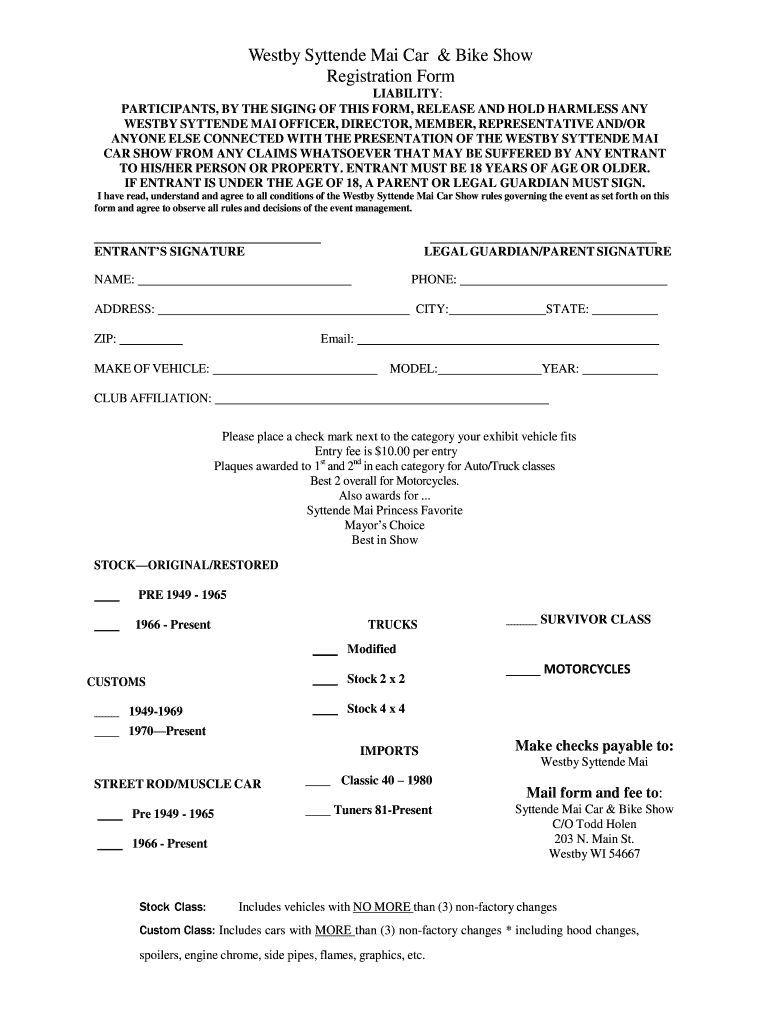
WI Westby Syttende Mai Car & Bike Show Registration Form 2016 free printable template
pdfFiller is not affiliated with any government organization

Fill out
Complete the form online in a simple drag-and-drop editor.

eSign
Add your legally binding signature or send the form for signing.

Share
Share the form via a link, letting anyone fill it out from any device.

Export
Download, print, email, or move the form to your cloud storage.
Why pdfFiller is the best tool for your documents and forms


End-to-end document management
From editing and signing to collaboration and tracking, pdfFiller has everything you need to get your documents done quickly and efficiently.
Accessible from anywhere
pdfFiller is fully cloud-based. This means you can edit, sign, and share documents from anywhere using your computer, smartphone, or tablet.
Secure and compliant
pdfFiller lets you securely manage documents following global laws like ESIGN, CCPA, and GDPR. It's also HIPAA and SOC 2 compliant.
What is WI Westby Syttende Mai Car & Bike Show Registration Form
The Westby Syttende Mai Car & Bike Show Registration Form is a business document used by participants to register their vehicles for the event.
pdfFiller scores top ratings on review platforms




Who needs WI Westby Syttende Mai Car & Bike Show Registration Form?
Explore how professionals across industries use pdfFiller.

WI Westby Syttende Mai Car & Bike Show Registration Form is needed by:
-
Car enthusiasts looking to showcase their vehicles
-
Parents or legal guardians registering for underage entrants
-
Event organizers needing participant information
-
Local businesses sponsoring the event
-
Community members participating in local festivities
Comprehensive Guide to WI Westby Syttende Mai Car & Bike Show Registration Form
What is the Westby Syttende Mai Car & Bike Show Registration Form?
The Westby Syttende Mai Car & Bike Show Registration Form serves a crucial role in the registration process for this vibrant event in Wisconsin. This form is essential for participants to officially formalize their entry into the car and bike show. By completing the form, entrants embrace the cultural significance of this cherished event while ensuring they meet all requirements for participation.
Purpose and Benefits of the Westby Syttende Mai Car & Bike Show Registration Form
The registration form is necessary for various reasons that also offer significant advantages to the participants. First, it ensures accurate registration details, reducing the likelihood of errors that could impede participation. Additionally, entering this event provides an opportunity to win prizes across multiple vehicle categories, which enhances the competitive spirit. Participants should also be aware of the entry fee requirements, as these funds are instrumental in supporting the event's activities.
Key Features of the Westby Syttende Mai Car & Bike Show Registration Form
The form is designed with essential components that facilitate ease of use. Key fields include the Entrant's Signature, Vehicle Make and Model, and contact details such as name, phone, and email. Furthermore, checkboxes enable entrants to select vehicle categories and confirm their eligibility. Detailed payment instructions are also provided, indicating an entry fee of $10.00 per vehicle.
Who Needs the Westby Syttende Mai Car & Bike Show Registration Form?
This registration form targets a diverse audience, encompassing various categories of vehicle entrants. Participants must be at least 18 years old or have a parent or legal guardian sign on their behalf if they are underage. Individuals motivated to partake in the show often share a passion for automobiles or motorcycles, seeking to celebrate this shared interest.
How to Fill Out the Westby Syttende Mai Car & Bike Show Registration Form Online (Step-by-Step)
Completing the registration form online can be straightforward by following these step-by-step instructions:
-
Begin by filling in your personal information, including name, phone, and email.
-
Provide details of the vehicle, including make, model, and year.
-
Select the appropriate vehicle category using the provided checkboxes.
-
Review all entered information for accuracy to avoid common errors.
-
Submit the form and ensure you follow up with the required fee.
Always double-check your information before submission to ensure seamless processing.
Submission Methods and Fees for the Westby Syttende Mai Car & Bike Show Registration Form
Participants must submit the completed registration form along with the entry fee through various methods. Here are some important notes regarding submission:
-
You can mail the filled-out form and payment to the specified address.
-
Be aware of the registration deadlines to ensure timely participation.
-
The acceptable payment methods include checks or money orders that accompany your registration.
What Happens After You Submit the Westby Syttende Mai Car & Bike Show Registration Form
After submitting the registration form, participants can expect a timeline for acknowledgement of their registration. It's essential to understand how to track submission status and where to receive notifications about processing. If any changes are necessary after submission, entrants should know the steps to amend their registration efficiently.
Security and Compliance for the Westby Syttende Mai Car & Bike Show Registration Form
Concerns regarding data protection and security are paramount. pdfFiller employs advanced security measures, ensuring that all submitted information remains safe. The platform adheres to compliance standards, offering users peace of mind about the handling of their personal information. Entrants are encouraged to follow best practices for maintaining the security of their personal details when filling out the form.
Explore How pdfFiller Can Help with the Westby Syttende Mai Car & Bike Show Registration Form
Utilizing pdfFiller can significantly enhance the form-filling experience. The tool provides capabilities for editing and eSigning PDFs, ensuring a convenient process for users. Additionally, pdfFiller's cloud-based management allows for seamless form access and organization. User testimonials underscore the reliability and effectiveness of using pdfFiller for completing the registration process.
Sample of a Completed Westby Syttende Mai Car & Bike Show Registration Form
To assist with the form completion, a sample of a fully completed form is available for reference. This sample highlights key sections such as personal information, vehicle details, and category selection, demonstrating the correct way to fill out each part. Visual aids, if available, can enhance understanding and serve as a practical guide.
How to fill out the WI Westby Syttende Mai Car & Bike Show Registration Form
-
1.To access the Westby Syttende Mai Car & Bike Show Registration Form, visit pdfFiller's website and log in or create an account. Utilize the search function to locate the form quickly.
-
2.Once the form is open, you will see multiple fillable fields. Begin with the 'Entrant’s Signature' field. Click on it to type your name or use pdfFiller's signature feature.
-
3.Have all necessary information ready before filling out the form. This includes personal details like your name, phone number, and address, as well as vehicle information including make, model, year, and category selection.
-
4.As you fill out each section, ensure that you enter accurate information. Use the checkboxes to select vehicle categories, and double-check your entries for typos.
-
5.After completing the form, take a moment to review all the information you've entered. Ensure every field is filled accurately according to event guidelines.
-
6.To save your progress, click on the 'Save' button. You can also download the completed form to your device in the preferred format or keep it saved in your pdfFiller account for later access.
-
7.Finally, follow the instructions provided in the form to mail it with the entry fee of $10.00 to the specified address. Make sure to send it well before the event deadline to secure your place.

What are the eligibility requirements for registering?
Entrants must be 18 years or older to register independently. If the entrant is under 18, a parent or legal guardian must sign the form to provide consent.
What is the deadline for submitting my registration form?
While the specific deadline for submissions isn't mentioned, it's advised to register as early as possible to ensure entry. Check the event's official website for any posted deadlines.
How do I submit the form and payment?
Once you have filled out the form completely, print it and mail it along with the $10.00 entry fee to the specified address indicated on the form.
What details must be included when filling out the form?
You need to provide personal information such as your name, phone number, address, and details about your vehicle including the make, model, year, and category selection.
Are there common mistakes to avoid while completing this form?
Ensure all fields are filled out completely and accurately. Double-check for spelling errors in contact information and vehicle details to prevent registration issues.
What kind of prizes can participants expect?
Participants have the chance to win awards such as plaques and prizes in various vehicle categories, making it a competitive and enjoyable event.
Can I update my registration once I have submitted it?
If you need to make changes after submission, contact the event organizers directly to inquire about the possibility of updating your registration.
WI Westby Syttende Mai Car & Bike Show Registration Form Form Versions
Related Forms



Get the latest insights from our blog



If you believe that this page should be taken down, please follow our DMCA take down process
here
.
This form may include fields for payment information. Data entered in these fields is not covered by PCI DSS compliance.