
Last updated on
Oct 19, 2026

Get the free Architect Engineer Qualifications Form
We are not affiliated with any brand or entity on this form

Fill out
Complete the form online in a simple drag-and-drop editor.

eSign
Add your legally binding signature or send the form for signing.

Share
Share the form via a link, letting anyone fill it out from any device.

Export
Download, print, email, or move the form to your cloud storage.
Why pdfFiller is the best tool for your documents and forms


End-to-end document management
From editing and signing to collaboration and tracking, pdfFiller has everything you need to get your documents done quickly and efficiently.
Accessible from anywhere
pdfFiller is fully cloud-based. This means you can edit, sign, and share documents from anywhere using your computer, smartphone, or tablet.
Secure and compliant
pdfFiller lets you securely manage documents following global laws like ESIGN, CCPA, and GDPR. It's also HIPAA and SOC 2 compliant.
What is SF 330
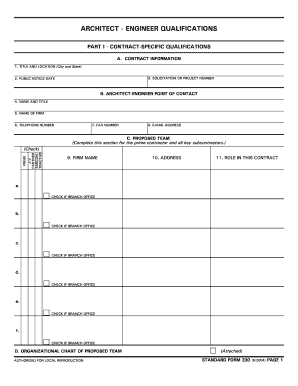
The Architect Engineer Qualifications Form is a business document used by architects and engineers to provide contract-specific qualifications for federal contracts.
pdfFiller scores top ratings on review platforms




Who needs SF 330?
Explore how professionals across industries use pdfFiller.

SF 330 is needed by:
-
Architects applying for government contracts
-
Engineers submitting proposals for federal projects
-
Contract managers reviewing qualifications
-
Business owners seeking federal affiliations
-
Project managers requiring team details
-
Personnel involved in construction project submissions
Comprehensive Guide to SF 330
What is the Architect Engineer Qualifications Form?
The Architect Engineer Qualifications Form is a vital document utilized to provide contract-specific qualifications essential for architects and engineers. This form serves as a standardized method for collecting comprehensive information needed for federal contracts.
-
It plays a crucial role in presenting qualifications relevant to specific projects.
-
Revised in 2013, the form is predominantly used across the United States.
-
The information gathered includes firm details, personnel qualifications, and experiences with past projects.
Purpose and Benefits of the Architect Engineer Qualifications Form
This form is critical for professionals, as it significantly impacts their ability to secure contracts. It streamlines the qualification assessment process for government entities and helps establish clear standards for evaluating potential vendors.
-
Helps architects and engineers present their qualifications effectively.
-
Assists government bodies in evaluating the capabilities of potential suppliers.
-
Facilitates a smoother proposal process by ensuring all necessary information is available upfront.
Key Features of the Architect Engineer Qualifications Form
The form is designed to be user-friendly and comprehensive, featuring several fillable sections that guide users through the process. It includes essential fields that gather pertinent details needed for a thorough proposal.
-
Sections cover contract information, team details, and individual resumes.
-
Checkboxes enhance usability, enabling online completion without unnecessary complications.
-
Gathers detailed information necessary for competitive proposals.
Who Needs the Architect Engineer Qualifications Form?
This form is targeted at various professionals and organizations engaged in architecture and engineering, especially those seeking federal contracts. Its importance is considerable for entities involved in government projects.
-
Architects and engineers aspiring to procure federal contracts.
-
Businesses aiming to submit proposals for government projects.
-
Subcontractors and branches involved in providing engineering services.
How to Fill Out the Architect Engineer Qualifications Form Online (Step-by-Step)
Completing the Architect Engineer Qualifications Form online is straightforward. Follow these step-by-step instructions to ensure accuracy and completeness as you fill out each section.
-
Start with the 'TITLE AND LOCATION' section to provide essential project information.
-
Proceed to fill out your information: 'NAME AND TITLE' and 'FIRM NAME'.
-
Complete the 'ADDRESS' section with your firm's contact details.
-
Detail your 'ROLE IN THIS CONTRACT' to specify your involvement.
-
Gather and input all required project experiences and educational qualifications.
Common Errors and How to Avoid Them When Submitting the Form
Navigating the submission process can sometimes lead to pitfalls. Recognizing common mistakes can help ensure your form is submitted correctly and efficiently.
-
Ensure all sections are filled out completely and accurately.
-
Cross-verify the roles assigned to each team member to avoid errors.
-
Check that all relevant documents accompany your submission.
How to Submit the Architect Engineer Qualifications Form
Submitting the Architect Engineer Qualifications Form requires understanding the different methods available. Be aware of the necessary components to include with your submission and any deadlines.
-
Submissions can be completed online or via traditional mail.
-
Included with the form should be supporting documents and any required fees.
-
Pay close attention to submission deadlines to avoid disqualification.
Security and Compliance When Filling the Architect Engineer Qualifications Form
Given the sensitive nature of the information collected, it is crucial to prioritize security and compliance when managing this form.
-
Utilize platforms like pdfFiller that offer robust security features, including encryption.
-
Understand compliance guidelines related to privacy in the context of federal contracts.
-
Always use secure methods when completing and submitting the Architect Engineer Qualifications Form.
Experience Seamless Document Management with pdfFiller
pdfFiller simplifies the process of managing documents like the Architect Engineer Qualifications Form. It provides a wealth of features designed to enhance user experience.
-
Edit text and images directly within your PDF documents.
-
Create fillable forms and facilitate eSigning from any device.
-
Enjoy user-friendly access without the need for downloads, making the process stress-free.
How to fill out the SF 330
-
1.Access the Architect Engineer Qualifications Form on pdfFiller by searching for the form name in the search bar.
-
2.Once located, click on the form to open it in pdfFiller’s editing interface.
-
3.Begin by reviewing the empty fields where you will enter your organization’s details and qualifications.
-
4.Gather necessary information such as firm names, addresses, roles, experience, education, and projects before you start filling out the form.
-
5.Fill in the 'TITLE AND LOCATION' section, followed by 'NAME AND TITLE', 'FIRM NAME', and 'ADDRESS'.
-
6.Indicate your 'ROLE IN THIS CONTRACT' accurately and check the box if your firm is a branch office.
-
7.After completing all relevant sections, review the entire form for accuracy and ensure all necessary fields have been filled.
-
8.Use the preview feature to finalize your document and confirm that it meets your requirements.
-
9.When satisfied with your form, you can save it to your account for future reference or download it for immediate submission.
-
10.For submission, upload your completed form according to the guidelines provided by the contracting agency, ensuring all required documents are attached.

Who needs to fill out the Architect Engineer Qualifications Form?
The form is essential for architects and engineers seeking government contracts, as well as contract managers and business owners involved in federal project submissions.
What information is required to complete the form?
You will need to provide details such as your firm name, addresses, roles, relevant experience, education, and details about key personnel and proposed teams.
How do I submit the Architect Engineer Qualifications Form?
Submit the completed form by following the specific submission guidelines provided by the contracting agency, and ensure you include all required supporting documents.
What are common mistakes to avoid when filling out this form?
Ensure all sections are completed accurately, especially contact details and role descriptions. Double-check for missing signatures or required attachments before submission.
Are there any deadlines for submitting the Architect Engineer Qualifications Form?
Deadlines vary by project, so it is important to check the specific submission timeline set by the contracting agency associated with your project.
Is notarization required for this form?
No, notarization is not required for the Architect Engineer Qualifications Form; however, be sure to check any additional document requirements for your submission.
How can I access the Architect Engineer Qualifications Form?
You can easily access the form through pdfFiller by searching for its name in the search bar, or browse the business forms section to find it.
Related Forms




Get the latest insights from our blog


If you believe that this page should be taken down, please follow our DMCA take down process
here
.
This form may include fields for payment information. Data entered in these fields is not covered by PCI DSS compliance.