
Last updated on
Oct 19, 2026

Get the free Patient Intake Form
We are not affiliated with any brand or entity on this form

Fill out
Complete the form online in a simple drag-and-drop editor.

eSign
Add your legally binding signature or send the form for signing.

Share
Share the form via a link, letting anyone fill it out from any device.

Export
Download, print, email, or move the form to your cloud storage.
Why pdfFiller is the best tool for your documents and forms


End-to-end document management
From editing and signing to collaboration and tracking, pdfFiller has everything you need to get your documents done quickly and efficiently.
Accessible from anywhere
pdfFiller is fully cloud-based. This means you can edit, sign, and share documents from anywhere using your computer, smartphone, or tablet.
Secure and compliant
pdfFiller lets you securely manage documents following global laws like ESIGN, CCPA, and GDPR. It's also HIPAA and SOC 2 compliant.
What is Chiropractic Intake Form
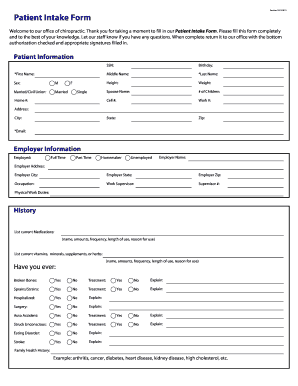
The Patient Intake Form is a healthcare document used by new patients to provide essential information for treatment and insurance purposes.
pdfFiller scores top ratings on review platforms




Who needs Chiropractic Intake Form?
Explore how professionals across industries use pdfFiller.

Chiropractic Intake Form is needed by:
-
New patients seeking chiropractic care
-
Parents or guardians filling out forms for minors
-
Healthcare providers requiring patient records
-
Insurance companies needing patient consent
-
Clinic administrative staff managing patient registrations
Comprehensive Guide to Chiropractic Intake Form
What is the Patient Intake Form?
The Patient Intake Form is a crucial document used by healthcare providers to gather essential personal and medical information from new patients. This form plays a significant role in collecting data that helps ensure proper treatment and care. It typically includes required information such as personal details, medical history, emergency contacts, and consent for treatment. By collecting this medical information, healthcare providers can offer tailored care and improve patient outcomes.
In addition to personal data, the form is designed to ensure patients provide informed consent, which is vital for effective healthcare delivery. The requirements of the form emphasize the importance of understanding patient rights and responsibilities during the treatment process.
Purpose and Benefits of the Patient Intake Form
The Patient Intake Form serves various purposes that benefit both patients and healthcare providers. First, it ensures comprehensive records of patient information, aiding healthcare professionals in making informed decisions regarding diagnosis and treatment. Informed consent obtained through this form helps patients understand the procedures and treatments they may undergo.
Moreover, by streamlining the new patient registration process, the form reduces wait times and administrative burdens during appointments. Additionally, it facilitates insurance claims and verification processes, helping both patients and providers navigate the complexities of healthcare billing efficiently.
Key Features of the Patient Intake Form
This form encompasses several specific components that are essential for a complete patient profile. Key sections typically found in the Patient Intake Form include personal information, medical history, and consent. Each section may contain fillable fields, checkboxes, and instructional text that guide patients in providing accurate information.
Importantly, the consent and authorization sections play a critical role in ensuring that patients approve treatments and the sharing of their information with insurers. This structure not only makes it user-friendly but also ensures that healthcare providers gather all necessary insights to deliver quality care.
Who Needs the Patient Intake Form?
The Patient Intake Form is intended for various users within the healthcare system. Primarily, it is designed for patients and, in certain cases, parents or guardians of minor patients. New patients are required to complete the form before their initial visit, while returning patients may need to update their information periodically.
This form is utilized across a wide range of healthcare settings but is especially common in chiropractic clinics, where it is integral to gathering essential patient information that informs treatment protocols. Understanding who needs to fill out the form is vital for maintaining accurate patient records.
How to Fill Out the Patient Intake Form Online (Step-by-Step)
Filling out the Patient Intake Form online can be a straightforward process if followed correctly. Start by gathering all necessary information such as personal details, medical history, and insurance information.
-
Open the Patient Intake Form on pdfFiller.
-
Fill in personal information, including name and contact details.
-
Complete the medical history section by providing relevant health information.
-
Review the consent and authorization sections, ensuring your understanding.
-
Save your progress and review the information entered before submission.
Taking the time to gather necessary information before starting the form can significantly enhance the accuracy and efficiency of the completion process.
Digital Signature vs. Wet Signature Requirements
Understanding the signing requirements for the Patient Intake Form is essential for compliance and legality. The eSigning process using pdfFiller allows patients to sign the form electronically, providing a quick and efficient way to complete the documentation.
While digital signatures are generally accepted, there may be instances where a wet signature is required, especially for certain treatments or insurance claims. Knowing when to obtain a wet signature is vital to prevent delays in processing for treatment or claims.
Submission Methods and Delivery of the Patient Intake Form
Once the Patient Intake Form is completed, there are several submission methods available. Patients can choose to submit their documents online through pdfFiller, print and mail the form, or deliver it in person at their healthcare provider's office. Each method may come with specific deadlines or potential fees, so being aware of these factors is crucial.
After submission, patients will typically receive confirmation that their form has been processed. Understanding this process helps manage expectations regarding healthcare delivery and record accuracy.
How pdfFiller Enhances Your Experience with the Patient Intake Form
pdfFiller offers powerful capabilities for users filling out the Patient Intake Form. With tools for editing, filling, and eSigning, pdfFiller streamlines the entire process, making it user-friendly and efficient.
Security is also a priority, with pdfFiller ensuring documents are protected through 256-bit encryption and compliance with HIPAA regulations. User testimonials highlight the platform's ease of use and the efficiency it brings to managing healthcare forms.
Common Mistakes to Avoid When Completing the Patient Intake Form
To avoid complications, patients should be mindful of common mistakes when filling out the Patient Intake Form. Frequent errors include omitting essential personal or medical information and failing to sign the necessary sections. These oversights can lead to delays or complications in treatment.
Reviewing the form for accuracy before submission is crucial. Taking the time to double-check can prevent potential consequences stemming from incorrectly filled forms, ensuring smoother healthcare experiences.
Maximize Your Patient Experience with Efficient Form Usage
Utilizing pdfFiller for completing the Patient Intake Form enhances the overall patient experience, enabling efficient management and filing of the required documentation. By leveraging the platform's features, patients can easily track their form submissions and ensure everything is in order.
Exploring additional capabilities of pdfFiller can support various document needs beyond just healthcare forms, providing a comprehensive solution for efficient form management.
How to fill out the Chiropractic Intake Form
-
1.To start, access pdfFiller and search for the Patient Intake Form using the search bar.
-
2.Open the form by clicking on the document title.
-
3.Before you begin filling it out, gather necessary information such as personal details, medical history, and insurance information.
-
4.Navigate through the form by clicking on the fillable fields. You can type directly into the fields or check boxes as needed.
-
5.Ensure to fill in all required fields, including your name, contact information, and emergency contacts.
-
6.Review the medical history section carefully, providing accurate and complete information about past treatments, medications, and allergies.
-
7.Once all sections are completed, take a moment to review the document for accuracy, ensuring your information is correct.
-
8.When satisfied with your entries, you can save the form directly to your pdfFiller account or download it as a PDF.
-
9.If you are ready to submit, use the submission options available on pdfFiller, ensuring you meet any deadlines set by your healthcare provider.

Who needs to complete the Patient Intake Form?
The Patient Intake Form must be completed by all new patients, including minors represented by their parents or guardians, before receiving treatment.
What information do I need to provide?
You will need to provide personal details, medical history, insurance information, and emergency contacts. Ensure you have all necessary documents at hand before starting.
How do I submit the Patient Intake Form?
After filling out the form on pdfFiller, you can submit it electronically through pdfFiller or print it to submit it in person at your healthcare provider’s office.
Are there any deadlines for submitting the form?
While specific deadlines can vary by practice, it's best to complete the intake form at least 24 hours before your scheduled appointment to ensure a smooth process.
What are common mistakes to avoid when filling out the form?
Common mistakes include omitting required fields, providing inaccurate information, and failing to sign the consent section. Carefully review before submission.
Can I save my form and complete it later?
Yes, pdfFiller allows you to save your progress. You can return to your Patient Intake Form at any time to complete and review it.
How long does it take to process the Patient Intake Form?
Processing time can vary, but typically, forms are processed quickly upon submission. Contact your healthcare provider if you have specific inquiries about the timeline.
Related Forms





Get the latest insights from our blog


If you believe that this page should be taken down, please follow our DMCA take down process
here
.
This form may include fields for payment information. Data entered in these fields is not covered by PCI DSS compliance.