
Last updated on
Nov 9, 2026
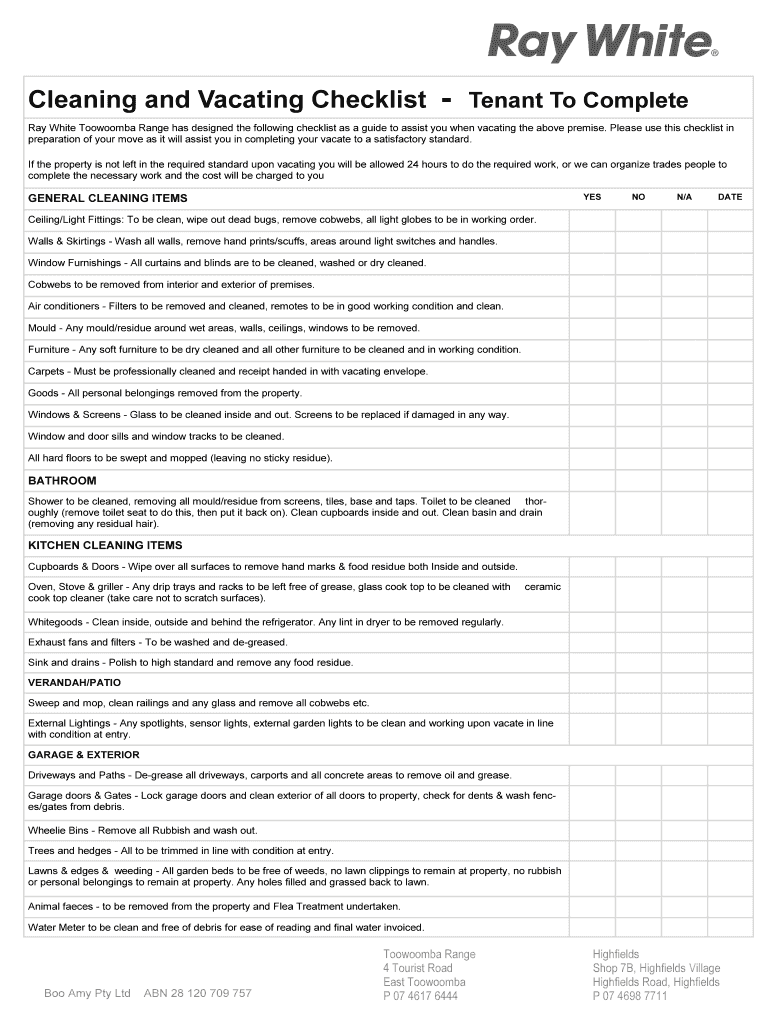
Ray White Cleaning and Vacating Checklist free printable template
We are not affiliated with any brand or entity on this form

Fill out
Complete the form online in a simple drag-and-drop editor.

eSign
Add your legally binding signature or send the form for signing.

Share
Share the form via a link, letting anyone fill it out from any device.

Export
Download, print, email, or move the form to your cloud storage.
Why pdfFiller is the best tool for your documents and forms


End-to-end document management
From editing and signing to collaboration and tracking, pdfFiller has everything you need to get your documents done quickly and efficiently.
Accessible from anywhere
pdfFiller is fully cloud-based. This means you can edit, sign, and share documents from anywhere using your computer, smartphone, or tablet.
Secure and compliant
pdfFiller lets you securely manage documents following global laws like ESIGN, CCPA, and GDPR. It's also HIPAA and SOC 2 compliant.
What is Ray White Cleaning and Vacating Checklist
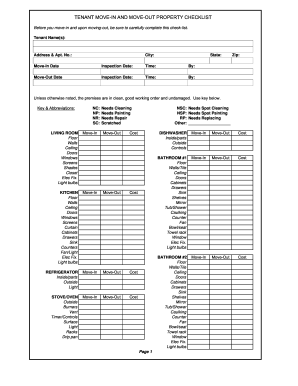
The Tenant Vacating Checklist is a move-in/move-out document used by tenants to ensure satisfactory property condition upon vacating in Queensland.
pdfFiller scores top ratings on review platforms




Who needs Ray White Cleaning and Vacating Checklist?
Explore how professionals across industries use pdfFiller.

Ray White Cleaning and Vacating Checklist is needed by:
-
Tenants preparing to move out of rental properties
-
Property managers overseeing tenant transitions
-
Landlords conducting final property inspections
-
Real estate agencies handling rental agreements
-
Cleaning services providing move-out assistance
Comprehensive Guide to Ray White Cleaning and Vacating Checklist
What is the Tenant Vacating Checklist?
The Tenant Vacating Checklist is a crucial tool for tenants in Queensland, ensuring a structured approach to moving out. This checklist serves to outline the necessary steps that need to be taken before vacating a rental property, helping to facilitate a smooth transition. Typical items included are cleaning tasks, the removal of personal belongings, and other obligations that need to be fulfilled to avoid disputes with landlords.
Utilizing the tenant vacating checklist is vital for ensuring compliance with rental obligations and aids in the overall moving process by providing clear guidance for tenants.
Benefits of Using the Tenant Vacating Checklist
Employing the tenant vacating checklist can significantly ease the moving-out process while minimizing potential disputes with landlords. By following this checklist, tenants enhance their chances of recovering the full security deposit as they comprehensively address all necessary tasks.
This proactive approach not only saves time but also fosters a more organized and effective moving experience, making it an essential resource for any tenant preparing to vacate a property.
Key Features of the Tenant Vacating Checklist
The tenant vacating checklist includes various fields designed to make the completion process as simple as possible. Features such as checkboxes allow users to mark off completed tasks, while signature spaces ensure that all parties are in agreement concerning the move-out condition.
Accurate completion of all sections is critical to avoid complications during the final inspection, making this checklist a comprehensive guide for tenants.
Who Needs the Tenant Vacating Checklist?
This form is primarily intended for tenants in Queensland who are preparing to leave their rental properties. It directly benefits those occupying rental units who need to document their move-out activities.
Additionally, landlords and property managers should recognize the importance of this checklist, as it provides a clear framework for tenants to follow, thus reducing potential issues during the transition.
How to Fill Out the Tenant Vacating Checklist Online
Filling out the tenant vacating checklist can be done easily using pdfFiller’s online platform by following these steps:
-
Access the tenant vacating checklist through the pdfFiller platform.
-
Fill in the required fields and ensure all tasks are adequately addressed.
-
Affix your signature in the designated area to confirm completion.
-
Review the filled-out checklist for accuracy before submitting.
PdfFiller offers user-friendly features that streamline the form-filling experience, making it efficient for tenants to complete their checklists online.
Common Errors and How to Avoid Them
Several common mistakes can occur when completing the tenant vacating checklist. These include:
-
Failing to fill out all required fields, leading to incomplete submissions.
-
Not signing the checklist, which is essential for validation.
-
Overlooking specific cleaning tasks that can affect the security deposit.
To avoid these pitfalls, tenants should double-check their entries and ensure that all sections are fully completed prior to submission. This diligence will help prevent issues during the final inspection.
Submission Methods for the Tenant Vacating Checklist
Once the tenant vacating checklist is completed, there are several methods for submission. Tenants should ensure the form is returned to the appropriate office or representative along with all keys and remotes associated with the rental property.
It is also advisable to keep copies of the completed checklist for personal records. This practice acts as documentation for the tenant that all obligations have been met.
Security and Compliance for the Tenant Vacating Checklist
Using pdfFiller guarantees the security of personal data when filling out the tenant vacating checklist. The platform complies with regulations such as GDPR, which ensures the protection of sensitive information shared during the process. This compliance is essential for both tenant peace of mind and adherence to legal requirements.
PdfFiller employs advanced security measures, including 256-bit encryption, to safeguard users' data while utilizing the platform.
Examples of a Completed Tenant Vacating Checklist
Having a visual example or description of a filled-out tenant vacating checklist can be incredibly beneficial. A completed checklist typically showcases various tasks that have been addressed along with dates and signatures, providing clarity on what has been done to prepare for the move.
Understanding what a filled-out checklist looks like can help tenants ensure they are following the proper format and including all necessary details as they prepare to vacate their property.
Maximizing Your Experience with pdfFiller
Utilizing pdfFiller enhances your experience with creating, editing, and submitting the tenant vacating checklist. This cloud-based platform ensures a secure and efficient way to manage documents.
The user-friendly interface allows for easy navigation and access to features that simplify the document management process, making pdfFiller an ideal choice for handling all your tenant-related forms, including the tenant vacating checklist.
How to fill out the Ray White Cleaning and Vacating Checklist
-
1.Access pdfFiller and search for 'Tenant Vacating Checklist' in the form templates.
-
2.Open the form by clicking on it to launch the editing interface.
-
3.Carefully read through the document to understand all requirements for completion.
-
4.Gather necessary information such as your current address, move-out date, and any receipts for cleaning or repairs.
-
5.Begin completing the form by filling in your personal details in the designated fields.
-
6.Use checkboxes to indicate completion of each task related to vacating the property.
-
7.If applicable, provide signatures in the 'Signature/s' section for all tenants listed.
-
8.Review your entries to ensure accuracy, ensuring all required fields are completed.
-
9.Finalize the form by clicking on the save button to store your information.
-
10.Download the completed form as a PDF or submit it directly through pdfFiller, ensuring you retain a copy for your records.

Who is eligible to use the Tenant Vacating Checklist?
Tenants who are moving out of rental properties in Queensland are eligible to use the Tenant Vacating Checklist, as long as their rental agreement requires it.
Is there a deadline for submitting the checklist?
The Tenant Vacating Checklist should be completed and submitted on your last day of tenancy, along with all keys and remotes, to ensure compliance with the lease terms.
How do I submit the completed checklist?
Once the checklist is completed, you can submit it by returning it to your property management office along with any keys and relevant remotes.
What supporting documents do I need?
You may need to submit receipts for any professional cleaning services or repairs alongside the completed Tenant Vacating Checklist to demonstrate that the property has been properly maintained.
What common mistakes should I avoid when filling out the checklist?
Ensure that all fields are filled out completely, signatures are provided where necessary, and that you don’t miss any checklist items, as incomplete forms may delay your deposit return.
How long does it take to process the checklist once submitted?
Processing times may vary; typically, expect confirmation within a few days after your checklist is submitted, depending on the property management's procedures.
What if I have questions while filling out the checklist?
If you have questions or need assistance while completing the Tenant Vacating Checklist, consider reaching out to your property manager for clarification on specific items.
Related Forms


Get the latest insights from our blog


If you believe that this page should be taken down, please follow our DMCA take down process
here
.
This form may include fields for payment information. Data entered in these fields is not covered by PCI DSS compliance.