
Last updated on
Nov 9, 2026

CPS Family Income Information Form 2016 free printable template
pdfFiller is not affiliated with any government organization

Fill out
Complete the form online in a simple drag-and-drop editor.

eSign
Add your legally binding signature or send the form for signing.

Share
Share the form via a link, letting anyone fill it out from any device.

Export
Download, print, email, or move the form to your cloud storage.
Why pdfFiller is the best tool for your documents and forms


End-to-end document management
From editing and signing to collaboration and tracking, pdfFiller has everything you need to get your documents done quickly and efficiently.
Accessible from anywhere
pdfFiller is fully cloud-based. This means you can edit, sign, and share documents from anywhere using your computer, smartphone, or tablet.
Secure and compliant
pdfFiller lets you securely manage documents following global laws like ESIGN, CCPA, and GDPR. It's also HIPAA and SOC 2 compliant.
What is CPS Family Income Information Form
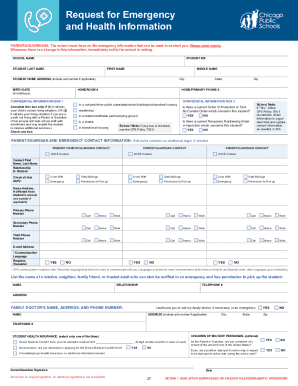
The CPS Family Income Information Form 2016-2017 is a document used by Chicago Public Schools to gather family income details to determine school funding.
pdfFiller scores top ratings on review platforms




Who needs CPS Family Income Information Form?
Explore how professionals across industries use pdfFiller.

CPS Family Income Information Form is needed by:
-
Parents/Guardians submitting income details for school funding
-
Liaisons assisting families with school forms
-
School administrators verifying family income information
-
Educational organizations seeking data on household income
-
Social workers helping families in need
Comprehensive Guide to CPS Family Income Information Form
What is the CPS Family Income Information Form 2?
The CPS Family Income Information Form 2 plays a crucial role in the Chicago Public Schools (CPS) system by gathering essential financial information. This form is designed for parents and guardians, enabling the schools to assess family income and allocate resources effectively. It requires details about household members and their income, ensuring appropriate support for eligible students.
Completing this form accurately is vital, as it directly influences funding opportunities for many schools within the CPS network.
Purpose and Benefits of the CPS Family Income Information Form 2
The primary purpose of the CPS Family Income Information Form 2 is to secure necessary funding for schools based on reported financial information. Accurate reporting can significantly impact funding allocation, helping schools cater to children from low-income families, including those who are homeless, migrant, or otherwise in need.
This form is pivotal for maintaining financial aid eligibility and ensuring that schools receive the support required to assist their students effectively. Complying with the form's requirements can lead to enhanced educational resources for children who need them most.
Who Needs to Complete the CPS Family Income Information Form?
This form must be completed by parents or guardians authorized to act on behalf of the students. These individuals include biological parents, adoptive parents, and legal guardians. Liaisons may also assist families in completing the form, ensuring all necessary information is accurately provided.
Circumstances such as enrollment in Head Start programs may necessitate the completion of this form, highlighting its importance across various conditions and educational settings.
When and How to Submit the CPS Family Income Information Form 2
Submitting the CPS Family Income Information Form 2 must be done within specific deadlines to ensure timely processing. Families should be aware of these key filing timeframes and adhere to them closely.
-
Submission methods include online platforms and in-person delivery at school offices.
-
It is crucial to verify the submission process to avoid delays or complications.
Completing the CPS Family Income Information Form Online: A Step-by-Step Guide
Filling out the CPS Family Income Information Form electronically can simplify the process. Begin by carefully reviewing each section of the form to understand what information is required.
-
Provide accurate household income and member details.
-
Utilize pdfFiller features for convenience, such as auto-filling and easy edits.
Prioritizing accuracy and detail during completion is essential to prevent issues that could arise from incorrect information.
Common Errors to Avoid When Filling Out the CPS Family Income Information Form
Many common mistakes can occur during the completion of this form, impacting its acceptance. It's essential to watch for typical errors such as missing signatures and providing inaccurate income details.
-
Double-check all information for consistency and accuracy.
-
Ensure that all required fields are filled out correctly to avoid processing delays.
Digital Signatures vs. Wet Signatures for the CPS Family Income Information Form
Understanding signature requirements is crucial for the CPS Family Income Information Form. A valid signature binds the document legally, and individuals can choose between digital and traditional wet signatures. With pdfFiller, digital signatures streamline the process, offering a practical solution for users.
Additionally, it's important to consider state compliance for the type of signature used and ensure that your chosen method meets these requirements.
Ensuring Security and Compliance for Your CPS Family Income Information Form
pdfFiller prioritizes document security, employing robust security measures including 256-bit encryption and compliance with privacy laws such as GDPR. Protecting sensitive personal information is a commitment that we take seriously.
-
Data protection strategies are in place to ensure the confidentiality of submitted forms.
-
Users can trust that their information remains secure throughout the handling process.
Next Steps After Submitting the CPS Family Income Information Form
After submission, users should be informed about tracking the status of their application and confirmation details. Understanding potential reasons for rejections can prepare families for any necessary responses to resolve issues quickly.
If applicable, users should also familiarize themselves with the renewal process for future submissions, ensuring continuing access to the benefits offered through the CPS.
Leverage pdfFiller to Streamline Your Form-Filling Experience
Utilizing pdfFiller can greatly enhance your experience when completing the CPS Family Income Information Form. The platform offers an intuitive interface and features designed to simplify the form-filling process.
-
Benefit from cloud-based editing and easy eSigning functionalities.
-
Experience accessibility and efficiency that address the specific needs of the form.
How to fill out the CPS Family Income Information Form
-
1.Access the CPS Family Income Information Form by visiting pdfFiller and searching for the form name.
-
2.Once located, open the form, and you will see pop-up instructions on how to fill each field.
-
3.Prepare to complete the form by gathering necessary information about your household members, including names, ages, and income details.
-
4.Navigate through the form as you enter the required information, ensuring to fill in all blank fields accurately, including any that pertain to specific needs such as homeless or migrant statuses.
-
5.Refer to the detailed instructions provided within the form to ensure all sections are correctly completed.
-
6.After filling in the form, review your entries thoroughly to confirm all household information and income details are accurate.
-
7.To finalize on pdfFiller, check the option to digitally sign the form if required.
-
8.Once you’re satisfied with the accuracy of the filled form, save the document to your device, or choose to download it as a PDF.
-
9.You can also submit the filled form directly through pdfFiller as per your school's submission policies.

What are the eligibility requirements for submitting the CPS Family Income Information Form?
To submit the CPS Family Income Form, you must be a parent or guardian of a student enrolled in Chicago Public Schools, providing information about your household income.
Is there a deadline for submitting this income information form?
The form should be submitted as soon as possible to ensure timely processing for school funding decisions. Verify specific deadlines with your local school.
What is the method for submitting the CPS Family Income Information Form?
You can submit the form by printing it and returning it to your child's school office, or you may use pdfFiller's submission options if available.
What supporting documents are needed when submitting the income form?
Typically, you must provide proof of income documentation such as pay stubs, tax returns, or benefits statements that verify your income as detailed in the form.
What are common mistakes to avoid when filling out the form?
Ensure that all required fields are filled in accurately, especially income and household member details. Double-check for any missing signatures.
How long does it take to process the CPS Family Income Information Form?
Processing times can vary, but it generally takes several weeks. Check with your school for specific details regarding their processing timeframe.
Is the CPS Family Income Information Form still relevant if it's for the 2016-2017 school year?
This form is outdated for the 2016-2017 school year. Always use the most current form provided by Chicago Public Schools for accurate submissions.
CPS Family Income Information Form Form Versions
Related Forms





Related Catalogs
Get the latest insights from our blog



If you believe that this page should be taken down, please follow our DMCA take down process
here
.
This form may include fields for payment information. Data entered in these fields is not covered by PCI DSS compliance.