
Last updated on
Nov 6, 2026

MicroGenDX Lab Requisition Form 2017-2026 free printable template
pdfFiller is not affiliated with any government organization

Fill out
Complete the form online in a simple drag-and-drop editor.

eSign
Add your legally binding signature or send the form for signing.

Share
Share the form via a link, letting anyone fill it out from any device.

Export
Download, print, email, or move the form to your cloud storage.
Why pdfFiller is the best tool for your documents and forms


End-to-end document management
From editing and signing to collaboration and tracking, pdfFiller has everything you need to get your documents done quickly and efficiently.
Accessible from anywhere
pdfFiller is fully cloud-based. This means you can edit, sign, and share documents from anywhere using your computer, smartphone, or tablet.
Secure and compliant
pdfFiller lets you securely manage documents following global laws like ESIGN, CCPA, and GDPR. It's also HIPAA and SOC 2 compliant.
What is MicroGenDX Lab Requisition Form
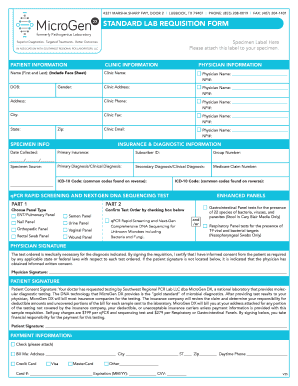
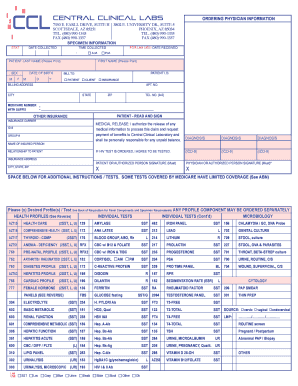
The MicroGen Specimen Label Form is a medical consent document used by healthcare providers to label specimens for molecular diagnostic testing.
pdfFiller scores top ratings on review platforms




Easy and fast, love that I don't have to fill out forms by hand.
Great for Business and Personal purposes!!
Who needs MicroGenDX Lab Requisition Form?
Explore how professionals across industries use pdfFiller.

MicroGenDX Lab Requisition Form is needed by:
-
Physicians ordering diagnostic tests
-
Patients providing consent for specimen testing
-
Medical laboratories managing specimen analysis
-
Insurance providers handling claims related to diagnostic testing
-
Healthcare administrators overseeing patient information management
Comprehensive Guide to MicroGenDX Lab Requisition Form
What is the MicroGen Specimen Label Form?
The MicroGen Specimen Label Form is a crucial healthcare diagnostic form used in molecular diagnostic testing. It serves the primary purpose of attaching to specimens that healthcare providers send to MicroGen DX. This form is specifically designed for both physicians and patients, ensuring that accurate and essential information accompanies each specimen. The form is associated with the Southwest Regional PCR Laboratory, reinforcing its importance in the diagnostic process.
Purpose and Benefits of the MicroGen Specimen Label Form
Understanding the purpose of the MicroGen Specimen Label Form is essential for effective specimen handling. This form helps facilitate accurate information flow, which is vital for testing and ensures that laboratory personnel can prevent delays in diagnostic testing. Additionally, it plays a significant role in complying with healthcare regulations, thus enhancing the overall quality of patient care.
Some benefits include:
-
Ensures accurate specimen identification
-
Prevents potential mishandling and errors
-
Facilitates timely diagnostic results
Key Features of the MicroGen Specimen Label Form
This form boasts several important attributes that streamline the specimen submission process. It contains multiple fillable fields for essential information such as patient facts and physician signatures. Instructions on the form, such as "Please attach this label to your specimen," guide users in completing the form correctly.
Key features include:
-
Fillable fields for patient information
-
Physician signature line
-
Instructions tailored for ease of use
-
Panel types relevant to various diagnostic tests
Who Needs the MicroGen Specimen Label Form?
The MicroGen Specimen Label Form is required by both physicians and patients in various situations. Healthcare providers use this form to ensure compliance and to provide accurate specimen handling. Patients, on their part, must be aware of their responsibilities in filling out necessary information accurately.
Situations that may necessitate this form include:
-
Submitting a specimen for molecular diagnostic testing
-
When a physician determines diagnostic tests are required
-
In instances of patient consent necessary for testing
How to Fill Out the MicroGen Specimen Label Form Online
Completing the MicroGen Specimen Label Form online can be straightforward if one follows a structured approach. Below are step-by-step instructions to assist users:
-
Begin by gathering all required information, including patient details and physician credentials.
-
Navigate to the field labeled "Name (First and Last): _____."
-
Continue filling in the remaining fields such as "Date Collected: _____."
-
Ensure both the patient and physician signatures are added in their respective fields.
To prevent common errors, consider using a checklist to confirm all sections are complete before submission.
How to Sign and Submit the MicroGen Specimen Label Form
The signing process for the MicroGen Specimen Label Form is essential, as it validates the information provided. Users can choose between digital signatures and traditional wet signatures depending on their needs.
Instructions for submission include:
-
Digital signatures can be placed directly on the form via online platforms.
-
Wet signatures must be added in person before physical submission.
-
Consider submission methods: electronic submissions may be faster than physical mail.
Be mindful of any associated fees and submission deadlines to ensure timely processing.
Security and Compliance When Using the MicroGen Specimen Label Form
Security is paramount when handling sensitive patient information in the MicroGen Specimen Label Form. The form adheres to strict security standards, such as HIPAA compliance, ensuring that all data is adequately protected.
To enhance data protection, users should adhere to the following tips:
-
Use secure platforms, such as pdfFiller, for document management.
-
Employ encrypted methods for sharing completed forms.
-
Limit access to the completed forms to authorized personnel only.
Maintaining compliance not only ensures the safety of patient data but also promotes trust in the healthcare system.
Sample of a Completed MicroGen Specimen Label Form
Having a visual reference can significantly aid users in completing the MicroGen Specimen Label Form accurately. A sample of a filled-out form demonstrates how to enter information correctly and highlights essential areas that require focus.
Key aspects to interpret include:
-
Accurate placement of patient and physician signatures
-
Correctly filled patient identification fields
-
Clear understanding of the instructions on the form
Maximize Ease with pdfFiller for Your MicroGen Specimen Label Form Needs
Using pdfFiller to manage the MicroGen Specimen Label Form can enhance the completion experience. It provides users with versatile tools for editing, eSigning, and sharing their forms seamlessly.
Some advantages of utilizing pdfFiller include:
-
Ease of editing documents to reflect the latest information.
-
Convenient eSigning capabilities for quick approval.
-
Tested reliability and positive testimonials from satisfied users.
Incorporating these tools can streamline the process and enhance efficiency.
How to fill out the MicroGenDX Lab Requisition Form
-
1.Access the MicroGen Specimen Label Form on pdfFiller by entering the site and searching for the form's name in the search bar.
-
2.Open the form by clicking on its title from the search results, which will load it in the pdfFiller editing interface.
-
3.Ensure you have all necessary information on hand, including patient details, insurance information, and diagnostic requirements.
-
4.Begin filling in the document by clicking on the highlighted fields. Enter information such as patient’s full name, date the specimen was collected, and details about the specimen.
-
5.Remember to fill out the sections requiring signatures from both the physician and the patient, as these are mandatory.
-
6.Review all entered information for accuracy, particularly the signatures and medical details, to avoid processing delays.
-
7.Once completed, save your work by clicking the 'Save' option, and then choose to download the document in your preferred format.
-
8.To submit the form, you may either print it directly from pdfFiller or email it to the appropriate facility.

Who is eligible to use the MicroGen Specimen Label Form?
Both physicians and patients are eligible to use the MicroGen Specimen Label Form. Physicians must complete the form to facilitate molecular diagnostic testing, while patients provide necessary consent.
What documents are required to complete this form?
To complete the MicroGen Specimen Label Form, you need to gather patient identification documents, insurance information, and details about the specimen being submitted for testing.
How should the form be submitted once completed?
Once you complete the MicroGen Specimen Label Form, you can submit it by printing and physically attaching it to the specimen or by following any specific submission guidelines from the testing facility.
Are there any common mistakes to avoid when filling out this form?
Common mistakes to avoid include leaving signature fields blank, entering incorrect patient information, and forgetting to include specific insurance details relevant to the diagnostic test.
What is the processing time for this form?
Processing times for forms like the MicroGen Specimen Label Form can vary, but it's typically processed as soon as the specimen is received in the laboratory. Delays may occur if there are missing details.
Is notarization required for the MicroGen Specimen Label Form?
No, notarization is not required for the MicroGen Specimen Label Form, making it a more straightforward process for both patients and healthcare providers.
What do I do if I make an error on the form?
If you make an error on the MicroGen Specimen Label Form, you can either cross it out and write the correct information or, depending on the extent of the errors, consider starting over for clarity.
Related Forms





Get the latest insights from our blog


If you believe that this page should be taken down, please follow our DMCA take down process
here
.
This form may include fields for payment information. Data entered in these fields is not covered by PCI DSS compliance.