
Last updated on
Oct 31, 2026

MN Child Care Aware CDA Training Tracking Form 2013-2026 free printable template
pdfFiller is not affiliated with any government organization

Fill out
Complete the form online in a simple drag-and-drop editor.

eSign
Add your legally binding signature or send the form for signing.

Share
Share the form via a link, letting anyone fill it out from any device.

Export
Download, print, email, or move the form to your cloud storage.
Why pdfFiller is the best tool for your documents and forms


End-to-end document management
From editing and signing to collaboration and tracking, pdfFiller has everything you need to get your documents done quickly and efficiently.
Accessible from anywhere
pdfFiller is fully cloud-based. This means you can edit, sign, and share documents from anywhere using your computer, smartphone, or tablet.
Secure and compliant
pdfFiller lets you securely manage documents following global laws like ESIGN, CCPA, and GDPR. It's also HIPAA and SOC 2 compliant.
What is MN Child Care Aware CDA Training Tracking Form
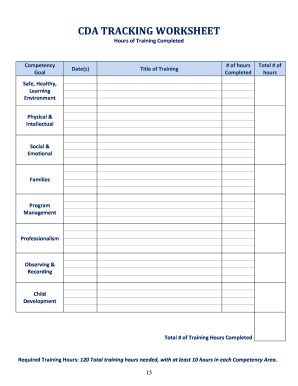
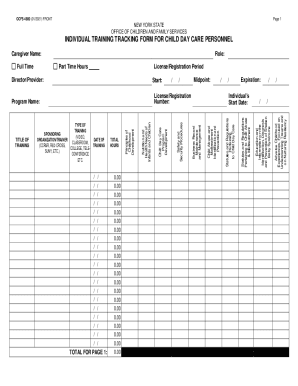
The CDA Training Tracking Form is an education document used by childcare professionals to document the required 120 hours of formal education for Child Development Associate (CDA) certification.
pdfFiller scores top ratings on review platforms




Who needs MN Child Care Aware CDA Training Tracking Form?
Explore how professionals across industries use pdfFiller.

MN Child Care Aware CDA Training Tracking Form is needed by:
-
Childcare providers seeking CDA certification
-
Education coordinators managing CDA training programs
-
Students enrolled in childcare education courses
-
Parents tracking caregiver qualifications
-
Training sponsors providing CDA courses
Comprehensive Guide to MN Child Care Aware CDA Training Tracking Form
Overview of the CDA Training Tracking Form
The CDA Training Tracking Form serves as a crucial document for childcare professionals seeking Child Development Associate (CDA) certification. This form is designed to help individuals organize their training records and ensure compliance with certification requirements. With a focus on documenting 120 hours of training across eight distinct subject areas, the CDA Training Tracking Form plays a pivotal role in the professional journey of childcare educators.
Documenting training is essential for maintaining a clear record of qualifications, and this form simplifies the process significantly. It provides structured fields to capture vital information, making it easier for users to track their progress towards obtaining CDA certification.
Purpose and Benefits of the CDA Training Tracking Form
Childcare professionals benefit greatly from utilizing the CDA Training Tracking Form. This form not only organizes training records but also aids in meeting regulatory requirements essential for CDA certification. Having a clear account of completed training helps professionals advance their careers in childcare, ensuring they remain competitive and up-to-date with industry standards.
With impressive organization, the form allows for easier retrieval of information required by accreditation bodies. Thus, by maintaining accurate and comprehensive records, users put themselves in a favorable position for career growth and development.
Key Features of the CDA Training Tracking Form
The CDA Training Tracking Form includes several key sections to facilitate effective documentation. These sections consist of fields where users can input the date, topic, sponsor, and hours acquired for each training event.
-
User-friendly design for easy navigation
-
Structured sections to ensure accuracy
-
Fields tailored to comply with CDA certification standards
Completeness and precision when filling out these fields are crucial, as they contribute directly to the validity of training documentation.
Who Needs the CDA Training Tracking Form?
The CDA Training Tracking Form is essential for a variety of professionals in the childcare field. First and foremost, it is aimed at individuals pursuing CDA certification. Additionally, educational institutions offering CDA training programs will find this form beneficial for their students. Lastly, childcare providers looking to fulfill professional development requirements must also utilize this form to keep track of their ongoing education efforts.
Overall, this tool is indispensable for anyone engaged in or preparing for certification in the childcare industry.
How to Fill Out the CDA Training Tracking Form Online
Filling out the CDA Training Tracking Form online involves several straightforward steps:
-
Enter the date of the training.
-
Specify the topic covered in the training session.
-
Provide the name of the training sponsor.
-
Document the total hours acquired during the training.
Ensure compliance with CDA standards by keeping all required documentation and tracking your hours effectively within the designated five-year period.
Common Errors When Filling Out the CDA Training Tracking Form
Users must be aware of several common mistakes that could hinder the submission process. Incomplete fields, incorrect dates, and missing signatures are frequent pitfalls to avoid. To ensure a smooth submission, take the time to review all entries carefully before sending the form. Utilizing a validation checklist can also help guarantee that all information is filled out correctly, thus minimizing errors.
How to Submit the CDA Training Tracking Form
Submitting the CDA Training Tracking Form can be done through various accepted methods:
-
Online submission for quick processing
-
Mailing the form to the appropriate address
-
In-person submission at designated locations
Be sure to check any specific requirements dictated by state laws or educational institutions regarding form submission. After submission, users should anticipate confirmation of receipt or next steps in the certification process.
Security and Compliance Considerations for the CDA Training Tracking Form
When handling the CDA Training Tracking Form, data security is of utmost importance. It's crucial for users to understand the data protection standards that govern the form's management. By utilizing secure platforms for form submission, individuals can ensure that their sensitive information remains protected.
pdfFiller, for example, implements robust security measures, including 256-bit encryption and compliance with SOC 2 Type II, HIPAA, and GDPR regulations. This ensures that your data is handled with the highest standards of privacy and protection.
Utilizing pdfFiller for Your CDA Training Tracking Form Needs
pdfFiller offers exceptional capabilities for managing CDA Training Tracking Forms effectively. Users can edit and file forms seamlessly within a secure cloud-based environment. The platform not only simplifies the form filling process but also provides comprehensive support and resources to assist users in completing the CDA Training Tracking Form accurately.
By leveraging pdfFiller's user-friendly interface and robust features, childcare professionals can enhance their training documentation experience while ensuring compliance with industry standards.
How to fill out the MN Child Care Aware CDA Training Tracking Form
-
1.To access the CDA Training Tracking Form on pdfFiller, visit the website and log in to your account. Use the search bar to locate the form by typing its name.
-
2.Once you have opened the form, familiarize yourself with the layout. You will see various fields designed for inputting information about your training hours.
-
3.Before filling in the form, gather your training records, including dates, topics, sponsors, and total hours acquired. Make sure this information is accurate and up to date.
-
4.Start filling in the fields, beginning with the date of each training session. Use the calendar feature in pdfFiller for easy date selection.
-
5.Next, enter the specific topic of each training. Be concise and clear, ensuring that the topic aligns with CDA training requirements.
-
6.In the sponsor field, include the name of the organization or person that provided the training. This may be your instructor or the institution.
-
7.Finally, detail the number of hours acquired for each training session. Ensure that the total hours meet the CDA requirement of 120 hours within a five-year window.
-
8.After filling out all necessary fields, carefully review your entries. Check for any errors or missing information that could affect your CDA application.
-
9.When satisfied with your completed form, save your progress. You can download a copy for your records or submit it directly through pdfFiller's submission feature.
-
10.Follow the prompts to either email the completed form or print it for mailing, depending on the submission instructions provided.

What are the eligibility requirements to use the CDA Training Tracking Form?
The CDA Training Tracking Form is designed for individuals pursuing Child Development Associate (CDA) certification. Users must have completed relevant training hours as specified by the CDA guidelines.
Is there a deadline for completing the CDA Training Tracking Form?
While there are no strict deadlines for form completion, it is recommended to complete the form as soon as your training hours are acquired to ensure a smooth CDA application process.
How should I submit the CDA Training Tracking Form once completed?
You can submit the completed CDA Training Tracking Form by downloading it and either emailing it to your certifying body or mailing a hard copy, depending on their submission preferences.
What supporting documents do I need to submit with the CDA Training Tracking Form?
Typically, you may need to include proof of training hours such as certificates, transcripts, or other documentation from your training sponsors along with your completed form.
What are common mistakes to avoid on the CDA Training Tracking Form?
Common mistakes include incorrect dates, mismatched topic descriptions, and failing to include the total hours. Double-check all entries for accuracy before submission.
How long does it take to process the CDA Training Tracking Form?
Processing times for the CDA Training Tracking Form can vary. It is advisable to allow several weeks for processing, especially if the form is mailed in.
Can I edit my CDA Training Tracking Form after submission?
Once submitted, changes to the CDA Training Tracking Form may require resubmission. Contact your certifying body for specific procedures regarding modifications.
Related Forms

Get the latest insights from our blog


If you believe that this page should be taken down, please follow our DMCA take down process
here
.
This form may include fields for payment information. Data entered in these fields is not covered by PCI DSS compliance.