
Last updated on
Oct 31, 2026

Get the free Sterling ISA Encashment Request Form
We are not affiliated with any brand or entity on this form

Fill out
Complete the form online in a simple drag-and-drop editor.

eSign
Add your legally binding signature or send the form for signing.

Share
Share the form via a link, letting anyone fill it out from any device.

Export
Download, print, email, or move the form to your cloud storage.
Why pdfFiller is the best tool for your documents and forms


End-to-end document management
From editing and signing to collaboration and tracking, pdfFiller has everything you need to get your documents done quickly and efficiently.
Accessible from anywhere
pdfFiller is fully cloud-based. This means you can edit, sign, and share documents from anywhere using your computer, smartphone, or tablet.
Secure and compliant
pdfFiller lets you securely manage documents following global laws like ESIGN, CCPA, and GDPR. It's also HIPAA and SOC 2 compliant.
What is ISA Withdrawal Form
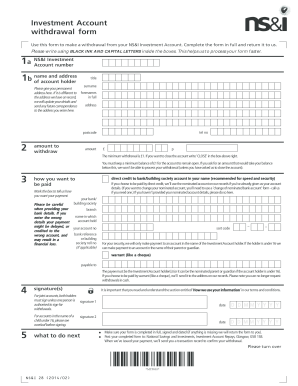
The Sterling ISA Encashment Request Form is a personal finance document used by account owners to request a full or partial withdrawal from a Sterling ISA account.
pdfFiller scores top ratings on review platforms




Who needs ISA Withdrawal Form?
Explore how professionals across industries use pdfFiller.

ISA Withdrawal Form is needed by:
-
Individual ISA account holders in the UK
-
Financial advisors assisting clients
-
Bank personnel processing encashment requests
-
Estate planners managing inheritance matters
-
Tax consultants advising on ISA withdrawals
Comprehensive Guide to ISA Withdrawal Form
What is the Sterling ISA Encashment Request Form?
The Sterling ISA Encashment Request Form serves as a formal document to process withdrawal requests from a Sterling ISA account. Completing this form accurately is essential, as it directly impacts the ability to access funds from a tax-efficient savings wrapper. This form is a key element in personal finance for individuals managing their savings and investments effectively.
Understanding the purpose of the Sterling ISA Encashment Request Form not only facilitates smoother withdrawal processes but also aligns with the broader context of managing one’s financial resources responsibly.
Purpose and Benefits of the Sterling ISA Encashment Request Form
This form allows for both full and partial withdrawals, making it flexible for various financial needs. Utilizing the Sterling ISA Encashment Request Form streamlines the encashment requests, contributing to efficient processing.
The form simplifies the withdrawal process, ensuring that account owners can quickly access their funds without unnecessary delays, thereby enhancing overall customer experience in managing their investments.
Who Needs the Sterling ISA Encashment Request Form?
The primary audience for this form includes current Sterling ISA account owners. Various situations might prompt these individuals to encash their ISA, ranging from unexpected financial needs to planned investments.
Understanding the eligibility criteria and demographics that typically access this form can help ensure that those in need of its services are well-informed about their options and requirements.
How to Fill Out the Sterling ISA Encashment Request Form Online (Step-by-Step)
To fill out the Sterling ISA Encashment Request Form online, follow these steps:
-
Enter your ISA account number in the designated field.
-
Provide personal details, including your name, address, and date of birth.
-
Specify your encashment instructions, including the amount you wish to withdraw.
-
Validate all information entered to ensure accuracy.
-
Review and confirm your details before submitting.
Pay special attention to fields requiring precise information to avoid common mistakes, ultimately ensuring that your withdrawal request is processed efficiently.
Required Documents and Supporting Materials
When submitting the Sterling ISA Encashment Request Form, certain documents may be required to verify your identity and account ownership. The following are typically needed:
-
Current government-issued identification, such as a passport or driver’s license.
-
Proof of address, like a utility bill or bank statement.
-
Additional supporting materials depending on the nature of your withdrawal request.
Understanding these requirements will help ensure a smooth submission process, minimizing delays in accessing your funds.
Submission Methods and Delivery
The completed Sterling ISA Encashment Request Form can be submitted in several ways, including online or via traditional mail. After submission, applicants should expect a processing period during which their requests are evaluated.
To keep track of the status of your encashment request, be sure to follow the provided instructions, which outline verification steps to ensure a transparent process.
Security and Compliance for the Sterling ISA Encashment Request Form
When submitting sensitive personal information through the Sterling ISA Encashment Request Form, data security is of utmost importance. pdfFiller employs robust security features including 256-bit encryption and compliance with regulations such as HIPAA and GDPR to protect your information.
To maintain privacy during the submission process, it is advisable to utilize secure methods and be aware of potential risks when handling personal data.
Common Errors and How to Avoid Them
Filling out the Sterling ISA Encashment Request Form can sometimes lead to errors. Common mistakes include:
-
Incorrect ISA account number entries.
-
Missing or incomplete personal details.
-
Not adhering to withdrawal limits or conditions.
To minimize errors, reviewing the form prior to submission is crucial. pdfFiller offers tools that assist in error-checking, which further enhances accuracy and confidence in your submission.
Sample or Example of a Completed Sterling ISA Encashment Request Form
Providing a visual example of a filled-out Sterling ISA Encashment Request Form can serve as an effective guide for users. It is crucial to note key aspects in the example that align with standard requirements, emphasizing the importance of including all essential elements correctly.
Get Started with pdfFiller to Fill Out Your Form Easily
Utilizing pdfFiller for the Sterling ISA Encashment Request Form makes the entire process more efficient. The platform enables users to edit, e-sign, and manage documents seamlessly. With a user-friendly interface and 24/7 support available, users will find it straightforward to complete their forms with confidence.
How to fill out the ISA Withdrawal Form
-
1.To complete the Sterling ISA Encashment Request Form on pdfFiller, first, access the pdfFiller website and log into your account or create a new account if you don't have one.
-
2.Once logged in, search for 'Sterling ISA Encashment Request Form' in the search bar.
-
3.Click on the form link to open it in the pdfFiller interface.
-
4.Before filling out the form, gather all necessary information such as your ISA account number, your full name, address, date of birth, and desired encashment details.
-
5.Navigate through the form by clicking on the fillable fields. Enter your ISA account number in the designated space.
-
6.Proceed by filling in your name, address, and date of birth accurately to ensure your identity is verified.
-
7.For encashment instructions, specify the type and amount of withdrawal clearly in the provided fields.
-
8.Once all fields are completed, review your entries for accuracy and completeness.
-
9.Utilize the pdfFiller tools to highlight any important sections or add notes if needed before finalizing the document.
-
10.To save or download the completed form, click on the 'Save' icon or 'Download' option available in the toolbar.
-
11.You may also submit the form electronically by selecting the 'Send via Email' option, ensuring to provide the necessary recipient details.

What are the eligibility requirements for this form?
To use the Sterling ISA Encashment Request Form, you must be the account owner of the ISA. Ensure that your details match the information held by the ISA provider.
What documents do I need to support my request?
You will need to provide personal identification such as proof of identity and address. Acceptable documents might include a passport, utility bill, or bank statement.
How do I submit the form once completed?
You can submit the completed Sterling ISA Encashment Request Form either electronically via pdfFiller or by downloading and mailing it directly to your ISA provider.
Are there any fees associated with encashing my ISA?
The processing of encashment requests may incur fees depending on the ISA provider's policies. It is advisable to check with your provider for specific details.
What common mistakes should I avoid while filling out the form?
Common mistakes include leaving fields blank, incorrect personal details, and failing to provide necessary supporting documents. Double-check your inputs before submission.
How long does it take to process my encashment request?
The processing time for ISA encashment requests can vary, typically ranging from a few business days to 2 weeks. Check with your provider for specific timelines.
What if I need to make changes after submitting the form?
If you need to make changes after submission, contact your ISA provider immediately. They will guide you on how to amend your request.
Related Forms





Get the latest insights from our blog



If you believe that this page should be taken down, please follow our DMCA take down process
here
.
This form may include fields for payment information. Data entered in these fields is not covered by PCI DSS compliance.