
Last updated on
Nov 9, 2026
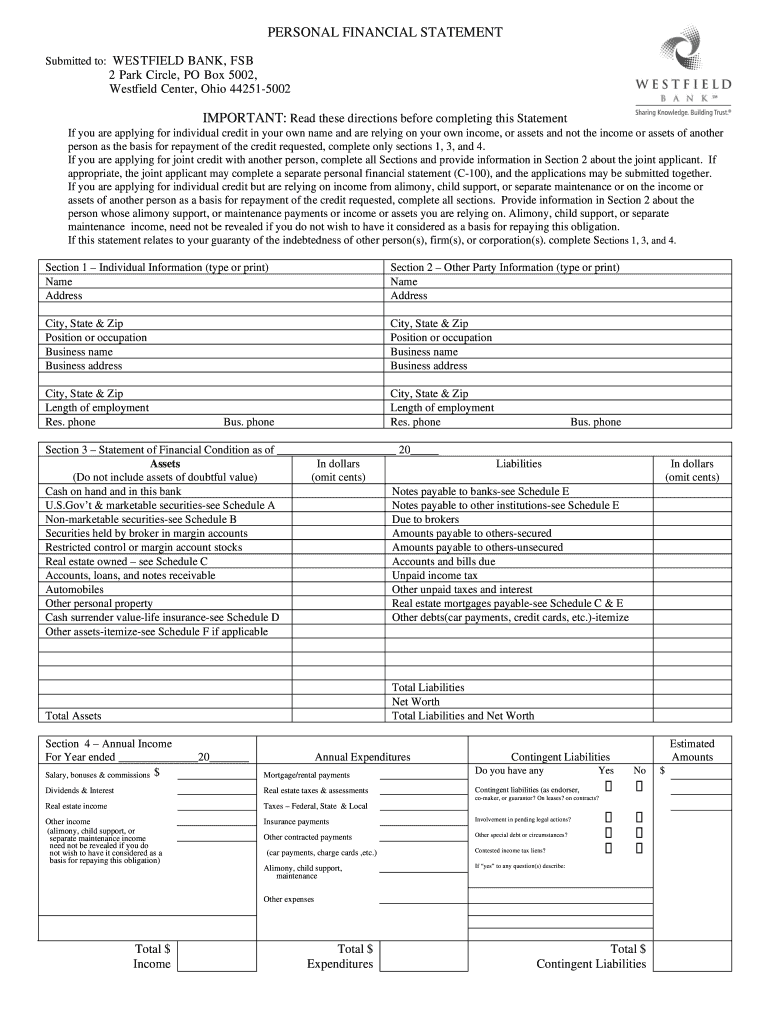
Westfield Bank Personal Financial Statement free printable template
pdfFiller is not affiliated with any government organization

Fill out
Complete the form online in a simple drag-and-drop editor.

eSign
Add your legally binding signature or send the form for signing.

Share
Share the form via a link, letting anyone fill it out from any device.

Export
Download, print, email, or move the form to your cloud storage.
Why pdfFiller is the best tool for your documents and forms


End-to-end document management
From editing and signing to collaboration and tracking, pdfFiller has everything you need to get your documents done quickly and efficiently.
Accessible from anywhere
pdfFiller is fully cloud-based. This means you can edit, sign, and share documents from anywhere using your computer, smartphone, or tablet.
Secure and compliant
pdfFiller lets you securely manage documents following global laws like ESIGN, CCPA, and GDPR. It's also HIPAA and SOC 2 compliant.
What is Westfield Bank Personal Financial Statement
The Personal Financial Statement is a document used by individuals applying for credit to provide comprehensive information about their financial condition.
pdfFiller scores top ratings on review platforms




Who needs Westfield Bank Personal Financial Statement?
Explore how professionals across industries use pdfFiller.

Westfield Bank Personal Financial Statement is needed by:
-
Individuals seeking credit from banks
-
Joint applicants for loans or credit
-
Small business owners applying for financial products
-
Financial advisors assisting clients with credit applications
-
Individuals needing to assess their personal finances
Comprehensive Guide to Westfield Bank Personal Financial Statement
What is a Personal Financial Statement?
A Personal Financial Statement is a comprehensive document that provides a detailed snapshot of an individual's financial condition. It holds significant importance, particularly for those seeking credit from Westfield Bank. This form outlines essential financial information, including a summary of assets, liabilities, income, and expenditures, that helps banks evaluate credit risk.
When completed accurately, the Personal Financial Statement serves as a crucial part of the credit application process. It allows banks to assess various financial factors to determine an applicant's suitability for loans or credit products.
Purpose and Benefits of Completing a Personal Financial Statement
Potential borrowers are required to fill out a Personal Financial Statement to provide a clear picture of their financial situation. This document plays a vital role in assessing creditworthiness, which is essential for securing a loan.
Benefits of completing this statement extend to both the applicant and any joint applicants, promoting transparency in financial dealings. It not only enhances an applicant's chances of loan approval but also serves as an effective tool for budgeting and financial planning.
Key Features of the Personal Financial Statement Form
The Personal Financial Statement form includes critical sections that detail asset holdings, liabilities, income streams, and expenditures. Each area is designed to capture precise financial data, ensuring an accurate representation of the applicant's financial state.
One of the unique aspects of the pdfFiller platform is its fillable format, which enhances user experience while filling out the form. This system streamlines the process, making it straightforward and user-friendly.
Who Should Complete the Personal Financial Statement?
This statement is primarily intended for individuals applying for credit from Westfield Bank. Essential participants include both the primary applicant and any joint applicants, each responsible for ensuring the accuracy and completeness of the information submitted.
Specific groups, such as business owners or newlyweds, may also find this form particularly beneficial. These individuals often need to present a clear financial picture when applying for loans that support their ventures or new household setups.
How to Complete the Personal Financial Statement Online (Step-by-Step)
Completing the Personal Financial Statement using pdfFiller is straightforward. Here’s a step-by-step guide:
-
Create an account on the pdfFiller platform.
-
Access the Personal Financial Statement template.
-
Gather essential financial information, including details about assets and liabilities.
-
Fill out each section of the form carefully.
-
Review for accuracy before finalizing.
-
Submit the completed form directly to Westfield Bank for processing.
Common Errors to Avoid When Filling Out the Personal Financial Statement
Applicants often make frequent mistakes that can jeopardize their financial applications. Common errors include misreporting income or overlooking debts, which can skew their financial portrayal.
To ensure accuracy and completeness, follow these tips:
-
Double-check numerical entries against documentation.
-
Ensure all required sections are filled out.
-
Use the review and validation checklist provided by pdfFiller to catch errors.
Signing the Personal Financial Statement: Digital vs. Wet Signatures
The signing process for the Personal Financial Statement requires signatures from both the applicant and joint applicant. It is essential to understand the different signing methods available.
Digital signatures offer convenience and legal validity, making the signing process more efficient. The pdfFiller platform simplifies this by allowing users to eSign documents securely.
Submission Methods for the Personal Financial Statement
Once completed, applicants must submit the Personal Financial Statement to Westfield Bank. It’s important to be aware of the various submission methods available.
Applicants should take note of submission deadlines and processing times. Understanding how to track the application status can also provide peace of mind after submitting the document.
Security and Compliance of Personal Financial Statements
Protecting personal data is critical when filling out financial statements. pdfFiller implements robust security protocols, including 256-bit encryption, to ensure the privacy and safety of users
Compliance with regulations like HIPAA and GDPR further assures users that their information is handled with the utmost care and in accordance with legal standards.
Enhance Your Application with pdfFiller
Utilizing pdfFiller for your Personal Financial Statement enhances the overall experience, making the process of filling out and managing this important document more efficient. Key features such as editing, eSigning, and secure document sharing significantly streamline the experience.
With pdfFiller, users can feel confident in the ease of use and security features that accompany their financial transactions.
How to fill out the Westfield Bank Personal Financial Statement
-
1.To start, navigate to pdfFiller's website and sign in to your account or create a new one if you don't have it yet.
-
2.In the search bar, type 'Personal Financial Statement' and select the correct form from the search results to open it.
-
3.Familiarize yourself with the layout of the form, noting various sections such as assets, liabilities, income, and expenditures.
-
4.Collect all necessary financial information before filling out the form. This includes bank statements, income records, and debts.
-
5.Begin filling in the fields starting with your name, address, and other personal details at the top of the form.
-
6.Next, proceed to list assets such as bank accounts, investments, and property in the designated sections.
-
7.After listing assets, accurately detail your liabilities, including loans, credit card debts, and any other financial obligations.
-
8.Continue by filling in your income sources in the appropriate sections, ensuring you provide complete details.
-
9.Use any additional schedules provided within the form for specific financial disclosures or notes required by the bank.
-
10.Once you have completed all fields, review the information to ensure accuracy and completeness.
-
11.Utilize pdfFiller's review features to check for any missed fields or errors before finalizing the document.
-
12.When satisfied with your input, save your progress on pdfFiller or download the completed form as a PDF.
-
13.You may then submit the completed Personal Financial Statement through your chosen method, whether electronically or by printing.

Who is eligible to fill out the Personal Financial Statement?
This form is designed for individuals applying for credit, including both primary and joint applicants. Applicants must have relevant financial information to disclose.
What documents do I need to complete this financial statement?
Gather records detailing your assets, liabilities, income, and expenditures. This typically includes bank statements, pay stubs, loan documentation, and any investment statements.
Can multiple people fill out this form?
Yes, both the primary applicant and any joint applicants must complete and sign the form to provide a comprehensive financial overview.
How do I submit the completed form?
You can submit the completed Personal Financial Statement either electronically through pdfFiller, or by printing it and delivering it to the bank in person.
What mistakes should I avoid when filling out this form?
Ensure each section is fully completed and that the information provided is accurate. Avoid leaving any required fields blank and double-check figures to prevent errors.
Is notarization required for this form?
No, notarization is not required for the Personal Financial Statement. You only need to ensure that all necessary parties sign the document.
How long does it take to process the submitted form?
Processing times can vary depending on the bank's policies. It typically takes a few business days for approval or further communication regarding your application.
Related Forms



Related Catalogs
Get the latest insights from our blog



If you believe that this page should be taken down, please follow our DMCA take down process
here
.
This form may include fields for payment information. Data entered in these fields is not covered by PCI DSS compliance.