
Last updated on
Oct 19, 2026

Get the free Present Simple Exercises
We are not affiliated with any brand or entity on this form

Fill out
Complete the form online in a simple drag-and-drop editor.

eSign
Add your legally binding signature or send the form for signing.

Share
Share the form via a link, letting anyone fill it out from any device.

Export
Download, print, email, or move the form to your cloud storage.
Why pdfFiller is the best tool for your documents and forms


End-to-end document management
From editing and signing to collaboration and tracking, pdfFiller has everything you need to get your documents done quickly and efficiently.
Accessible from anywhere
pdfFiller is fully cloud-based. This means you can edit, sign, and share documents from anywhere using your computer, smartphone, or tablet.
Secure and compliant
pdfFiller lets you securely manage documents following global laws like ESIGN, CCPA, and GDPR. It's also HIPAA and SOC 2 compliant.
What is Present Simple
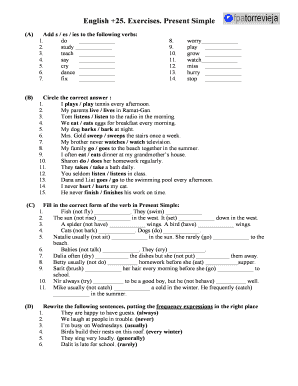
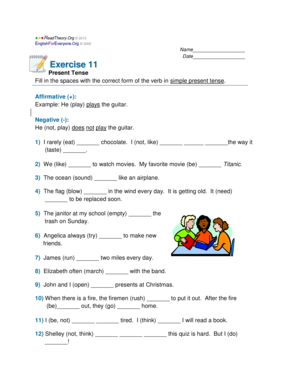
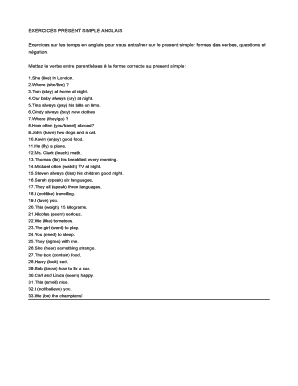
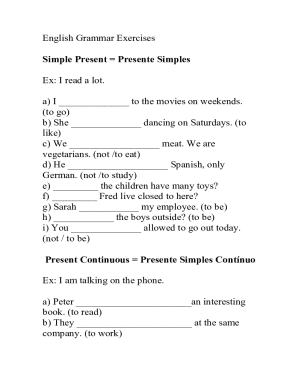
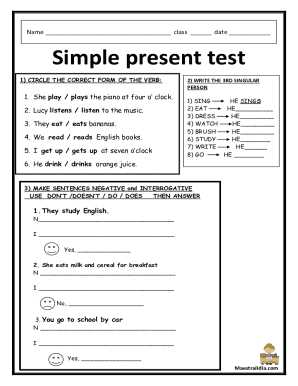
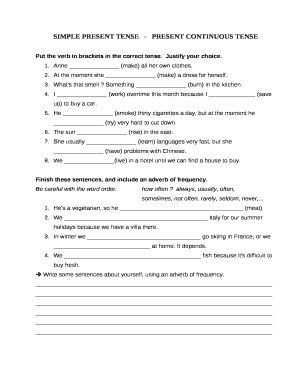
The Present Simple Exercises is an educational form used by students to practice the present simple tense in English through various exercises.
pdfFiller scores top ratings on review platforms




Who needs Present Simple?
Explore how professionals across industries use pdfFiller.

Present Simple is needed by:
-
Students learning English grammar
-
Teachers creating language lesson plans
-
Tutors providing additional practice materials
-
Education professionals assessing language skills
-
Homeschooling parents seeking structured exercises
-
Language learning centers enhancing curriculum
Comprehensive Guide to Present Simple
What Are Present Simple Exercises?
Present simple exercises are integral to mastering the present simple tense, which is essential for effective communication in English. These exercises focus on different aspects of the tense, including affirmative sentences, negative sentences, questions, and the use of third person 's'. Engaging with these exercises allows learners to practice and reinforce their understanding, ultimately enhancing their command of English grammar.
Benefits of Practicing Present Simple Exercises
Practicing present simple exercises offers several advantages for language learners. These exercises significantly improve understanding of daily habits and routines, enabling learners to describe their lives in English accurately. Additionally, using grammar practice worksheets aids in enhancing fluency, helping students articulate their thoughts more effectively in conversation.
Who Should Use Present Simple Exercises?
Present simple exercises are ideal for various users, including students preparing for language exams or individuals looking to boost their English skills. Furthermore, educators can benefit from these exercises by incorporating them into their teaching methods, ensuring that their students grasp essential grammatical concepts.
How to Use the Present Simple Exercises Effectively
To maximize learning from present simple exercises, follow these steps:
-
Read the instructions carefully to understand what is expected.
-
Use the verb in brackets to fill in the gaps in the provided template.
-
Review your completed exercises to reinforce the learning process.
Employing these techniques will ensure you get the most out of your practice.
Key Features of the Present Simple Exercises
These exercises come with several unique features that enhance usability:
-
A fillable format that allows for easy online editing and completion.
-
Security measures in place when using pdfFiller, ensuring protection of users' data during the exercise process.
Common Mistakes to Avoid When Filling Out Present Simple Exercises
While practicing, be aware of common mistakes that may occur in verb usage and sentence construction. To avoid these pitfalls, consider the following tips:
-
Double-check your verb forms to ensure they match the correct tense.
-
Proofread your completed exercises to catch and correct any errors before submission.
How to Save, Print, and Submit Your Completed Exercises
Managing your completed exercises is essential for effective learning. Follow these guidelines:
-
Save your work using the options available within pdfFiller's system.
-
Print your exercises if a physical submission is necessary.
Utilizing pdfFiller for Present Simple Exercises
pdfFiller offers numerous benefits for completing present simple exercises. Key functionalities include:
-
Edit and fill forms easily online without needing to download software.
-
Securely access exercises from any device, enhancing convenience for users.
Practice Makes Perfect: Encouragement to Engage with Present Simple Exercises
Active engagement with present simple exercises is crucial for mastering the tense. Consistent practice will improve your skills significantly. Don’t hesitate to explore multiple versions and exercises available through pdfFiller to bolster your learning experience.
How to fill out the Present Simple
-
1.Access the Present Simple Exercises form on pdfFiller by searching the title in the search bar or navigating through the education forms category.
-
2.Once the form opens, review the first section which includes affirmative sentences to familiarize yourself with the format.
-
3.Before starting, gather necessary information such as the verbs you need to use for the exercises provided.
-
4.Begin filling in the gaps according to the instructions. Click on each blank space to enter the required verb form directly.
-
5.Utilize pdfFiller's editing tools to refine your responses, ensuring accuracy in tense usage for affirmative, negative, and question formats.
-
6.As you progress, keep an eye on instructional comments that guide you through filling out third person 's' and routines-related sections.
-
7.After completing the form, review all sections to check for any errors or omissions, making necessary amendments.
-
8.Finalize your work by clicking the 'Finish' button, which allows you to save your updated document.
-
9.To download or submit your completed exercises, select the appropriate option in pdfFiller, ensuring you choose a suitable format for your needs, like PDF.

Who can use the Present Simple Exercises?
The Present Simple Exercises can be used by students learning English, teachers preparing lessons, and tutors providing grammar practice. It's designed for anyone needing to enhance their understanding of the present simple tense.
Is there a deadline for completing the exercises?
The Present Simple Exercises do not have a set deadline unless assigned by an instructor. Users are encouraged to complete the exercises at their own pace to fully grasp the material.
How do I submit the completed exercises?
You can submit the completed exercises by downloading the filled form from pdfFiller and emailing it to your teacher or printer-friendly version for in-person submission as per your requirement.
What format is the form available in?
The Present Simple Exercises form is available in a digital, fillable format on pdfFiller, allowing you to type directly into the document before saving or printing.
Can I edit my answers later?
Yes, you can return to your completed form on pdfFiller and edit your answers as needed until you finalize and download the document.
Are there any common mistakes to avoid while filling the form?
Ensure you know the correct verb forms and pay attention to the instructions regarding affirmative and negative sentence structures. Double-check your work for grammatical accuracy.
What support materials should I prepare before starting?
Before starting, prepare a list of verbs and examples you want to use, and make sure you understand the rules of the present simple tense for better completion of the exercises.
Related Forms



Related Catalogs
Get the latest insights from our blog


If you believe that this page should be taken down, please follow our DMCA take down process
here
.
This form may include fields for payment information. Data entered in these fields is not covered by PCI DSS compliance.