
Last updated on
Oct 31, 2026

Get the free Risk Assessment for Pregnant Employees
We are not affiliated with any brand or entity on this form

Fill out
Complete the form online in a simple drag-and-drop editor.

eSign
Add your legally binding signature or send the form for signing.

Share
Share the form via a link, letting anyone fill it out from any device.

Export
Download, print, email, or move the form to your cloud storage.
Why pdfFiller is the best tool for your documents and forms


End-to-end document management
From editing and signing to collaboration and tracking, pdfFiller has everything you need to get your documents done quickly and efficiently.
Accessible from anywhere
pdfFiller is fully cloud-based. This means you can edit, sign, and share documents from anywhere using your computer, smartphone, or tablet.
Secure and compliant
pdfFiller lets you securely manage documents following global laws like ESIGN, CCPA, and GDPR. It's also HIPAA and SOC 2 compliant.
What is Pregnancy Risk Assessment
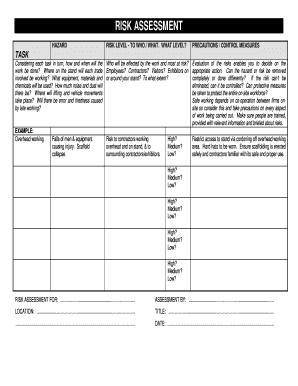
The Risk Assessment for Pregnant Employees is an employment form used by assessors to evaluate potential workplace hazards for pregnant employees.
pdfFiller scores top ratings on review platforms




Who needs Pregnancy Risk Assessment?
Explore how professionals across industries use pdfFiller.

Pregnancy Risk Assessment is needed by:
-
Pregnant employees seeking safety evaluations.
-
Assessors responsible for workplace safety.
-
Managers or department heads overseeing pregnant staff.
-
Human resource professionals ensuring compliance with safety regulations.
-
Health and safety officers emphasizing workplace safety for expectant mothers.
Comprehensive Guide to Pregnancy Risk Assessment
What is the Risk Assessment for Pregnant Employees?
The Risk Assessment for Pregnant Employees form is designed to evaluate and document potential hazards in the workplace for pregnant employees. This form plays a crucial role in identifying risks associated with the working environment, ensuring the safety of pregnant workers. It is necessary for both the assessor and the pregnant employee to provide their signatures, which validates the assessment process.
-
This form defines workplace hazards specific to pregnant employees.
-
It serves as documentation to address identified risks and strategies for mitigation.
-
Signatures from both parties are required to confirm understanding and agreement.
Purpose and Benefits of the Risk Assessment for Pregnant Employees
Implementing the Risk Assessment for Pregnant Employees is essential for several reasons. First and foremost, it helps identify potential hazards within the workplace that could impact pregnant employees. Additionally, this form offers various benefits, such as fostering employee safety, ensuring legal compliance, and enabling necessary work adjustments tailored to each individual's needs.
-
Identifying hazards helps in minimizing risks to pregnant employees.
-
Legal compliance supports organizational responsibility and employee rights.
-
The assessment can improve job satisfaction and performance during pregnancy.
Key Features of the Risk Assessment for Pregnant Employees Form
The Risk Assessment for Pregnant Employees form comprises several essential components that facilitate the assessment process. Each section is designed to gather critical information about the employee and the identified risks, ensuring a comprehensive evaluation.
-
Key sections include fields for 'Name', 'Job Title', and 'Date of Assessment'.
-
The assessor and pregnant employee must collaborate in filling out the form.
-
Updates to the form are necessary if conditions change during the pregnancy.
Who Needs the Risk Assessment for Pregnant Employees?
Understanding who requires the Risk Assessment for Pregnant Employees form is vital for effective implementation. This includes various roles within the organization and the specific employees needing the assessment.
-
Pregnant employees must complete the form to ensure their safety.
-
Assessors, such as health and safety officers, play a pivotal role in the evaluation process.
-
Managers and department heads also have responsibilities related to ensuring compliance with safety regulations.
How to Fill Out the Risk Assessment for Pregnant Employees Online (Step-by-Step)
Filling out the Risk Assessment for Pregnant Employees online is straightforward with pdfFiller. Here is a step-by-step guide to assist users in the process.
-
Access the form through the pdfFiller platform.
-
Fill in required fields, including 'Due Date' and 'Assessor’s Name'.
-
Review entries for accuracy before submission.
-
Utilize editing features to make any necessary adjustments.
-
Share the completed form directly from pdfFiller.
Common Errors and How to Avoid Them When Filling Out the Form
Accurate completion of the Risk Assessment for Pregnant Employees form is crucial. Being aware of common mistakes can help ensure compliance and clarity. Here are some frequent errors to avoid.
-
Missing signatures from either the assessor or the pregnant employee.
-
Entering incorrect or incomplete data in required fields.
-
Neglecting to update the assessment if circumstances change.
How to Sign or Notarize the Risk Assessment for Pregnant Employees
The signing process for the Risk Assessment for Pregnant Employees is a key element of the documentation. It ensures that both parties agree with the contents of the assessment.
-
Both the assessor and the pregnant employee must provide their signatures.
-
PdfFiller offers secure eSigning features for a smooth signing process.
-
In specific cases, a wet signature may be required for legal validity.
Submitting the Risk Assessment for Pregnant Employees
After completing the Risk Assessment for Pregnant Employees, it is essential to understand the submission process. This clarity helps ensure that the form is appropriately filed and processed.
-
Submit the completed form to the HR department or designated authority.
-
Be aware of any deadlines or processing times for submission.
-
Check for options to track the submission status if available.
Security and Compliance Considerations for the Risk Assessment for Pregnant Employees
The handling of the Risk Assessment for Pregnant Employees form involves important security and compliance measures. These practices are crucial to protect sensitive employee data.
-
PdfFiller uses 256-bit encryption to safeguard document security.
-
Compliance with GDPR ensures that personal data is managed properly.
-
It is important to retain records securely for future reference.
Leverage pdfFiller for a Hassle-Free Risk Assessment Process
Utilizing pdfFiller to complete the Risk Assessment for Pregnant Employees can streamline the process significantly. By leveraging the platform's capabilities, users can enhance their form-filling experience.
-
PdfFiller allows for easy editing and sharing of the Risk Assessment.
-
eSigning features simplify the signing process for all parties involved.
-
Start using pdfFiller to ensure a seamless and efficient workplace safety assessment.
How to fill out the Pregnancy Risk Assessment
-
1.Access and open the Risk Assessment for Pregnant Employees form on pdfFiller by searching for its title or navigating through your document library.
-
2.Once opened, familiarize yourself with the form structure. Use the toolbar on the right to zoom in or out for better visibility.
-
3.Begin filling in the essential fields such as 'Name:', 'Dept:', and 'Job Title:'. Ensure you have the pregnant employee's necessary details ready.
-
4.Gather information regarding the working environment and any previous assessments to accurately assess potential hazards.
-
5.Use the checkboxes provided for 'Yes' and 'No' responses to mark any identified hazards or concerns related to biological, chemical, and physical agents.
-
6.Review any comments sections to provide additional context or individual concerns about the assessed conditions.
-
7.Once completed, carefully review all entries for accuracy, ensuring all required fields are filled correctly.
-
8.Finalize by saving the form on pdfFiller. Choose whether to download a copy, print it directly, or submit it electronically through the platform.

Who is required to sign the Risk Assessment for Pregnant Employees form?
The form requires signatures from both the assessor and the pregnant employee, indicating mutual agreement on the assessment findings.
What should I do if circumstances change during the pregnancy?
If circumstances regarding the work environment change, it's essential to update the Risk Assessment for Pregnant Employees form to reflect new hazards and considerations.
How do I submit the completed form?
After completing the form on pdfFiller, you can submit it electronically via the platform, or print and submit a physical copy to the relevant department.
Are there specific deadlines for completing the form?
While there are no specific legal deadlines, it is advisable to complete the Risk Assessment for Pregnant Employees as early as possible to ensure workplace safety throughout the pregnancy.
What common mistakes should I avoid when filling out the form?
Avoid leaving any required fields blank, overlooking safety hazards, and failing to gather input from all necessary parties involved in the assessment.
What documents should I gather before starting the form?
Collect any previous risk assessments, workplace safety guidelines, and the pregnant employee’s job description to ensure thorough evaluation during the form completion.
What process does the Risk Assessment undergo after submission?
After submission, the form is reviewed by the relevant manager or department head. They ensure compliance and determine if further action or adjustments are required based on the assessment.
Related Forms





Related Catalogs
Get the latest insights from our blog


If you believe that this page should be taken down, please follow our DMCA take down process
here
.
This form may include fields for payment information. Data entered in these fields is not covered by PCI DSS compliance.