
Last updated on
Oct 31, 2026

Get the free Learner Information Form - Skills Programmes
We are not affiliated with any brand or entity on this form

Fill out
Complete the form online in a simple drag-and-drop editor.

eSign
Add your legally binding signature or send the form for signing.

Share
Share the form via a link, letting anyone fill it out from any device.

Export
Download, print, email, or move the form to your cloud storage.
Why pdfFiller is the best tool for your documents and forms


End-to-end document management
From editing and signing to collaboration and tracking, pdfFiller has everything you need to get your documents done quickly and efficiently.
Accessible from anywhere
pdfFiller is fully cloud-based. This means you can edit, sign, and share documents from anywhere using your computer, smartphone, or tablet.
Secure and compliant
pdfFiller lets you securely manage documents following global laws like ESIGN, CCPA, and GDPR. It's also HIPAA and SOC 2 compliant.
What is Learner Info Form
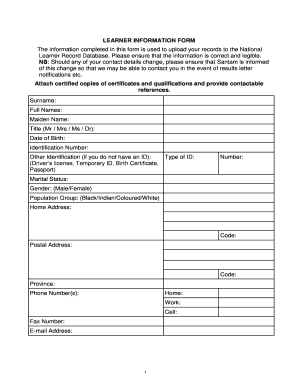
The Learner Information Form - Skills Programmes is a document used by learners in South Africa to provide essential personal and educational information required for skills programme registration.
pdfFiller scores top ratings on review platforms




Who needs Learner Info Form?
Explore how professionals across industries use pdfFiller.

Learner Info Form is needed by:
-
Learners seeking to enroll in skills programmes
-
Educational institutions requiring learner details
-
Employers in the Road Freight Chamber of TETA
-
Training providers managing skills assessments
-
Accreditation bodies like SAQA
Comprehensive Guide to Learner Info Form
What is the Learner Information Form - Skills Programmes?
The Learner Information Form is a critical document used in South Africa’s educational landscape, particularly in relation to skills programmes. This form collects essential information such as personal details, contact information, and educational background. The significance of this form is underscored by its requirement from the Road Freight Chamber of TETA, which plays a crucial role in assessment moderation and ensuring that learner data is accurately recorded and processed.
Purpose and Benefits of the Learner Information Form - Skills Programmes
This form is essential for various stakeholders, providing numerous benefits to both learners and educational institutions. By facilitating efficient data collection, it helps ensure compliance with TETA requirements and streamlines the organization and processing of skills programme applications. The use of this form can significantly enhance the alignment between learner information and the regulatory standards set by TETA.
Who Needs the Learner Information Form - Skills Programmes?
The Learner Information Form is designed for several key groups. Primarily, learners enrolling in skills programmes are required to complete it. Educational institutions and training providers also need this information to effectively track and manage learner registration. Additionally, regulatory bodies rely on the data collected through this form to ensure compliance and uphold educational standards.
How to Fill Out the Learner Information Form - Skills Programmes Online
Filling out the Learner Information Form online using pdfFiller is a straightforward process. Follow these steps:
-
Navigate to the relevant section of pdfFiller.
-
Input your personal and educational information in the designated fields.
-
Ensure that all required fields are completed accurately.
-
Double-check your entries for completeness and correctness.
-
Proceed to the signature section for validation.
Following these guidelines will help ensure your submission is accurate and complete.
Common Errors and How to Avoid Them When Filling the Learner Information Form
When completing the Learner Information Form, certain mistakes commonly arise. These errors include:
-
Incomplete personal or educational details.
-
Submitting inaccurate contact information.
-
Omitting required signatures from the form.
To avoid these pitfalls, it is crucial to verify all information before submission. Taking the time to double-check details can help enhance the chances of successful form completion.
How to Sign the Learner Information Form - Skills Programmes
Signing the Learner Information Form is a vital step in the submission process. Every learner must provide a valid signature, which can be done digitally through pdfFiller for added convenience. Digital signatures not only streamline the process but also enhance security. To eSign within the pdfFiller platform, follow the on-screen instructions provided during the signing step.
Security and Compliance for the Learner Information Form - Skills Programmes
Data security is paramount when handling the Learner Information Form. pdfFiller implements robust security measures, including encryption, to protect sensitive information. Furthermore, compliance with standards such as GDPR and HIPAA ensures that all learner data is managed responsibly. Safeguarding this information is essential for maintaining trust and integrity in the educational process.
How to Submit the Learner Information Form - Skills Programmes
Submitting the Learner Information Form can be done through several methods. Learners can choose to submit their forms online, via email, or through traditional postal services. After submission, tracking confirmation is recommended to keep abreast of processing timelines. It's important to be aware of these timelines to anticipate when the application will be reviewed and processed.
What Happens After You Submit the Learner Information Form - Skills Programmes
Once the Learner Information Form is submitted, several follow-up processes take place. TETA will conduct an assessment of the submitted information, and learners can check their application status online. It is crucial to know what to expect regarding approval notifications and any further actions that may be required following submission.
Utilize pdfFiller to Complete Your Learner Information Form - Skills Programmes
Leveraging pdfFiller for your Learner Information Form provides numerous advantages. The platform offers an intuitive interface that makes form filling seamless and efficient. Users have reported positive experiences, praising the ease of use and editing capabilities, which contribute to an overall smoother process when completing educational forms.
How to fill out the Learner Info Form
-
1.Access pdfFiller and search for 'Learner Information Form - Skills Programmes'. Click on the form to open it.
-
2.Familiarize yourself with the layout of the form, identifying sections for personal details, contact information, and educational background.
-
3.Gather the necessary information such as your full name, contact number, email address, and details of your previous education before starting the form.
-
4.Begin filling in the form by clicking on each field. Use the text box to input your answers; for checkboxes, simply click to select or deselect as needed.
-
5.Refer to the instructions provided on the form for each section to ensure all information is correctly entered.
-
6.After completing all fields, review your entries for accuracy. Make sure that all required sections are filled out completely.
-
7.To finalize, look for the signature field and use pdfFiller’s e-signature tools to sign your name, confirming your information is correct.
-
8.Once finished, save your completed form by selecting 'Save' or 'Download' options in pdfFiller. Choose the preferred file format and ensure you keep a copy for your records.
-
9.If required, submit the form directly through pdfFiller via email or by following the provided submission guidelines.

Who needs to complete the Learner Information Form?
The Learner Information Form must be completed by individuals enrolling in skills programmes to provide essential details required by training providers and accreditation bodies.
What information is required to complete the form?
You will need personal details such as your name, contact information, and prior educational background. Gather all relevant information before starting the form to expedite the process.
How do I submit the completed form?
After saving the completed form on pdfFiller, you can submit it via email or follow any specific submission instructions provided by the training provider or Road Freight Chamber of TETA.
Are there any deadlines for submitting this form?
Deadlines may vary depending on the specific skills programme. It is recommended to check with the educational institution or training provider for their specific submission cut-off dates.
What common mistakes should I avoid while filling out the form?
Ensure all required fields are filled out accurately, double-check spelling for all personal information, and remember to sign the form before submission. Omitting required data can cause processing delays.
Is there a fee associated with submitting this form?
Typically, there is no fee specifically for filling out the Learner Information Form. However, associated costs may be linked to the skills programme itself; verify with your training provider.
What happens after I submit the form?
Once submitted, the form will be processed by the relevant educational institution or training provider. You may receive communication regarding the next steps in the registration or assessment process.
Related Forms





Related Catalogs
Get the latest insights from our blog


If you believe that this page should be taken down, please follow our DMCA take down process
here
.
This form may include fields for payment information. Data entered in these fields is not covered by PCI DSS compliance.