
Last updated on
Oct 31, 2026

Get the free Authorization for Prescription Pick-Up
We are not affiliated with any brand or entity on this form

Fill out
Complete the form online in a simple drag-and-drop editor.

eSign
Add your legally binding signature or send the form for signing.

Share
Share the form via a link, letting anyone fill it out from any device.

Export
Download, print, email, or move the form to your cloud storage.
Why pdfFiller is the best tool for your documents and forms


End-to-end document management
From editing and signing to collaboration and tracking, pdfFiller has everything you need to get your documents done quickly and efficiently.
Accessible from anywhere
pdfFiller is fully cloud-based. This means you can edit, sign, and share documents from anywhere using your computer, smartphone, or tablet.
Secure and compliant
pdfFiller lets you securely manage documents following global laws like ESIGN, CCPA, and GDPR. It's also HIPAA and SOC 2 compliant.
What is Prescription Pick-Up Authorization
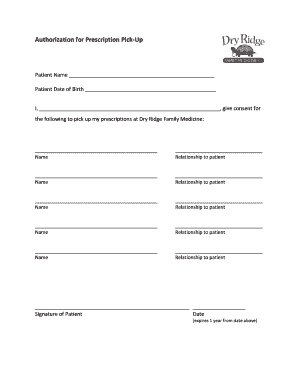
The Authorization for Prescription Pick-Up is a medical consent form used by patients to authorize individuals to collect their prescriptions on their behalf.
pdfFiller scores top ratings on review platforms




Who needs Prescription Pick-Up Authorization?
Explore how professionals across industries use pdfFiller.

Prescription Pick-Up Authorization is needed by:
-
Patients needing assistance with prescription collection
-
Family members authorized to pick up medications
-
Caregivers managing healthcare tasks for patients
-
Pharmacists confirming authorized individuals for prescription release
-
Healthcare providers requiring patient consent for information sharing
Comprehensive Guide to Prescription Pick-Up Authorization
Understanding the Authorization for Prescription Pick-Up
The Authorization for Prescription Pick-Up form serves as a critical document in healthcare settings, enabling patients to allow specific individuals to collect their prescriptions on their behalf. This patient authorization form is essential for safeguarding patient privacy and ensuring that prescriptions are picked up only by designated individuals. By using this form, patients can simplify the retrieval process, which is particularly beneficial in busy healthcare environments.
Purpose and Benefits of the Authorization for Prescription Pick-Up
This medical consent form is designed to address several key needs. It allows family members or caregivers to assist patients who may have difficulty picking up their medications. Additionally, it facilitates compliance with healthcare regulations, thereby protecting patient information. The primary benefits include:
-
Designated individuals can pick up prescriptions, ensuring convenience.
-
Enhances compliance with privacy laws, safeguarding patient details.
-
Reduces stress for patients by simplifying the prescription retrieval process.
Key Features of the Authorization for Prescription Pick-Up Form
The Authorization for Prescription Pick-Up form encompasses several essential elements that users should be aware of. Key features include the following sections:
-
Patient name and authorized person's name.
-
Signatures from both the patient and the designated individual.
-
Identification requirements that must be met during pick-up.
-
Fillable form options available through platforms like pdfFiller.
Who Should Use the Authorization for Prescription Pick-Up?
This form is particularly useful for various users, including:
-
Patients requiring assistance in collecting their prescriptions.
-
Family members or caregivers designated to help with this task.
-
Healthcare professionals guiding patients in navigating the authorization process.
How to Complete the Authorization for Prescription Pick-Up Form
Filling out the Authorization for Prescription Pick-Up form requires attention to detail. To ensure the form is completed correctly, follow these steps:
-
Enter the patient’s name and details accurately.
-
Provide names and relationships of authorized individuals.
-
Ensure all parties review the document and provide their signatures.
-
Utilize pdfFiller to ease the completion process with fillable features.
Accurate information is crucial, as improper signatures can lead to delays in prescription collection.
Common Challenges and Solutions in Using the Authorization for Prescription Pick-Up
Users may encounter common challenges when completing the Authorization for Prescription Pick-Up form. Typical issues include:
-
Missing signatures or incorrect identification during pick-up.
-
Difficulty in verifying the accuracy of completed forms.
For assistance, users can access resources provided by pdfFiller's support team to navigate any concerns effectively.
Submission and Processing of the Authorization for Prescription Pick-Up
Submitting the Authorization for Prescription Pick-Up form can vary based on the healthcare provider's policies. Users should be informed of the following:
-
Methods for submitting the form, which can include fax, email, or in-person delivery.
-
Expected processing times and how to confirm receipt of the authorization.
-
Possible scenarios where the form might be rejected and what corrections may be needed.
Security and Compliance for the Authorization for Prescription Pick-Up
Data protection is paramount when handling sensitive information related to the Authorization for Prescription Pick-Up form. Users should know that:
-
pdfFiller employs 256-bit encryption to safeguard user data.
-
All processes comply with HIPAA and GDPR guidelines to ensure patient privacy.
-
It is essential to protect all sensitive information to prevent unauthorized access.
Getting Started with pdfFiller to Complete Your Authorization for Prescription Pick-Up
To use pdfFiller for completing the Authorization for Prescription Pick-Up form:
-
Visit the pdfFiller website to access the form easily.
-
Utilize features such as eSign and secure storage for enhanced convenience.
-
Explore the platform's capabilities for a smooth and reliable experience.
How to fill out the Prescription Pick-Up Authorization
-
1.Access the Authorization for Prescription Pick-Up form on pdfFiller by searching for the form name in the search bar or navigating to the healthcare forms section.
-
2.Open the form in an editable format to start entering your information.
-
3.Before filling out the form, gather necessary information such as the names and relationships of the authorized individuals, as well as your signature.
-
4.Begin filling in the blank fields on the form, including details about the authorized persons and their relationship with you.
-
5.Ensure each authorized person is mentioned to avoid any confusion during the prescription pick-up process.
-
6.Once you have filled in all required fields, review the form for accuracy, checking for spelling errors and completeness of information.
-
7.Finalize the form to your satisfaction and ensure you have signed where indicated, as this is crucial for its validity.
-
8.To save your completed form, click the save button, where you will be able to choose the format for downloading, such as PDF.
-
9.Submit the completed form directly to your pharmacy if they accept electronic submissions, or download and print it for in-person delivery.

Who needs to sign the Authorization for Prescription Pick-Up?
Both the patient and the authorized persons listed on the form must sign it. Patient signatures ensure consent, while authorized individuals must sign to complete the collection process.
Can I authorize more than four individuals for prescription pick-up?
The form is designed to include up to four authorized persons. For additional agents, you may need to create another authorization form.
Do I need to notarize the Authorization for Prescription Pick-Up form?
No, notarization is not required for this form. However, signatures from both the patient and the authorized individuals are mandatory.
What identification do authorized persons need to show upon picking up the prescription?
Each authorized person must present valid picture identification, such as a driver’s license or state ID, when picking up the prescriptions.
Is there a specific time limit to use the Authorization for Prescription Pick-Up form?
While there is no strict deadline, it is recommended to complete and submit the form before the prescription is due for pickup to ensure a smooth process.
What should I do if I make a mistake on the form?
If a mistake is made, simply correct the information on the form. Make sure to review the changes before finalizing and submitting the form.
Where can I submit the completed Authorization for Prescription Pick-Up form?
You can submit the completed form to your pharmacy in person, or if they accept electronic submissions, you may send it via email or their online platform.
Related Forms





Related Catalogs
Get the latest insights from our blog


If you believe that this page should be taken down, please follow our DMCA take down process
here
.
This form may include fields for payment information. Data entered in these fields is not covered by PCI DSS compliance.