
Last updated on
Oct 31, 2026

VA For Children Sake Annual TB Test Results 2008-2026 free printable template
pdfFiller is not affiliated with any government organization

Fill out
Complete the form online in a simple drag-and-drop editor.

eSign
Add your legally binding signature or send the form for signing.

Share
Share the form via a link, letting anyone fill it out from any device.

Export
Download, print, email, or move the form to your cloud storage.
Why pdfFiller is the best tool for your documents and forms


End-to-end document management
From editing and signing to collaboration and tracking, pdfFiller has everything you need to get your documents done quickly and efficiently.
Accessible from anywhere
pdfFiller is fully cloud-based. This means you can edit, sign, and share documents from anywhere using your computer, smartphone, or tablet.
Secure and compliant
pdfFiller lets you securely manage documents following global laws like ESIGN, CCPA, and GDPR. It's also HIPAA and SOC 2 compliant.
What is VA For Children Sake Annual TB Test Results
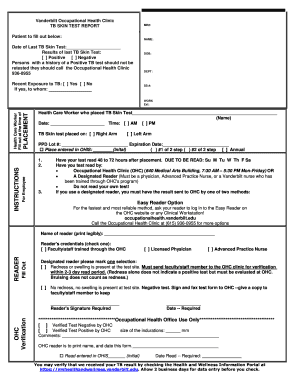
The TB Test Results Form is a healthcare document used by physicians to record and document the results of a TB/PPD test for children.
pdfFiller scores top ratings on review platforms




Who needs VA For Children Sake Annual TB Test Results?
Explore how professionals across industries use pdfFiller.

VA For Children Sake Annual TB Test Results is needed by:
-
Physicians providing TB testing for children
-
Parents requiring documentation of test results
-
Healthcare facilities managing child health records
-
School officials needing health compliance documentation
-
Legal representatives for medical authorization
Comprehensive Guide to VA For Children Sake Annual TB Test Results
What is the TB Test Results Form?
The TB Test Results Form is a crucial document used in healthcare to record the outcomes of TB/PPD testing for children, specifically as mandated in Virginia. This form includes essential fields such as the child's name, the test date, the result, and any physician comments, along with a designated signature line for the physician. Its significance in pediatric healthcare cannot be overstated, as accurate results help safeguard children's health and support necessary medical documentation.
Purpose and Benefits of the TB Test Results Form
Recording TB test results is vital for maintaining comprehensive health records for children. The benefits of the TB Test Results Form extend to various stakeholders:
-
Physicians can easily track and review a child's TB status.
-
Parents gain peace of mind knowing their child's health status is documented.
-
Schools and organizations often require proof of testing for enrollment and participation in activities.
Overall, this form plays a significant role in facilitating effective communication regarding child health issues.
Key Features of the TB Test Results Form
The TB Test Results Form is designed with multiple user-friendly features to enhance its usability:
-
Fillable fields allow for easy entry of critical information such as the child's name, test date, and result options, which include negative and positive outcomes.
-
A signature line for the physician ensures the authenticity of the document.
-
A comments section is available for special cases, particularly when testing is not required.
Who Needs the TB Test Results Form?
The TB Test Results Form is pertinent for several groups:
-
Parents or guardians of children undergoing TB testing.
-
Healthcare providers who administer TB tests.
-
Schools and organizations that request documentation of a child's TB testing status.
This form serves as a fundamental component in various healthcare and educational settings.
How to Fill Out the TB Test Results Form Online (Step-by-Step)
Completing the TB Test Results Form online is a straightforward process. Follow these steps for accurate submission:
-
Access the online form through the designated platform.
-
Input the child's name and date of the test in the respective fields.
-
Select the result, choosing between negative or positive.
-
Utilize the comments section if applicable, and ensure the physician provides a signature.
-
Double-check all information for accuracy before final submission.
Submission Methods for the TB Test Results Form
Once the TB Test Results Form is completed, various submission methods are available:
-
Online submission through pdfFiller for immediate processing.
-
Mailing options for those who prefer traditional methods.
-
In-person submission details are provided for Virginia-based submissions.
Be aware of any potential fees and processing times for submissions to ensure timely documentation.
What Happens After You Submit the TB Test Results Form?
After the TB Test Results Form is submitted, users can expect the following:
-
Confirmation of receipt from the processing entity.
-
Details on how to track the status of the submission if tracking is available.
-
Guidelines on possible actions if the form is rejected or requires amendments.
Security and Compliance for Handling the TB Test Results Form
The TB Test Results Form requires stringent security measures, as it contains sensitive medical information. Important aspects include:
-
Overview of the security measures in place to protect sensitive data.
-
Compliance with HIPAA and GDPR regulations to safeguard personal information.
-
Utilization of pdfFiller's secure handling practices ensures the protection of user data.
Example of a Completed TB Test Results Form
Providing a visual reference, an example of a completed TB Test Results Form helps users understand proper entries:
-
A filled-out sample that showcases all sections appropriately completed.
-
Annotations highlighting what proper entries should look like.
-
The importance of using the example to avoid common mistakes during completion.
Utilizing pdfFiller for Your TB Test Results Form Needs
pdfFiller simplifies the process of filling out the TB Test Results Form. Users benefit from:
-
Capacity to edit, sign, and share forms easily online.
-
Convenience compared to traditional methods of paperwork.
-
Encouragement to start creating the form today for a hassle-free experience.
How to fill out the VA For Children Sake Annual TB Test Results
-
1.Begin by accessing the TB Test Results Form on pdfFiller. Use the search feature to locate the specific form quickly.
-
2.Once the form is open, familiarize yourself with the fillable fields, including sections for the child's name, test date, and results.
-
3.Before starting the filling process, gather all necessary details such as the child's full name, date of the TB test, and results indicating whether it is 'Negative' or 'Positive'.
-
4.Click on each fillable field to enter the relevant information using your keyboard. Ensure accuracy, especially in the child's name and dates.
-
5.For test results, use the provided checkboxes to indicate whether the result is 'Negative' or 'Positive'.
-
6.If the child does not require the test, utilize the section for physician comments to provide explanations as necessary.
-
7.After filling in all the required fields, review the completed form for any errors or omissions. Verify that all information is complete and accurate.
-
8.Once satisfied with the completion of the form, choose the save option to store the document securely on pdfFiller.
-
9.You can also download the form in PDF format or choose to submit it directly from pdfFiller, following any organization-specific submission guidelines.

Who is eligible to complete the TB Test Results Form?
The TB Test Results Form should be completed by a licensed physician who is administering the TB test for a child, ensuring that all necessary information is accurately recorded.
Is there a deadline for submitting the TB Test Results Form?
While specific deadlines can vary based on the institution or requirement, it is advisable to submit the TB Test Results Form as soon as test results are available to ensure timely documentation for school or medical records.
What is the process for submitting the completed TB Test Results Form?
Completed forms can typically be submitted electronically through pdfFiller or printed and handed in to the appropriate school or healthcare facility, depending on their submission guidelines.
Are there any supporting documents required with the form?
Generally, the TB Test Results Form does not require additional documentation unless specifically requested by a healthcare facility or school. It’s always good to check their requirements beforehand.
What are common mistakes to avoid when filling out the form?
Common mistakes include misspelling the child's name, incorrect dates, and failure to select the appropriate test results. Double-checking all entries before submission can help avoid these errors.
How long does it take to process the TB Test Results Form?
Processing times for the TB Test Results Form can vary, but most healthcare providers aim to input the information into their systems within a few days after submission.
What if I need to revise the information on the TB Test Results Form?
If you need to revise any information after submission, contact the receiving healthcare facility or school to discuss their procedures for corrections, which may involve completing a new form.
Related Forms





Related Catalogs
Get the latest insights from our blog


If you believe that this page should be taken down, please follow our DMCA take down process
here
.
This form may include fields for payment information. Data entered in these fields is not covered by PCI DSS compliance.