
Last updated on
Oct 31, 2026

Temple City Unified School District Interdistrict Permit Request 2017-2026 free printable template
pdfFiller is not affiliated with any government organization

Fill out
Complete the form online in a simple drag-and-drop editor.

eSign
Add your legally binding signature or send the form for signing.

Share
Share the form via a link, letting anyone fill it out from any device.

Export
Download, print, email, or move the form to your cloud storage.
Why pdfFiller is the best tool for your documents and forms


End-to-end document management
From editing and signing to collaboration and tracking, pdfFiller has everything you need to get your documents done quickly and efficiently.
Accessible from anywhere
pdfFiller is fully cloud-based. This means you can edit, sign, and share documents from anywhere using your computer, smartphone, or tablet.
Secure and compliant
pdfFiller lets you securely manage documents following global laws like ESIGN, CCPA, and GDPR. It's also HIPAA and SOC 2 compliant.
What is Temple City Unified School District Interdistrict Permit Request
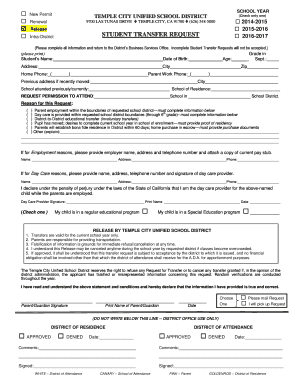
The Temple City Unified School District Student Transfer Request is a document used by parents or guardians to request a transfer of their child from one elementary school to another within the district.
pdfFiller scores top ratings on review platforms




Who needs Temple City Unified School District Interdistrict Permit Request?
Explore how professionals across industries use pdfFiller.

Temple City Unified School District Interdistrict Permit Request is needed by:
-
Parents or guardians of students in Temple City Unified School District
-
Families seeking to change their child's elementary school
-
School administrators overseeing student transfers
-
Education professionals assisting with student enrollment
-
Community members interested in district policies on school transfers
Comprehensive Guide to Temple City Unified School District Interdistrict Permit Request
What is the Temple City Unified School District Student Transfer Request?
The Temple City Unified School District Student Transfer Request is a form designed for parents or guardians seeking to transfer their child from one elementary school to another within the district. This form is crucial when families relocate or wish to enhance their child's educational experience. Typically, parents should complete this request at the beginning of a school year or when enrollment needs change.
Eligibility to fill out the request includes any parent or guardian of a student currently enrolled within the district. Ensuring that this form is submitted on time can facilitate a smoother transfer process.
Purpose and Benefits of the Temple City Unified School District Student Transfer Request
The primary purpose of submitting the TCUSD transfer request is to accommodate educational needs that may not be met in a current school setting. Transfers can provide students with access to specialized programs, enhanced facilities, or particular staff expertise that can better support their learning.
Benefits of filing this request include improved educational opportunities, greater school choice, and the ability to align a child's schooling with their interests and needs.
Eligibility Criteria for the Temple City Unified School District Student Transfer Request
To qualify for the Temple City Unified School District Student Transfer Request, applicants must meet specific criteria, including:
-
Current enrollment in an elementary school within the district.
-
Residency within the boundaries of the district.
-
Consideration of available space at the desired school.
-
Understanding transportation responsibilities if the transfer is approved.
It is essential for parents to review these criteria to ensure eligibility before submitting the request.
How to Fill Out the Temple City Unified School District Student Transfer Request Online (Step-by-Step)
Filling out the Temple City Unified School District Student Transfer Request online is straightforward. Follow these steps to ensure completion:
-
Access the form through the designated platform.
-
Provide the student's name and date of birth.
-
Input the current and desired school addresses.
-
State the reason for the transfer in the appropriate section.
-
Sign the form by the parent or guardian.
This structured approach helps ensure all necessary fields are completed accurately, thus minimizing the risk of errors.
Common Errors and How to Avoid Them
While completing the request, several common mistakes can occur, such as:
-
Incomplete or inaccurate personal information.
-
Failure to sign the request.
-
Missing crucial documents that support the request.
To avoid these pitfalls, double-check all entries and confirm required documentation is attached before submission.
Submission Methods and Delivery for the Temple City Unified School District Student Transfer Request
Completed forms can be submitted electronically through the designated online platform, allowing for efficient processing. If using pdfFiller, users can leverage its online features for quick submission. After submission, a confirmation notification will typically be sent to confirm successful receipt of the request.
What Happens After You Submit the Temple City Unified School District Student Transfer Request?
Once submitted, the request will undergo a review process, where district officials will assess the application based on established criteria. Applicants can expect an estimate regarding the timeline for decisions, which may vary depending on specific circumstances.
Users can track the status of their submission through communication channels provided by the district, ensuring they remain informed throughout the process.
Security and Compliance for the Temple City Unified School District Student Transfer Request
When handling sensitive information, security is paramount. The platform pdfFiller employs 256-bit encryption and adheres to compliance standards such as SOC 2 Type II, HIPAA, and GDPR, ensuring that all data is protected throughout the transfer request process.
Users can be confident that their personal information remains secure and private while filling out the Temple City Unified School District Student Transfer Request.
How to Correct or Amend the Temple City Unified School District Student Transfer Request
If errors are identified after submission, users should reach out to the district office as soon as possible for guidance on amending the request. The process may involve a simple correction or could require resubmitting a new application if the original request was denied.
Prompt action can help address any issues that may arise, allowing for a smoother experience with the transfer process.
Empowering Your Transfer Experience with pdfFiller
Utilizing pdfFiller to fill out the Temple City Unified School District Student Transfer Request streamlines the process significantly. The platform is designed for ease of use, enabling parents and guardians to fill out, sign, and securely share forms without hassle.
With additional capabilities like eSigning and secure document sharing, pdfFiller enhances the user experience, making it the perfect solution for managing school transfer requests effectively.
How to fill out the Temple City Unified School District Interdistrict Permit Request
-
1.Access the Temple City Unified School District Student Transfer Request form on pdfFiller by searching for 'Temple City student transfer request' on the homepage.
-
2.Once the form opens, review the fields available. Use the panel on the right to see options for filling in the information electronically.
-
3.Before you start, ensure you have all the necessary information ready. This includes the student's name, date of birth, address, and reason for the transfer.
-
4.Fill in the required fields, including the student's personal details. You can navigate through the form using 'Tab' or your mouse to click each field.
-
5.For the parent/guardian's section, input your name and provide the necessary signature. If you're filling it out digitally, make sure to use the signature tool available in pdfFiller.
-
6.After completing the form, carefully review all entered information for accuracy. Make any necessary corrections before finalizing.
-
7.Once satisfied, save the completed form by clicking 'Save' on the top right corner. You can also download a copy of the form for your records.
-
8.To submit the form, use the 'Submit' option in pdfFiller, selecting the appropriate submission method outlined by the district.

Who is eligible to use the Temple City Unified School District Student Transfer Request?
Eligibility for this transfer request form requires that the applicant is a parent or guardian of a student currently enrolled in the Temple City Unified School District.
What documents are needed to support the transfer request?
While specifics may vary, typical supporting documents might include proof of residency, records of the student's current enrollment, and any relevant academic or behavioral reports as specified by the district.
Is there a deadline for submitting the Student Transfer Request?
Yes, forms should be submitted before the school year's start or according to the district's specified enrollment deadlines. Check the district website for exact dates.
How do I submit the completed transfer request form?
The completed Temple City Unified School District Student Transfer Request form can typically be submitted electronically through pdfFiller, or you may print it out and deliver it to the appropriate school office.
What are common mistakes to avoid on the transfer request form?
Ensure all fields are filled in completely and legibly. Common mistakes include missing signatures, incorrect dates, and not providing the reason for the transfer which may lead to delays.
How long does it take to process the transfer request?
Processing times may vary, but typically, it can take a few weeks to a month. It's best to follow up with the school district if you do not receive a response within that timeframe.
Can I appeal if my transfer request is denied?
Yes, if your transfer request is denied, you should receive information on how to appeal the decision. It's essential to check with the district for their specific appeals process.
Temple City Unified School District Interdistrict Permit Request Form Versions
Related Forms



Get the latest insights from our blog


If you believe that this page should be taken down, please follow our DMCA take down process
here
.
This form may include fields for payment information. Data entered in these fields is not covered by PCI DSS compliance.