
Last updated on
Oct 31, 2026
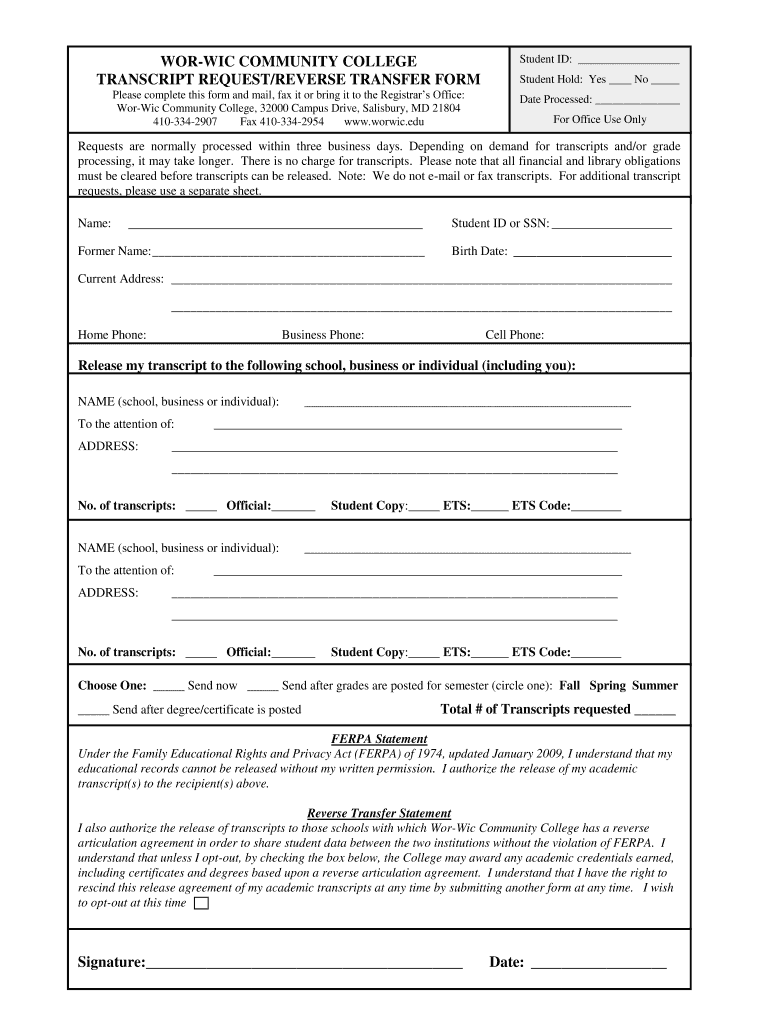
Wor-Wic Community College Transcript RequestReverse Transfer free printable template
pdfFiller is not affiliated with any government organization

Fill out
Complete the form online in a simple drag-and-drop editor.

eSign
Add your legally binding signature or send the form for signing.

Share
Share the form via a link, letting anyone fill it out from any device.

Export
Download, print, email, or move the form to your cloud storage.
Why pdfFiller is the best tool for your documents and forms


End-to-end document management
From editing and signing to collaboration and tracking, pdfFiller has everything you need to get your documents done quickly and efficiently.
Accessible from anywhere
pdfFiller is fully cloud-based. This means you can edit, sign, and share documents from anywhere using your computer, smartphone, or tablet.
Secure and compliant
pdfFiller lets you securely manage documents following global laws like ESIGN, CCPA, and GDPR. It's also HIPAA and SOC 2 compliant.
What is Wor-Wic Community College Transcript RequestReverse Transfer
The Wor-Wic Community College Transcript Request Form is an education document used by students to request their academic transcripts efficiently.
pdfFiller scores top ratings on review platforms




Who needs Wor-Wic Community College Transcript RequestReverse Transfer?
Explore how professionals across industries use pdfFiller.

Wor-Wic Community College Transcript RequestReverse Transfer is needed by:
-
Current students of Wor-Wic Community College
-
Alumni seeking academic records for further education
-
Individuals applying for jobs requiring transcripts
-
Students participating in reverse transfer programs
-
Parents requesting transcripts on behalf of their children
-
Admissions offices at other educational institutions
Comprehensive Guide to Wor-Wic Community College Transcript RequestReverse Transfer
What is the Wor-Wic Community College Transcript Request Form?
The Wor-Wic Community College Transcript Request Form serves as an essential document for students seeking to obtain their academic transcripts. This form is crucial for accessing educational records, enabling students to provide verifiable evidence of their academic history for various purposes. Compliance with legal standards, such as the FERPA statement, ensures that students' academic records are handled with the utmost confidentiality and authorization.
Purpose and Benefits of the Transcript Request Form
The main purpose of the transcript request form is to facilitate students in obtaining their academic transcripts. This document provides significant benefits, including:
-
Access to future education opportunities, allowing students to apply to other institutions.
-
Verification of academic history for job applications or transfer processes.
-
The convenience of requesting and obtaining transcripts online without any fees.
Key Features of the Wor-Wic Community College Transcript Request Form
The transcript request form includes specific fields and options that users must fill out correctly for successful processing. Key features of the form are:
-
Required fields like student ID, name, and contact address.
-
Options for the number and type of transcripts requested, ensuring flexibility.
-
The necessity of a signature, signifying the student's authorization for the release of documents.
Who Needs to Fill Out the Transcript Request Form?
This form is intended for various individuals seeking academic transcripts, including:
-
Current students wanting to continue their education.
-
Alumni needing records for job applications.
-
Former students who may require transcripts for further studies or employment.
It is essential for users to meet any eligibility criteria and have necessary documentation ready when submitting the form.
How to Fill Out the Wor-Wic Community College Transcript Request Form Online
Filling out the transcript request form online can be completed in a few straightforward steps:
-
Access the form and enter your student ID, name, and address accurately.
-
Select the number and type of transcripts required.
-
Provide your authorization by signing the form digitally.
It’s advisable to review your entries carefully, check formatting, and utilize pdfFiller’s editing tools to ensure smooth completion.
Submission Methods for the Transcript Request Form
Students have several options for submitting the completed transcript request form:
-
Digital submission through an online platform for immediate processing.
-
Physical submission by mailing or delivering the form directly to the Registrar’s Office.
Students should also be aware of the typical processing time and understand the security measures in place to protect sensitive information during this process.
What Happens After You Submit the Transcript Request Form?
After submission, students can expect the following:
-
Overview of processing and delivery times, providing clarity on when to expect responses.
-
Confirmation methods for tracking the status of transcript requests.
-
Information on common reasons for request rejections and steps to rectify those issues.
Using pdfFiller to Complete Your Transcript Request Form
pdfFiller offers a practical solution for managing your transcript request form efficiently. Key capabilities include:
-
Editing and signing the document securely online.
-
Storing completed forms and important documents safely in the cloud.
Utilizing pdfFiller ensures that your experience in filling out the form is seamless and secure, contributing to the protection of sensitive information.
Privacy and Data Protection for Transcript Requests
Data security is a top priority when handling transcript requests:
-
Compliance with legal standards, such as FERPA, HIPAA, and GDPR, underlines the institution's commitment to protecting privacy.
-
Confidential handling of academic records assures students that their information is treated with confidentiality.
-
The data retention policies that pertain to transcript requests ensure proper management and disposal of personal information.
Sample Completed Wor-Wic Community College Transcript Request Form
To aid in the completion process, a sample of the filled-out transcript request form is available. Important details to note include:
-
Common fields highlighted for clarity in completion.
-
Correct examples of typically filled-out information to guide users.
By examining a completed form, users can ensure accuracy and adherence to form requirements when submitting their requests.
How to fill out the Wor-Wic Community College Transcript RequestReverse Transfer
-
1.To begin, visit pdfFiller and navigate to the template library. Search for the 'Wor-Wic Community College Transcript Request Form'.
-
2.Once you find the form, click to open it in pdfFiller’s editable interface.
-
3.Before filling out the form, gather necessary information such as your Student ID, full name, current address, and details of the transcript recipient.
-
4.Start completing the form by entering your personal information in the designated fields. Ensure accuracy to avoid processing delays.
-
5.Use the checkboxes to indicate the number and type of transcripts you need. Be clear about whether you need official or unofficial transcripts.
-
6.Make sure to read the FERPA statement and provide your signature in the appropriate field to authorize the release of your transcripts.
-
7.After filling in all fields, review your entries for accuracy. Check for any blank fields or errors that may impede processing.
-
8.Once satisfied with the information provided, you can save your work within pdfFiller. Choose 'Save', then select your preferred format (PDF, Word, etc.) for download.
-
9.To submit the form, you may either download and email it to the Registrar’s Office or use the submission features provided by pdfFiller.

Who is eligible to use the Wor-Wic Community College Transcript Request Form?
Any current student or alumni of Wor-Wic Community College can use this form to request academic transcripts. You need to provide your Student ID and personal details to process the request.
Is there a deadline for submitting the transcript request?
There isn't a specific deadline for submitting the transcript request form. However, if you need the transcripts for specific timelines, it's advisable to submit the form at least a few weeks in advance.
How can I submit my completed transcript request form?
The completed transcript request form can be submitted by emailing it to the Registrar's Office after downloading from pdfFiller. Ensure all fields are complete and signed to avoid delays.
What supporting documents do I need to provide with my request?
Typically, no additional documents are required; however, you must include your Student ID and personal information as stipulated on the form. Always verify with the Registrar’s Office for any specific requirements.
What common mistakes should I avoid when filling out this form?
Common mistakes include missing fields, incorrect Student ID, and failing to provide a signature. Double-check each section to ensure all required information is complete and accurate.
How long does it take to process my transcript request?
Processing time for transcript requests can vary but typically takes a few business days. It's advisable to check directly with the Registrar’s Office for more specific timelines.
Are there any fees associated with requesting transcripts?
There are no fees for requesting transcripts through the Wor-Wic Community College Transcript Request Form, as stated within the form's description.
Related Forms



Get the latest insights from our blog


If you believe that this page should be taken down, please follow our DMCA take down process
here
.
This form may include fields for payment information. Data entered in these fields is not covered by PCI DSS compliance.