
Last updated on
Oct 31, 2026

TX Nutrition 1st Patient Comprehensive Assessment Questionnaire 2015-2026 free printable template
pdfFiller is not affiliated with any government organization

Fill out
Complete the form online in a simple drag-and-drop editor.

eSign
Add your legally binding signature or send the form for signing.

Share
Share the form via a link, letting anyone fill it out from any device.

Export
Download, print, email, or move the form to your cloud storage.
Why pdfFiller is the best tool for your documents and forms


End-to-end document management
From editing and signing to collaboration and tracking, pdfFiller has everything you need to get your documents done quickly and efficiently.
Accessible from anywhere
pdfFiller is fully cloud-based. This means you can edit, sign, and share documents from anywhere using your computer, smartphone, or tablet.
Secure and compliant
pdfFiller lets you securely manage documents following global laws like ESIGN, CCPA, and GDPR. It's also HIPAA and SOC 2 compliant.
What is TX Nutrition 1st Patient Comprehensive Assessment Questionnaire
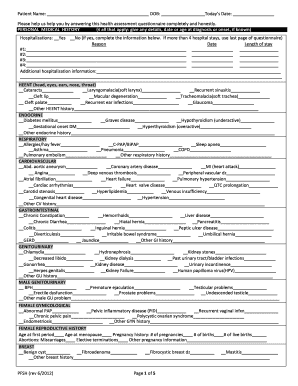
The Patient Comprehensive Assessment Questionnaire is a medical history form used by patients to report health concerns, symptoms, and lifestyle habits to healthcare providers for effective health assessment.
pdfFiller scores top ratings on review platforms




Who needs TX Nutrition 1st Patient Comprehensive Assessment Questionnaire?
Explore how professionals across industries use pdfFiller.

TX Nutrition 1st Patient Comprehensive Assessment Questionnaire is needed by:
-
Patients seeking to evaluate their health status
-
Healthcare providers conducting patient assessments
-
Clinics requiring comprehensive intake forms
-
Researchers analyzing patient health trends
-
Insurance companies needing health documentation
-
Health coaches monitoring client wellness
Comprehensive Guide to TX Nutrition 1st Patient Comprehensive Assessment Questionnaire
What is the Patient Comprehensive Assessment Questionnaire?
The Patient Comprehensive Assessment Questionnaire is a crucial healthcare form designed to aid both patients and healthcare providers in gathering essential health information. Its primary purpose is to assess patient health by capturing a wide range of data, including symptoms, medical history, and lifestyle habits. By utilizing this patient assessment questionnaire, healthcare professionals can gain a clearer understanding of patients’ health concerns and circumstances.
Purpose and Benefits of the Patient Comprehensive Assessment Questionnaire
This questionnaire serves multiple purposes that significantly benefit both patients and healthcare providers. Firstly, it helps healthcare providers understand patient health concerns and history, which is vital for effective diagnosis and treatment. Secondly, the data collected aids in creating personalized treatment plans that cater specifically to the individual needs of each patient. Additionally, filling out the health survey template encourages patients to take an active role in monitoring their health, which can lead to better health outcomes.
Key Features of the Patient Comprehensive Assessment Questionnaire
The Patient Comprehensive Assessment Questionnaire includes several important features that enhance its usability. Key elements of the form consist of:
-
Fillable fields and checkboxes that simplify data entry.
-
Sections dedicated to lifestyle habits, major health concerns, and detailed symptoms checklist.
-
Robust security features that ensure data is protected during submission and storage.
These features make the patient intake form functional and user-friendly, allowing patients to easily provide comprehensive health information.
Who Needs the Patient Comprehensive Assessment Questionnaire?
This assessment is intended for a variety of individuals. Specifically, it is essential for patients seeking medical advice or treatment to provide detailed health insights. Additionally, individuals needing evaluations for wellness checks will find this questionnaire beneficial. Multiple healthcare settings, including clinics, hospitals, and private practices, may require this assessment to ensure that patients receive appropriate care.
How to Fill Out the Patient Comprehensive Assessment Questionnaire Online (Step-by-Step)
Filling out the Patient Comprehensive Assessment Questionnaire online is a straightforward process. Follow these steps for efficient completion:
-
Access the form online and review the instructions provided.
-
Gather essential information such as medical history and current medications.
-
Start filling out the form, utilizing fillable fields and checkboxes where applicable.
-
Take advantage of the option to save your progress as you complete the information.
-
Submit the form securely upon completion using pdfFiller’s features.
By adhering to these steps, users will ensure that their submissions are thorough and accurate.
Common Errors and How to Avoid Them when Filling Out the Questionnaire
When completing the questionnaire, users may encounter common errors that can delay processing. To avoid these issues, consider the following tips:
-
Avoid missing information; ensure all required fields are filled out completely.
-
Double-check entries for accuracy to prevent incorrect information.
-
Utilize pdfFiller’s validation features to help identify potential errors before submission.
By taking these precautions, users can streamline their questionnaire submission and ensure prompt processing.
How to Download and Save the Patient Comprehensive Assessment Questionnaire PDF
For individuals who prefer offline access to the form, downloading it as a PDF is a simple process. Follow these instructions:
-
Navigate to the section of the website dedicated to the Patient Comprehensive Assessment Questionnaire.
-
Select the option to download the form as a PDF file.
-
Save and organize the completed forms in a designated electronic or physical folder.
-
Consider using pdfFiller to edit and modify the PDF for future use as necessary.
This ensures that users can easily manage their health records and documentation.
Where to Submit the Patient Comprehensive Assessment Questionnaire
Once the form is completed, understanding where to submit it is vital. Common submission methods include:
-
Online uploads via the healthcare provider’s patient portal.
-
Faxing the completed form to the designated medical office.
-
Delivering the form in person during an appointment.
It is crucial to check with healthcare providers regarding their preferred submission methods and to track submissions for confirmation of receipt to ensure nothing is lost.
Security and Compliance for the Patient Comprehensive Assessment Questionnaire
Concern for the security of sensitive information is paramount when filling out the Patient Comprehensive Assessment Questionnaire. pdfFiller implements robust security measures, including:
-
256-bit encryption to protect data during transmission.
-
Compliance with HIPAA and GDPR regulations to ensure data protection and privacy.
-
Best practices for safeguarding personal health information during form submission.
This commitment to security reassures users that their data is being handled responsibly and securely.
Experience the Benefits of Using pdfFiller for Your Patient Comprehensive Assessment Questionnaire
Utilizing pdfFiller not only enhances the form completion process but also adds a range of functionalities. Key capabilities include:
-
The ability to edit and fill out forms seamlessly online.
-
Options for document sharing and eSigning, simplifying collaboration.
-
Secure storage solutions for completed forms, ensuring they are easily accessible when needed.
By leveraging these features, users can enjoy a smooth and efficient form-filling experience with their Patient Comprehensive Assessment Questionnaire.
How to fill out the TX Nutrition 1st Patient Comprehensive Assessment Questionnaire
-
1.To access the Patient Comprehensive Assessment Questionnaire on pdfFiller, visit the main website and use the search bar to locate the form by its name.
-
2.Once located, click on the form title to open it in the pdfFiller interface, allowing for easy navigation.
-
3.Before filling in the form, gather all necessary information such as your medical history, a list of current medications, information about your diet, and exercise habits.
-
4.Navigating the form, start filling out the personal information fields such as your name and date at the top of the document.
-
5.Proceed to check off any symptoms you have experienced in the past year, ensuring that you mark each applicable checkbox accurately.
-
6.Provide detailed descriptions of your health concerns and lifestyle habits in the provided sections, using clear and concise language.
-
7.Use pdfFiller's tools to add notes or comments as necessary, ensuring that all relevant information is included.
-
8.After completing the form, carefully review each section for any missing information or errors.
-
9.Once satisfied, use the 'Save' function to store your completed form digitally.
-
10.Download your filled form to your device or submit it directly through pdfFiller if required by your healthcare provider.

Who is eligible to complete the Patient Comprehensive Assessment Questionnaire?
Anyone seeking healthcare services who wishes to provide their medical history and health concerns is eligible to complete this form. It is designed for adult patients but can also be filled out for minors by their guardians.
Is there a deadline for submitting the questionnaire?
There are typically no strict deadlines for submitting the Patient Comprehensive Assessment Questionnaire. However, it is recommended to complete and submit it before your scheduled medical appointment to ensure timely assessment by healthcare providers.
How do I submit the completed questionnaire?
Upon completing the form, you can submit it directly through pdfFiller if this option is available, or you can download it and email or bring it to your healthcare provider's office.
What supporting documents do I need to provide with this form?
Normally, no additional supporting documents are required to complete the Patient Comprehensive Assessment Questionnaire. However, having a list of current medications and any previous medical records can help provide a comprehensive overview.
What are some common mistakes to avoid when filling out the form?
Common mistakes include leaving fields blank, failing to mark all relevant symptoms, and not providing accurate information about medical history. Always review your completed form to avoid such errors.
How long does it take to process the Patient Comprehensive Assessment Questionnaire?
Processing time depends on the healthcare provider's protocol. Generally, once submitted, it should be reviewed by a provider prior to your appointment.
Can I edit my answers after I submit the form?
Once the form is submitted, changes typically cannot be made unless specifically allowed by the healthcare provider. Always double-check your answers before submission.
Related Forms





Related Catalogs
Get the latest insights from our blog


If you believe that this page should be taken down, please follow our DMCA take down process
here
.
This form may include fields for payment information. Data entered in these fields is not covered by PCI DSS compliance.