
Last updated on
Oct 31, 2026

AZ Payees Plus Intake Form 2017-2026 free printable template
pdfFiller is not affiliated with any government organization

Fill out
Complete the form online in a simple drag-and-drop editor.

eSign
Add your legally binding signature or send the form for signing.

Share
Share the form via a link, letting anyone fill it out from any device.

Export
Download, print, email, or move the form to your cloud storage.
Why pdfFiller is the best tool for your documents and forms


End-to-end document management
From editing and signing to collaboration and tracking, pdfFiller has everything you need to get your documents done quickly and efficiently.
Accessible from anywhere
pdfFiller is fully cloud-based. This means you can edit, sign, and share documents from anywhere using your computer, smartphone, or tablet.
Secure and compliant
pdfFiller lets you securely manage documents following global laws like ESIGN, CCPA, and GDPR. It's also HIPAA and SOC 2 compliant.
What is AZ Payees Plus Intake Form
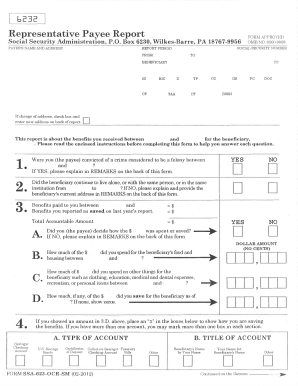
The Payees Plus Intake Form is a government document used by individuals applying for representative payee services to submit personal information for Social Security Administration processing.
pdfFiller scores top ratings on review platforms




Who needs AZ Payees Plus Intake Form?
Explore how professionals across industries use pdfFiller.

AZ Payees Plus Intake Form is needed by:
-
Individuals seeking representative payee services
-
Legal guardians of applicants requiring payee assistance
-
Social Security Administration personnel handling applications
-
Advocacy groups assisting individuals with disabilities
-
Family members supporting applicants in completing the form
Comprehensive Guide to AZ Payees Plus Intake Form
What is the Payees Plus Intake Form?
The Payees Plus Intake Form is a crucial document for individuals seeking representative payee services. This form serves the primary purpose of gathering essential personal information necessary for applying to become or designate a representative payee. It is closely related to the overall representative payee application process, especially within the context of the Arizona payee form.
Understanding the significance of the Payees Plus Intake Form is vital for prospective applicants who aim to secure assistance in managing benefits from the Social Security Administration.
Purpose and Benefits of the Payees Plus Intake Form
The primary motivation for using the Payees Plus Intake Form lies in its significance for individuals who require representative payee services. These services are designed to assist beneficiaries, ensuring their financial needs are managed effectively. By utilizing this form, applicants can streamline the submission process, making it more accessible and user-friendly through pdfFiller.
Some of the key advantages of the Payees Plus Intake Form include:
-
Enhanced ease of use for applicants.
-
Online accessibility allows for convenience and flexibility.
-
Efficient completion boosts the likelihood of a successful application.
Who Needs the Payees Plus Intake Form?
The target audience for the Payees Plus Intake Form includes individuals who might qualify as applicants for representative payee services. Generally, this includes those who require assistance in managing their financial affairs due to specific needs or circumstances.
Particular groups that may benefit from this form encompass:
-
Disabled individuals needing financial management support.
-
Legal guardians acting on behalf of beneficiaries.
By understanding who needs the form, applicants can better navigate the process and ensure they meet the necessary criteria.
How to Fill Out the Payees Plus Intake Form Online (Step-by-Step)
Filling out the Payees Plus Intake Form online can be accomplished through a straightforward process. Here is a step-by-step guide on how to accurately complete the form:
-
Begin by entering your NAME in the designated field.
-
Provide your SOCIAL SECURITY NUMBER (SSN).
-
Input your DATE OF BIRTH (DOB).
-
Fill in your current ADDRESS, PHONE, and EMAIL information.
-
If applicable, include details about your legal guardian.
-
Finally, ensure you provide your SIGNED INITIALS in the required section.
It is essential to pay attention to each detail and check for common pitfalls that might lead to errors in the submission process.
Field-by-Field Instructions for the Payees Plus Intake Form
Completing the Payees Plus Intake Form requires careful attention to detail for each field. Here are field-by-field instructions to assist applicants:
-
Personal Information: Ensure accurate entries for NAME, SSN, and DOB as these are critical for identification.
-
Legal Guardian Details: If applicable, provide complete information about your legal guardian.
-
Contact Information: Double-check that your ADDRESS, PHONE number, and EMAIL are entered correctly to ensure prompt communication.
-
Signed Initials: Required in various sections—read instructions carefully to make sure you initial all required sections.
Common Errors and How to Avoid Them
While filling out the Payees Plus Intake Form, applicants may encounter several common errors. Understanding these can help ensure a smoother submission process. Common mistakes include:
-
Omitting initials in required fields.
-
Incorrectly entered SOCIAL SECURITY NUMBERS (SSN).
-
Missing information in critical sections.
To avoid these issues, double-check each section before submitting the form and ensure all necessary information is accurately filled out.
Submission Methods for the Payees Plus Intake Form
Once the Payees Plus Intake Form is completed, applicants must submit it appropriately. Several submission options are available, including:
-
Mailing the form to the Social Security Administration.
-
Checking for any associated fees for submission and processing times.
Understanding these submission methods can prevent unnecessary delays in processing your representative payee application.
Security and Compliance for the Payees Plus Intake Form
When handling sensitive information through the Payees Plus Intake Form, security and privacy are paramount. pdfFiller implements robust security measures:
-
256-bit encryption to protect personal data.
-
Compliance with HIPAA and GDPR regulations to ensure data protection.
Applicants can trust that their information is safeguarded throughout the submission process, emphasizing the importance of personal data protection.
Next Steps After Submitting the Payees Plus Intake Form
After submitting the Payees Plus Intake Form, applicants should know what to expect in the following steps. Typically, the process includes:
-
Receiving a confirmation of submission.
-
Instructions on how to track the status of your application.
-
Guidance for addressing common reasons for rejection or issues that may arise.
Being informed about these next steps helps applicants stay proactive in managing their representative payee application.
Using pdfFiller to Simplify the Payees Plus Intake Form Process
For a seamless experience, utilizing pdfFiller can significantly simplify the Payees Plus Intake Form process. Key features include:
-
Editing capabilities that allow for easy text and image adjustments.
-
eSigning for quick and secure completion.
-
Cloud-based access for efficient document management.
By leveraging pdfFiller's functionalities, applicants can enhance their experience in filling out the Payees Plus Intake Form and ensure a smoother submission.
How to fill out the AZ Payees Plus Intake Form
-
1.To access the Payees Plus Intake Form on pdfFiller, visit the pdfFiller website and log into your account or create a new one if you do not have an account yet.
-
2.Once logged in, use the search function to find the 'Payees Plus Intake Form' or navigate through the government forms section to locate it.
-
3.Open the form by clicking on it, where you will find interactive fields for inputting necessary personal information, such as your name, Social Security Number (SSN), date of birth (DOB), and contact details.
-
4.Before filling out the form, gather essential information, including your current payee status and contact details for your legal guardian, if applicable. Ensure you have accurate data ready.
-
5.As you fill in the fields, navigate through the form by clicking on each field to enter your information using your keyboard or selecting from provided options.
-
6.Make sure to review your entries for accuracy and completeness, especially the sections related to your personal details and any required checkboxes.
-
7.After completing all the sections, save your form regularly to avoid losing any progress. You can do this by selecting the 'Save' option in the menu.
-
8.Once you are satisfied with the completed form, finalize it by clicking the 'Finish' button. This allows you to proceed to download a PDF version or submit it electronically.
-
9.Download your finalized form by selecting the 'Download' option and choosing your preferred file format. Ensure you save a copy for your records.
-
10.If you need to submit the form electronically, follow the on-screen instructions to provide submission details directly to the Social Security Administration or print it for mailing.

Who is eligible to fill out the Payees Plus Intake Form?
Eligibility for the Payees Plus Intake Form includes individuals needing payee services due to disabilities or other reasons. Legal guardians can also apply on behalf of the applicants, ensuring they provide consent and necessary information.
What is the submission process for this form?
After completing the Payees Plus Intake Form, you can submit it either electronically through pdfFiller or by printing and mailing it directly to the Social Security Administration. Ensure you follow any specific submission guidelines provided.
Are there deadlines for submitting the Payees Plus Intake Form?
While there is typically no set deadline for the form, it is advisable to submit it as soon as possible to avoid delays in processing your request for payee services. Check with the Social Security Administration for any time-sensitive requirements.
What supporting documents are required with the form?
Supporting documents may include identification proof, financial documentation, and details about the applicant’s current payee status. Ensure you have all necessary documents ready when completing the form.
What common mistakes should I avoid when filling out this form?
Common mistakes include providing inaccurate personal information, neglecting to sign initials where required, and failing to check all necessary sections before submission. Double-check your entries carefully.
How long does it take to process the Payees Plus Intake Form?
Processing times can vary. Typically, it can take several weeks for applications to be reviewed and processed by the Social Security Administration. Check with them for any updates during the waiting period.
Can I edit my Payees Plus Intake Form after submitting?
Once submitted, if you need to make changes, you may have to reach out to the Social Security Administration for guidance on how to amend your application or submit a corrected form.
Related Forms





Get the latest insights from our blog


If you believe that this page should be taken down, please follow our DMCA take down process
here
.
This form may include fields for payment information. Data entered in these fields is not covered by PCI DSS compliance.