
Last updated on
Oct 31, 2026

Health benefits plan census form free printable template
We are not affiliated with any brand or entity on this form

Fill out
Complete the form online in a simple drag-and-drop editor.

eSign
Add your legally binding signature or send the form for signing.

Share
Share the form via a link, letting anyone fill it out from any device.

Export
Download, print, email, or move the form to your cloud storage.
Why pdfFiller is the best tool for your documents and forms


End-to-end document management
From editing and signing to collaboration and tracking, pdfFiller has everything you need to get your documents done quickly and efficiently.
Accessible from anywhere
pdfFiller is fully cloud-based. This means you can edit, sign, and share documents from anywhere using your computer, smartphone, or tablet.
Secure and compliant
pdfFiller lets you securely manage documents following global laws like ESIGN, CCPA, and GDPR. It's also HIPAA and SOC 2 compliant.
What is Health benefits plan census form
The Health Benefits Plan Census Form is an employment document used by employers to collect and report information about employees and their dependents for health benefits administration.
pdfFiller scores top ratings on review platforms




Who needs Health benefits plan census form?
Explore how professionals across industries use pdfFiller.

Health benefits plan census form is needed by:
-
Employers managing employee health benefits
-
Human resources professionals handling employee records
-
Payroll departments coordinating benefits enrollment
-
Insurance brokers assisting with health plans
-
Benefits administrators overseeing employee benefits
-
Companies undergoing employee benefits audits
Comprehensive Guide to Health benefits plan census form
What is the Health Benefits Plan Census Form?
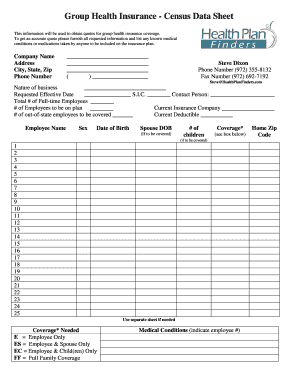
The Health Benefits Plan Census Form is a crucial document used by employers to collect and report information related to employee health benefits. This form plays an essential role in health benefits administration, enabling employers to manage and update enrollment data effectively. Specific information required includes the group name, company address, contact details, effective date, and subscriber count.
Purpose and Benefits of the Health Benefits Plan Census Form
Employers need to collect accurate data through the Health Benefits Plan Census Form to streamline the management of employee health benefits. Maintaining precise health benefits data provides a range of advantages, such as improved compliance with regulations and enhanced reporting capabilities to stakeholders. By effectively gathering this information, organizations can ensure that health benefits are administered fairly and transparently.
Key Features of the Health Benefits Plan Census Form
The Health Benefits Plan Census Form features several essential components, including subscriber details and tier information that are critical for accurate data collection. It allows users to list individual subscribers along with personal details, such as home zip code and coverage tier, ensuring comprehensive coverage for employees and their dependents. This form also facilitates easy updates to previously submitted data, enhancing the overall employee benefits administration process.
Who Needs to Use the Health Benefits Plan Census Form?
This form is primarily utilized by HR and benefits administrators within organizations. Scenarios that necessitate its use include annual enrollment periods, onboarding of new employees, or updates to existing employee benefits information. Both small and large employers benefit from using the form to maintain accurate and up-to-date health benefits records for their workforce.
How to Fill Out the Health Benefits Plan Census Form Online (Step-by-Step)
-
Access the Health Benefits Plan Census Form through your chosen platform.
-
Complete the required fields, ensuring to provide accurate group name and effective date.
-
Fill in subscriber information, paying attention to contact details and subscriber count.
-
Double-check the form for completeness, including all necessary signatures.
-
Submit the completed form online following the provided guidelines for submission.
Common Errors and How to Avoid Them
When filling out the Health Benefits Plan Census Form, there are a few common mistakes that should be avoided. Frequent errors include incorrect subscriber details and missing required information. Validating entries before submission is crucial, and best practices include reviewing all completed forms multiple times to ensure accuracy and completeness.
How to Submit the Health Benefits Plan Census Form
There are multiple ways to submit the Health Benefits Plan Census Form, including online submission or mailing a hard copy to the designated address. Awareness of deadlines is critical, as late submissions can affect health benefits administration. After submission, organizations may track the status of their form to receive confirmation of receipt.
Security and Compliance for the Health Benefits Plan Census Form
pdfFiller emphasizes the security of sensitive employee information throughout the form filling process. The platform complies with essential regulations such as HIPAA and GDPR, ensuring data privacy is maintained. This commitment to security is vital, considering the sensitive nature of health benefits data that organizations handle.
Sample or Example of a Completed Health Benefits Plan Census Form
To assist users, a sample of a completed Health Benefits Plan Census Form is available to provide clarity on each section. This example highlights key areas, such as subscriber information and tier details, improving understanding for those filling out the form for the first time. Users are encouraged to refer to this example as a guideline when completing their forms.
Enhance Your Experience with pdfFiller
Utilizing pdfFiller for completing the Health Benefits Plan Census Form offers several advantages, including features like eSigning and editing capabilities. These tools support users in achieving a streamlined and efficient form-filling experience. Accessing pdfFiller allows organizations to manage their health benefits forms with ease and confidence.
How to fill out the Health benefits plan census form
-
1.To access the Health Benefits Plan Census Form on pdfFiller, navigate to the website and search for the form by name in the search bar.
-
2.Once you’ve found the form, click on it to open the document in pdfFiller's editing interface.
-
3.Before filling in the form, gather necessary information such as the group name, company address, contact details, effective date, and subscriber count.
-
4.Start entering data into the designated fields. Click on a blank field to type in information, such as 'Group Name' and 'Effective Date.' Utilize text boxes and dropdown menus provided.
-
5.For listing individual subscribers, click on the table included in the form and input personal details like name, tier, and home zip code for each subscriber.
-
6.Review the completed form carefully to ensure all required fields are accurately filled out and that no information is missing.
-
7.Once satisfied with the information entered, you can save your changes in pdfFiller, allowing for future access and edits if needed.
-
8.To download a copy of the completed form, click on the 'Download' button found in the toolbar.
-
9.If you need to submit the form electronically, follow the submission options within pdfFiller, choosing to email directly or share via a link.

Who is eligible to fill out the Health Benefits Plan Census Form?
Eligible users include employers, HR professionals, and benefits administrators managing employee health benefits. Anyone handling employee records for health benefits can complete this form.
What information is required to complete this form?
Essential information includes group name, company address, contact information, effective date, subscriber count, and individual subscriber details such as names and zip codes.
How do I submit the Health Benefits Plan Census Form once completed?
You can submit the form by either downloading it and sending it manually or using the pdfFiller interface to email it directly after completion. Ensure all fields are accurately filled.
Are there deadlines for submitting the form?
Deadlines may vary based on your company's policies or health benefits provider requirements. It’s recommended to submit the form as soon as possible to ensure timely health benefits enrollment.
What are common mistakes to avoid while completing this form?
Common mistakes include missing required fields, unclear handwriting, and providing incorrect personal details of subscribers. Always double-check the information before submitting.
How long does it take to process the form after submission?
Processing times can vary. Typically, it can take a few days to a couple of weeks depending on the employer's review process and the health benefits provider's timelines.
Do I need to notarize the Health Benefits Plan Census Form?
No, notarization is not required for the Health Benefits Plan Census Form. This form is meant to be completed by employers for administrative purposes.
Related Forms





Get the latest insights from our blog


If you believe that this page should be taken down, please follow our DMCA take down process
here
.
This form may include fields for payment information. Data entered in these fields is not covered by PCI DSS compliance.