
Last updated on
Nov 7, 2026

NMSA Vocal Audition Evaluation Form 2017-2026 free printable template
pdfFiller is not affiliated with any government organization

Fill out
Complete the form online in a simple drag-and-drop editor.

eSign
Add your legally binding signature or send the form for signing.

Share
Share the form via a link, letting anyone fill it out from any device.

Export
Download, print, email, or move the form to your cloud storage.
Why pdfFiller is the best tool for your documents and forms


End-to-end document management
From editing and signing to collaboration and tracking, pdfFiller has everything you need to get your documents done quickly and efficiently.
Accessible from anywhere
pdfFiller is fully cloud-based. This means you can edit, sign, and share documents from anywhere using your computer, smartphone, or tablet.
Secure and compliant
pdfFiller lets you securely manage documents following global laws like ESIGN, CCPA, and GDPR. It's also HIPAA and SOC 2 compliant.
What is NMSA Vocal Audition Evaluation Form
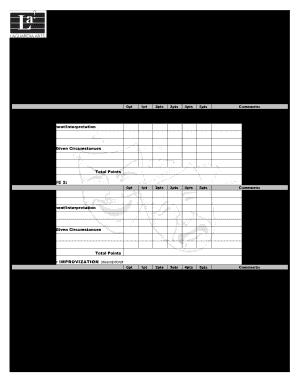
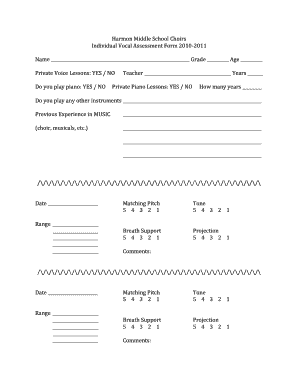
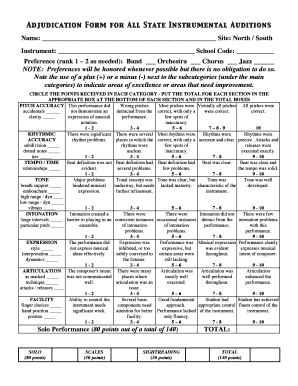
The Vocal Audition Evaluation Form is a document used by panelists to evaluate applicants for a vocal program effectively.
pdfFiller scores top ratings on review platforms




Who needs NMSA Vocal Audition Evaluation Form?
Explore how professionals across industries use pdfFiller.

NMSA Vocal Audition Evaluation Form is needed by:
-
Music program directors seeking to assess vocal talent.
-
Audition panelists requiring a structured evaluation tool.
-
Students applying for vocal programs needing to submit evaluation forms.
-
Educators involved in scouting vocal talent for music schools.
-
Administrative staff managing vocal audition processes.
Comprehensive Guide to NMSA Vocal Audition Evaluation Form
What is the Vocal Audition Evaluation Form?
The Vocal Audition Evaluation Form is an essential tool for assessing candidates in vocal programs. This form includes blank fields for scores, comments, and specific dimensions of evaluation. Its significance lies in helping panelists gauge applicants' suitability against music school standards, making it a critical document in the audition process.
Moreover, this form operates as a music audition form designed to assess various attributes necessary for success in vocal performances. By establishing clear criteria, it enhances the decision-making process for selecting candidates.
Purpose and Benefits of the Vocal Audition Evaluation Form
This form serves a vital role in the evaluation process by facilitating a structured assessment that captures applicants' abilities. One primary benefit is the incorporation of a clear rating system across different performance aspects.
Panelists can utilize the audition evaluation template to ensure their recommendations are well-founded and consistent, thereby improving the overall quality of applicant selection. The structured nature aids in identifying standout vocalists and supports the integrity of music school admission processes.
Key Features of the Vocal Audition Evaluation Form
Multiple categories within the Vocal Audition Evaluation Form enhance its utility. Key features include a diverse range of evaluation criteria such as posture, technique, tone, and communication skills.
Additionally, an interview section prompts specific questions that provide insights into the candidate's readiness. The inclusion of a final recommendation scoring system ensures a holistic evaluation, producing reliable results that benefit both the panel and the applicants.
Who Needs the Vocal Audition Evaluation Form?
The primary users of the Vocal Audition Evaluation Form are panelists tasked with evaluating candidates applying for vocal programs. This form is particularly relevant for music educators, instructional staff, and institutions that prioritize clear assessment methods.
Furthermore, it has legal implications, enhancing compliance with necessary educational standards and ensuring fairness in the selection process for vocal program applications. This commitment to transparency fosters confidence among candidates and institutions alike.
How to Fill Out the Vocal Audition Evaluation Form Online (Step-by-Step)
Filling out the Vocal Audition Evaluation Form online is a straightforward process. Follow these structured steps for efficient completion:
-
Enter the applicant's name and the grade they're applying for in the designated fields.
-
Assign scores from one to ten in the various performance categories: Passion, Aptitude, and Promise.
-
Include comments for each evaluation criterion to personalize the feedback.
-
Calculate the total score, ensuring it does not exceed 30 points possible.
-
Sign the form to validate your assessment as a panelist.
Clarity in ratings and accurate scoring are crucial for an effective assessment, ensuring each applicant is fairly evaluated.
Common Errors to Avoid When Completing the Vocal Audition Evaluation Form
To ensure the accuracy of evaluations, it's key to avoid common pitfalls when completing the form. Consistency in ratings across different categories is vital to maintain fairness.
Another common error is leaving sections incomplete, which can lead to misunderstandings regarding the applicant's abilities. Take special care with the interview section; clear, concise responses streamline the evaluation process.
Security and Compliance When Using the Vocal Audition Evaluation Form
Handling sensitive information on the Vocal Audition Evaluation Form is safeguarded by robust security protocols. pdfFiller employs 256-bit encryption to protect user data effectively.
Additionally, compliance with HIPAA and GDPR regulations ensures that all information is treated with the utmost privacy and care. Secure storage of evaluation records further establishes trust for both evaluators and candidates.
How to Submit the Vocal Audition Evaluation Form
Submitting the Vocal Audition Evaluation Form involves several convenient methods. Users can choose to submit the form online via pdfFiller, ensuring a streamlined process.
For those needing alternatives, printed forms can be delivered through mail or in person. After submission, confirmation and tracking options are available to verify the form's receipt and status.
What Happens After You Submit the Vocal Audition Evaluation Form?
Following the submission of the Vocal Audition Evaluation Form, a review process commences. Applicants may wonder about the timeline for evaluations and the factors influencing final decisions regarding admissions.
It’s also advisable for users to know how to follow up on the status of their submissions or request amendments if necessary, ensuring clear communication throughout the selection process.
Experience Seamless Form Filling with pdfFiller
Using pdfFiller introduces numerous benefits for completing and managing the Vocal Audition Evaluation Form. The platform allows quick access to a variety of features including editing, signing, and sharing documents.
Users can appreciate the user-friendly interface that prioritizes security while simplifying the form completion process. This seamless experience positions pdfFiller as an optimal choice for managing vital documentation like the vocal audition evaluation form.
How to fill out the NMSA Vocal Audition Evaluation Form
-
1.Begin by accessing pdfFiller and navigating to the Vocal Audition Evaluation Form. You can find this form by searching in the pdfFiller library or by entering the form name in the search bar.
-
2.Once you have found the form, click on it to open it in the editor. Familiarize yourself with the layout to ensure you complete all necessary sections.
-
3.Before filling out the form, gather all required information, including the applicant’s name, grade applying for, and evaluation criteria such as passion, aptitude, promise, and the total score.
-
4.Use the fillable fields provided in the form to enter the necessary information. Click on each field to type or select your ratings from the drop-down menus. Some fields may require specific responses, so read the instructions carefully.
-
5.Pay attention to the interview section, where you will need to provide specific ratings and comments. Utilize the checkboxes and blank fields as instructed to ensure a thorough evaluation of the applicant.
-
6.After completely filling out the form, review all entries for accuracy. Check that all ratings are correctly entered and that there are no missing responses.
-
7.Finally, save your completed form by clicking the save button. You can choose to download the form as a PDF for submission or directly submit it through the online portal as required.

What are the eligibility requirements for submitting this form?
Eligibility typically requires that the applicant is applying for a vocal program. There may be specific age or grade requirements depending on the institution.
What is the deadline for submitting the Vocal Audition Evaluation Form?
Deadlines generally vary by institution. It is advisable to check with the specific music program for accurate submission dates.
How do I submit the completed Vocal Audition Evaluation Form?
You can submit the completed form by downloading it and emailing it to the designated admissions office or using an online submission portal as specified by the music program.
Are there any required supporting documents needed with this form?
Additional documents may include a resume, recommendation letters, or a video audition. Check the specific program’s requirements for detailed information.
What are common mistakes to avoid when filling out this form?
Ensure all sections are completed and avoid skipped ratings or comments. Also, verify that your submission meets any specific instructions provided in the form.
What is the usual processing time for the Vocal Audition Evaluation Form?
Processing times vary among institutions, but it often takes a few weeks to assess evaluations and inform applicants of the results.
Can I edit the Vocal Audition Evaluation Form after saving it?
Yes, you can return to the saved document in pdfFiller and make necessary edits before final submission, ensuring all information is accurate.
NMSA Vocal Audition Evaluation Form Form Versions
Related Forms




Get the latest insights from our blog


If you believe that this page should be taken down, please follow our DMCA take down process
here
.
This form may include fields for payment information. Data entered in these fields is not covered by PCI DSS compliance.