
Last updated on
Oct 31, 2026

OH Columbus Podiatry and Surgery New Patient Welcome Forms 2016 free printable template
pdfFiller is not affiliated with any government organization

Fill out
Complete the form online in a simple drag-and-drop editor.

eSign
Add your legally binding signature or send the form for signing.

Share
Share the form via a link, letting anyone fill it out from any device.

Export
Download, print, email, or move the form to your cloud storage.
Why pdfFiller is the best tool for your documents and forms


End-to-end document management
From editing and signing to collaboration and tracking, pdfFiller has everything you need to get your documents done quickly and efficiently.
Accessible from anywhere
pdfFiller is fully cloud-based. This means you can edit, sign, and share documents from anywhere using your computer, smartphone, or tablet.
Secure and compliant
pdfFiller lets you securely manage documents following global laws like ESIGN, CCPA, and GDPR. It's also HIPAA and SOC 2 compliant.
What is OH Columbus Podiatry and Surgery New Patient Welcome Forms
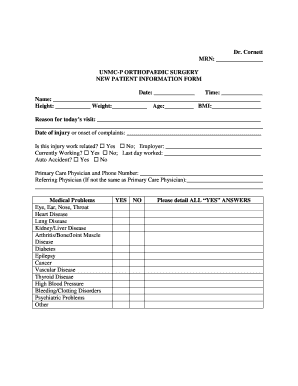
The New Patient Welcome Forms is a healthcare document used by Columbus Podiatry & Surgery Inc. to collect essential information from new patients.
pdfFiller scores top ratings on review platforms




Who needs OH Columbus Podiatry and Surgery New Patient Welcome Forms?
Explore how professionals across industries use pdfFiller.

OH Columbus Podiatry and Surgery New Patient Welcome Forms is needed by:
-
New patients seeking podiatry services
-
Guardians completing forms for minors
-
Medical practitioners needing patient information
-
Insurance companies requiring patient data
-
Healthcare administrators managing patient records
-
Office staff facilitating the registration process
Comprehensive Guide to OH Columbus Podiatry and Surgery New Patient Welcome Forms
What Are New Patient Welcome Forms?
New Patient Welcome Forms are essential documents used by Columbus Podiatry & Surgery Inc. to collect vital information from new patients. These forms typically include components such as personal details, medical history, emergency contact information, and insurance details. Collecting accurate patient information is crucial for healthcare providers to deliver effective care and establish a solid foundation for future appointments.
The significance of these forms lies in their ability to gather complete and precise information, which is necessary for personalized patient care. Therefore, utilizing the podiatry new patient form ensures that healthcare professionals have the information they need from the outset.
Why You Need to Complete the New Patient Welcome Forms
Completing the New Patient Welcome Forms accurately and promptly offers several benefits. Timely collection of this information is vital for facilitating patient care and ensuring healthcare providers have the necessary context for each patient. By streamlining the patient registration process, these forms help prevent delays in appointment scheduling.
When patients fill out their medical history form in a timely manner, it allows staff to prepare adequately for their arrival, enhancing the overall healthcare experience.
Key Features of the New Patient Welcome Forms
The New Patient Welcome Forms comprise essential sections designed to gather comprehensive patient information. These sections typically include personal details, emergency contact data, and insurance information. Each section lists required fields clearly, employing options such as checkboxes and signature lines to simplify the completion process.
-
Personal Details: Includes fields for name, date of birth, and contact information.
-
Emergency Contact: Information needed in case of urgent medical situations.
-
Insurance Information: Essential for billing and coverage verification.
-
Medical History: Detailed inquiry into previous health conditions and treatments.
Accurately completing each multi-part information field is crucial for effective processing.
Who Should Fill Out New Patient Welcome Forms?
New patients, along with their guardians, are typically required to fill out these forms. In cases where a minor is the patient, the guardian's signature is necessary to ensure consent and the accuracy of the provided information. It’s important to identify who qualifies as a patient in the context of podiatry, as this may impact the information required for the form.
Completing the podiatry registration form is mandatory for all new patients to initiate their healthcare journey effectively.
How to Fill Out the New Patient Welcome Forms Online
Filling out the New Patient Welcome Forms online can be straightforward if users follow a systematic approach. Here’s how to complete the forms digitally:
-
Open the online form and begin with the Personal Details section.
-
Proceed to the Medical History section, ensuring all relevant past conditions are listed.
-
Provide accurate Emergency Contact and Insurance Information.
-
Review each section for completeness before finalizing the form.
Avoid common pitfalls such as leaving required fields blank or entering incorrect information, as this can impede the registration process.
Filing and Submitting the New Patient Welcome Forms
Once the New Patient Welcome Forms are completed, multiple submission methods are available. Patients can either upload the forms online or print them for delivery. It is crucial to know where to send or deliver the forms to ensure they are processed efficiently.
Also, be aware of any applicable fees, deadlines, or specific conditions related to the submission to avoid delays in care.
What to Do After Submitting the New Patient Welcome Forms
After submitting the New Patient Welcome Forms, patients can expect a systematic review of their submissions. Typically, the processing time is communicated to ensure patients are informed. It is also advisable to confirm that their submission was received successfully.
Following this, the next steps regarding appointment scheduling will be communicated, allowing patients to proceed with their care journey.
Security and Privacy of Your Details in New Patient Welcome Forms
Ensuring the security of personal information is paramount when filling out New Patient Welcome Forms. pdfFiller employs advanced security measures, including encryption and compliance with industry standards, to safeguard sensitive health information. Protecting patient data during form filling and submission is a top priority, providing users with the reassurance they need while disclosing personal details.
How pdfFiller Can Help You with New Patient Welcome Forms
pdfFiller offers a range of tools to assist users in completing New Patient Welcome Forms efficiently. With capabilities for editing, eSigning, and converting documents, users can manage their forms easily from any browser. The convenience and accessibility of a cloud-based solution make the process user-friendly and secure.
By utilizing pdfFiller, patients can enhance their form completion experience and ensure that all necessary information is accurately provided.
Sample of a Completed New Patient Welcome Form
Providing a visual reference for users can significantly enhance understanding. A sample filled-out form illustrates key sections such as Personal Details, Medical History, and Emergency Contact Information. Highlighting how to correctly fill out these sections clarifies common fields and reinforces accurate completion.
Utilizing a completed form as a reference assists new patients in navigating their own forms with confidence.
How to fill out the OH Columbus Podiatry and Surgery New Patient Welcome Forms
-
1.To access the New Patient Welcome Forms, go to pdfFiller's website and search for the form by name in the search bar.
-
2.Once located, click on the form to open it in pdfFiller's editing interface.
-
3.Review the form layout to familiarize yourself with the required fields and sections.
-
4.Gather the necessary information including personal details, emergency contact information, insurance details, and medical history before starting.
-
5.Begin filling out the form by clicking on each field to enter or select your information. Use checkboxes where indicated.
-
6.Ensure that all required fields marked by asterisks are complete. Revisit any skipped sections if needed.
-
7.After filling in all information, review the provided details for accuracy to avoid errors.
-
8.Once everything is confirmed, proceed to provide your signature in the designated area.
-
9.Finally, save the completed form by clicking the save button. You can download it as a PDF or submit it directly through pdfFiller if required.

Who needs to fill out the New Patient Welcome Forms?
New patients visiting Columbus Podiatry, guardians submitting for minors, and anyone requiring podiatric services must complete these forms to ensure accurate record-keeping.
Is there a deadline to submit the New Patient Welcome Forms?
While there isn't a strict deadline, it's recommended to submit the New Patient Welcome Forms at least 24 hours before your first appointment to ensure timely processing.
How do I submit the New Patient Welcome Forms after completion?
After you complete the New Patient Welcome Forms, you have options to download the form and submit it via email or in person at the office, or submit it directly through pdfFiller.
What information is required on the New Patient Welcome Forms?
This form requires personal information, emergency contacts, insurance details, demographic data, and medical history information, along with a patient signature to confirm accuracy.
What common mistakes should I avoid while filling out the form?
Be cautious of spelling errors, incomplete fields, and not signing the form. Make sure to double-check all entries, especially insurance details, for accuracy.
How long does it take to process the New Patient Welcome Forms?
Processing time may vary, but typically, the forms are reviewed within one business day, allowing for any necessary follow-up before your appointment.
Do I need to notarize the New Patient Welcome Forms?
No, the New Patient Welcome Forms do not require notarization; however, a valid signature from the patient or guardian is necessary to confirm the information provided.
OH Columbus Podiatry and Surgery New Patient Welcome Forms Form Versions
Related Forms




Get the latest insights from our blog



If you believe that this page should be taken down, please follow our DMCA take down process
here
.
This form may include fields for payment information. Data entered in these fields is not covered by PCI DSS compliance.