
Last updated on
Oct 31, 2026

Get the free Queensland Inspection Certificate Form 16
We are not affiliated with any brand or entity on this form

Fill out
Complete the form online in a simple drag-and-drop editor.

eSign
Add your legally binding signature or send the form for signing.

Share
Share the form via a link, letting anyone fill it out from any device.

Export
Download, print, email, or move the form to your cloud storage.
Why pdfFiller is the best tool for your documents and forms


End-to-end document management
From editing and signing to collaboration and tracking, pdfFiller has everything you need to get your documents done quickly and efficiently.
Accessible from anywhere
pdfFiller is fully cloud-based. This means you can edit, sign, and share documents from anywhere using your computer, smartphone, or tablet.
Secure and compliant
pdfFiller lets you securely manage documents following global laws like ESIGN, CCPA, and GDPR. It's also HIPAA and SOC 2 compliant.
What is Qld Inspection Certificate
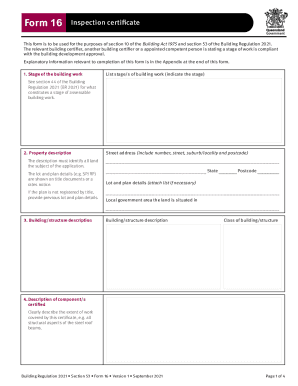
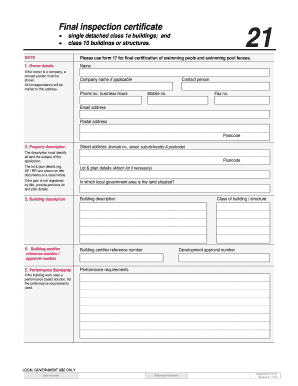
The Queensland Inspection Certificate Form 16 is a government document used by building professionals in Queensland, Australia, to certify stages of assessable building work.
pdfFiller scores top ratings on review platforms




Who needs Qld Inspection Certificate?
Explore how professionals across industries use pdfFiller.

Qld Inspection Certificate is needed by:
-
Building Certifiers responsible for project oversight.
-
Competent Persons involved in quality assurance.
-
QBSA Licensees who conduct building assessments.
-
Architects requiring documentation for compliance.
-
Property developers during permit applications.
-
Homeowners needing proof of work completion.
Comprehensive Guide to Qld Inspection Certificate
What is the Queensland Inspection Certificate Form 16?
The Queensland Inspection Certificate Form 16 is a crucial document in the building process within Queensland, Australia. It is defined as a certification used for assessing stages of building work or specific aspects of that work. This form plays a vital role in ensuring that construction complies with established standards and regulations.
Governed by the Building Act 1975 and the Building Regulation 2006, the form ensures adherence to legal requirements. Its completion confirms that the work has been inspected and meets the standards set forth in the relevant legislation.
Purpose and Benefits of the Queensland Inspection Certificate Form 16
The primary purpose of the Queensland Inspection Certificate Form 16 is to assure compliance with local building regulations. It helps stakeholders maintain standards, particularly for building certifiers, competent persons, and QBSA licensees. The form represents an essential step for property developers and home builders in fulfilling legal obligations.
-
Ensures compliance with building regulations, reducing the risk of legal issues.
-
Benefits building certifiers by providing a structured approach to certification.
-
Supports property developers in maintaining quality and legal standards.
-
Facilitates the work of QBSA licensees in their certification roles.
Key Features of the Queensland Inspection Certificate Form 16
This form includes several critical fields that users must complete accurately. Significant fields encompass property description, scope of work, and the basis for certification. Furthermore, the form must be signed by authorized individuals including building certifiers, competent persons, and QBSA licensees.
-
Property description identifies the location that the form pertains to.
-
Scope of work outlines the specific tasks or stages certified.
-
Certification basis provides the rationale for the approval.
-
Fillable fields within the form enhance ease of use for completing the document.
Who Needs the Queensland Inspection Certificate Form 16?
The Queensland Inspection Certificate Form 16 is essential for several roles in the building industry. Building certifiers, competent persons, and QBSA licensees are required to utilize this form when conducting inspections or certifications. Additionally, property owners can benefit from using the form during their building projects to ensure compliance.
This form becomes crucial in various scenarios, particularly when starting new projects or undergoing significant renovations. By adhering to the requirements of the form, all parties involved can guarantee their work meets regulatory expectations.
How to Fill Out the Queensland Inspection Certificate Form 16 Online
Filling out the Queensland Inspection Certificate Form 16 online requires a systematic approach. First, users need to access the form on a suitable platform. Once open, follow these steps to complete the document:
-
Fill out the property description and details about the scope of work.
-
Input the basis for certification as applicable to the work done.
-
Ensure required signatures are obtained from certified professionals.
-
Add any relevant digital signatures and verify all information.
-
Save the completed form securely for future reference.
Submission Methods and Delivery for the Queensland Inspection Certificate Form 16
Submitting the Queensland Inspection Certificate Form 16 can be accomplished through various methods, including online submissions or in-person delivery. Users should consider the preferred method of submission based on convenience and urgency.
-
Online submission is efficient and provides quicker processing times.
-
In-person delivery allows for direct confirmation of receipt.
-
Tracking the status of the submission is possible through designated channels.
-
A review of any associated fees or deadlines is essential before submission.
Consequences of Not Filing the Queensland Inspection Certificate Form 16
Failing to file the Queensland Inspection Certificate Form 16 or submitting it late can lead to serious consequences. Legal implications may arise for builders and property developers if they neglect to meet certification requirements.
-
Delays in project timelines often occur due to non-compliance.
-
Financial penalties may be imposed on those who fail to adhere to regulations.
-
Non-compliance can also jeopardize the legality of building projects.
Privacy and Data Protection for the Queensland Inspection Certificate Form 16
Utilization of the Queensland Inspection Certificate Form 16 involves the handling of sensitive information. It is critical that users are assured of data security and protection. When using platforms like pdfFiller, various security features are in place to safeguard information.
-
The platform implements 256-bit encryption for data security.
-
Compliance with GDPR and HIPAA ensures proper handling of personal information.
-
Electronic submissions maintain document safety throughout the process.
Why Use pdfFiller for Your Queensland Inspection Certificate Form 16?
Choosing pdfFiller to complete the Queensland Inspection Certificate Form 16 offers several advantages. The platform provides a user-friendly environment for filling and managing PDF documents efficiently.
-
Cloud accessibility allows users to complete forms from any device.
-
Features support easy editing, signing, and sharing of documents.
-
Enhanced security measures are in place when dealing with sensitive information.
How to fill out the Qld Inspection Certificate
-
1.Access pdfFiller and search for 'Queensland Inspection Certificate Form 16' to find the document available for editing.
-
2.Open the form in the pdfFiller interface, where you can view all available fields and instructions for completion.
-
3.Before starting, gather all necessary information, including property details, scope of work, and applicable reference documentation.
-
4.Begin filling in the fields, starting with the property description and then moving on to the building or structure description.
-
5.Indicate the specific aspects of the work being certified, ensuring all relevant stages are clearly noted.
-
6.As you fill in the form, use pdfFiller's features to check boxes and input data in the required fields efficiently.
-
7.Once all fields are completed, carefully review the form to ensure accuracy and compliance with regulations.
-
8.Finalize the form by checking for any skipped sections or errors before saving your work.
-
9.To save or download the completed form, use the 'Download' button or opt for the 'Send' feature to submit directly through pdfFiller.

Who is eligible to sign the Queensland Inspection Certificate Form 16?
Eligible signatories include a registered Building Certifier, a qualified Competent Person, or a licensed QBSA Licensee who meets the requirements set forth by Queensland regulations.
What is the deadline for submitting the form?
The form should be submitted promptly after the completion of the relevant stage of construction, in line with local council requirements to avoid delays in approvals.
How should I submit the completed form?
Once completed, the form can be submitted directly to the relevant local council or building authority, either physically or via online submission as permitted.
What supporting documents are required with this form?
Typically, supporting documents include proof of previous permits, construction plans, and any previous forms completed for this project, which help validate the certification.
What are common mistakes to avoid when filling out the form?
Common mistakes include omitting required fields, failing to check all relevant aspects of work, and inaccuracies in property details, which can lead to processing delays.
How long does it take to process the form?
Processing times can vary based on the local authority, but generally, you can expect a response within a few weeks after submission.
What happens if I need to make changes after submission?
If changes are needed, you may need to submit an amendment request or a new form, depending on the nature of the changes and the rules of the local authority.
Related Forms





Get the latest insights from our blog


If you believe that this page should be taken down, please follow our DMCA take down process
here
.
This form may include fields for payment information. Data entered in these fields is not covered by PCI DSS compliance.