
Last updated on
Nov 9, 2026

UHM UHM-1 2017 free printable template
pdfFiller is not affiliated with any government organization

Fill out
Complete the form online in a simple drag-and-drop editor.

eSign
Add your legally binding signature or send the form for signing.

Share
Share the form via a link, letting anyone fill it out from any device.

Export
Download, print, email, or move the form to your cloud storage.
Why pdfFiller is the best tool for your documents and forms


End-to-end document management
From editing and signing to collaboration and tracking, pdfFiller has everything you need to get your documents done quickly and efficiently.
Accessible from anywhere
pdfFiller is fully cloud-based. This means you can edit, sign, and share documents from anywhere using your computer, smartphone, or tablet.
Secure and compliant
pdfFiller lets you securely manage documents following global laws like ESIGN, CCPA, and GDPR. It's also HIPAA and SOC 2 compliant.
What is UHM UHM-1
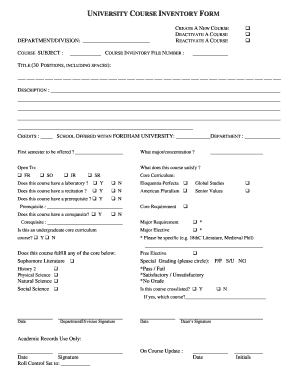
The University of Hawaii Course Addition Form is a document used by the University of Hawaii at Manoa to request the addition of new courses within their academic programs.
pdfFiller scores top ratings on review platforms




Who needs UHM UHM-1?
Explore how professionals across industries use pdfFiller.

UHM UHM-1 is needed by:
-
Faculty members who wish to propose new courses.
-
Department Chairs or Directors responsible for course offerings.
-
College or School Deans overseeing academic curriculum.
-
General Education Directors managing course designations.
-
Graduate Division Deans involved in course approvals.
-
Vice Chancellor for Academic Affairs for final review.
Comprehensive Guide to UHM UHM-1
What is the University of Hawaii Course Addition Form?
The University of Hawaii Course Addition Form is integral for students and faculty at the University of Hawaii at Manoa who wish to add new courses to the curriculum. This form serves as a formal request to initiate the academic course addition process, ensuring that all new offerings are appropriately vetted and approved. Understanding how to complete this form correctly is crucial for a successful submission.
Purpose and Benefits of the University of Hawaii Course Addition Form
This form facilitates the incorporation of new courses into the university's curriculum, streamlining the process for all involved parties. The benefits of utilizing the University of Hawaii Course Addition Form extend to:
-
Enhancing academic offerings for students.
-
Providing clear guidelines for faculty when proposing new courses.
-
Assisting administrative staff in managing curriculum changes efficiently.
Using this template ensures that necessary steps are followed for smooth approval.
Who Needs the University of Hawaii Course Addition Form?
Stakeholders such as academic Chairs, Deans, and Directors are responsible for submitting the University of Hawaii Course Addition Form. Eligibility to use the form generally includes:
-
Faculty members proposing new courses.
-
Department Chairs responsible for curriculum oversight.
-
Deans reviewing course proposals for academic integrity.
Awareness of these roles enhances the compliance of submissions with university policies.
Required Documents and Information for Submission
Completing the University of Hawaii Course Addition Form requires specific details, including:
-
Course subject and course number.
-
Effective term and frequency of offering.
-
Credit limits and grading options.
-
Justifications and course descriptions.
Accurate information is essential to avoid delays or rejection of the course addition request.
How to Fill Out the University of Hawaii Course Addition Form Online (Step-by-Step)
Filling out the University of Hawaii Course Addition Form online involves several important steps:
-
Access the form through the university’s designated portal.
-
Enter basic course information, including subject and credits.
-
Complete requirement sections accurately to ensure clarity.
-
Review the completed form for any errors before submission.
Pay attention to common pitfalls, such as incomplete information or missing signatures, which can delay processing.
Digital vs. Wet Signature Requirements for the University of Hawaii Course Addition Form
The signing process for the University of Hawaii Course Addition Form mandates various signatures, including those from the Chair and Deans. Understanding the distinction between digital signatures and traditional wet signatures is vital, as:
-
Digital signatures offer a secure method of validation.
-
Wet signatures may still be required in some traditional processes.
Being aware of these requirements ensures compliance and expedites the approval process.
Submission Methods and Where to Submit the University of Hawaii Course Addition Form
There are multiple ways to submit the completed University of Hawaii Course Addition Form:
-
Submit electronically via the university portal.
-
Print and deliver to the appropriate academic office.
It's essential to be mindful of submission deadlines and processing times to ensure timely curriculum updates.
What Happens After You Submit the University of Hawaii Course Addition Form?
Following submission, several steps occur, including:
-
Tracking the status of your course addition request through the university system.
-
Addressing any feedback or required changes from the review committee.
-
Maintaining a personal record of your submission for future reference.
This process emphasizes the importance of effective communication during the review period.
Ensuring Security and Compliance for the University of Hawaii Course Addition Form
When submitting the University of Hawaii Course Addition Form online, maintaining data protection is critical. Key security measures include:
-
Utilizing platforms compliant with data protection regulations.
-
Employing encryption protocols for sensitive information.
Understanding these security practices safeguards personal and academic data during submission.
Maximize Your Experience with pdfFiller for the University of Hawaii Course Addition Form
Using pdfFiller enhances the experience of filling out the University of Hawaii Course Addition Form. This platform offers features such as eSigning, editing tools, and comprehensive document management to streamline the process.
Leveraging these features not only simplifies form completion but also ensures a secure and efficient handling of submissions.
How to fill out the UHM UHM-1
-
1.Begin by accessing the University of Hawaii Course Addition Form through pdfFiller. Use the search function or navigate to the provided link to locate the form.
-
2.Once the form is open, familiarize yourself with its layout. pdfFiller allows you to click on fillable fields to enter information directly.
-
3.Before completing the form, gather necessary details such as course subject, number, effective term, and any prerequisites needed. It's crucial to have this information handy.
-
4.Proceed to enter the course information in the appropriate fields. Use relevant drop-down options where available to ensure accurate entries.
-
5.Be sure to check each field for clarity and correctness. Review the course description, justification, and any other sections requiring detailed information.
-
6.After filling out the form, take advantage of pdfFiller’s review features. Look for any red flags or areas that might need additional clarification.
-
7.Once satisfied with the completed form, save your work. pdfFiller allows you to download the completed form in various formats for your records.
-
8.Select the option to submit the form electronically or follow the outlined steps for printing and signing. Ensure all required signatures are gathered from the authorities listed.

Who is eligible to use the University of Hawaii Course Addition Form?
The form is primarily for faculty members, department chairs, and deans at the University of Hawaii at Manoa who are aiming to propose the addition of new courses.
What information is needed to fill out the Course Addition Form?
You will need to gather details such as the course subject, number, effective term, frequency, required signatures, and additional course specifics before starting the form.
How do I submit the Course Addition Form after completion?
The form can be submitted electronically through pdfFiller, or you may download and print it to gather necessary signatures and submit it in person to the relevant departments.
What mistakes should I avoid when filling out the form?
Common mistakes include missing required fields, incorrect course information, and failing to secure necessary signatures. Review the form thoroughly before submission.
Is there a deadline for submitting the Course Addition Form?
While specific deadlines may vary, it is generally advised to submit your form well in advance of the term you wish to add courses for to allow for necessary approvals.
How long does it take to process the Course Addition Form?
Processing times can vary depending on departmental review speeds. However, expect a processing period of several weeks, especially during peak registration times.
What additional documents might be required with the form?
You may need to attach supporting documents, such as course syllabi or outlines, especially if the course has specific prerequisites or major requirements.
UHM UHM-1 Form Versions
Related Content
Related Forms




Get the latest insights from our blog


If you believe that this page should be taken down, please follow our DMCA take down process
here
.
This form may include fields for payment information. Data entered in these fields is not covered by PCI DSS compliance.