
Last updated on
Nov 7, 2026
IE SARP Employer Return 2017 free printable template
We are not affiliated with any brand or entity on this form

Fill out
Complete the form online in a simple drag-and-drop editor.

eSign
Add your legally binding signature or send the form for signing.

Share
Share the form via a link, letting anyone fill it out from any device.

Export
Download, print, email, or move the form to your cloud storage.
Why pdfFiller is the best tool for your documents and forms


End-to-end document management
From editing and signing to collaboration and tracking, pdfFiller has everything you need to get your documents done quickly and efficiently.
Accessible from anywhere
pdfFiller is fully cloud-based. This means you can edit, sign, and share documents from anywhere using your computer, smartphone, or tablet.
Secure and compliant
pdfFiller lets you securely manage documents following global laws like ESIGN, CCPA, and GDPR. It's also HIPAA and SOC 2 compliant.
What is IE SARP Employer Return
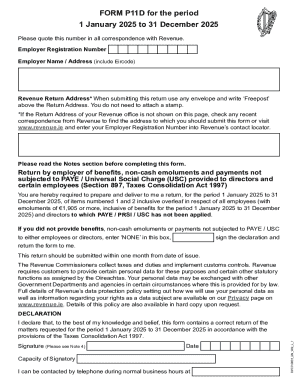
The SARP Employer Return 2017 is a tax document used by employers in Ireland to report employees who availed of relief under the Special Assignee Relief Programme for the year 2017.
pdfFiller scores top ratings on review platforms




Who needs IE SARP Employer Return?
Explore how professionals across industries use pdfFiller.

IE SARP Employer Return is needed by:
-
Employers utilizing the Special Assignee Relief Programme
-
HR professionals managing employee tax compliance
-
Accountants preparing employer tax returns
-
Tax advisors assisting clients with SARP claims
-
Businesses reporting employee gross income for 2017
Comprehensive Guide to IE SARP Employer Return
What is the SARP Employer Return 2017?
The SARP Employer Return 2017 is a crucial tax document for employers in Ireland, serving to report details concerning employees who benefited from the Special Assignee Relief Programme (SARP). This form aims to ensure that relevant tax relief is applied accurately and efficiently, contributing to compliance with Irish tax regulations. It is fundamental for employers needing to claim SARP tax relief on behalf of their assignees, enabling proper documentation of earned income and relief amounts.
The SARP relief form is essential for managing tax obligations and streamlining reporting processes. It plays a significant role in ensuring that employers can leverage available tax incentives while maintaining compliance with legal requirements.
Purpose and Benefits of the SARP Employer Return 2017
The primary objective of the SARP Employer Return 2017 is to clarify which employees are eligible for SARP tax relief and the specific amounts they are entitled to. By submitting this form, employers can benefit from streamlined tax compliance and enhance their organizational financial efficiency.
Employers benefit significantly from this process, as it not only alleviates tax burdens for employees but also aids in accurate tax reporting. Properly filed SARP relief forms can assist companies in avoiding potential penalties related to non-compliance, ensuring their financial practices are aligned with regulations.
Who Needs to Complete the SARP Employer Return 2017?
Employers who have any employees participating in the Special Assignee Relief Programme must complete the SARP Employer Return 2017. This requirement extends to all organization sizes, from small startups to larger established businesses. Employee eligibility under SARP includes those assigned to work in Ireland from abroad, qualifying for specific tax reliefs based on their roles and income levels.
Organizations need to assess their employee profiles to determine who qualifies for the SARP relief and ensure compliance with tax regulations accordingly.
Key Information Required for the SARP Employer Return 2017
To effectively complete the SARP Employer Return 2017, employers should gather specific details about their employees. Required information includes:
-
Employee names
-
Personal Public Service numbers (PPS)
-
Job titles
-
Gross income figures
-
Amount of SARP relief claimed
Furthermore, having supporting documentation, such as employment contracts or payslips, can facilitate a smoother filing process. Proper organization of these documents is essential for precise reporting.
How to Fill Out the SARP Employer Return 2017 Online (Step-by-Step)
Using pdfFiller to complete the SARP Employer Return 2017 simplifies the form-filling process. Follow these steps to fill out the form:
-
Access the form via pdfFiller’s platform.
-
Fill in required details carefully, ensuring accuracy.
-
Review each section thoroughly to prevent errors.
-
Utilize editing tools to make necessary changes and adjustments.
-
Sign the document electronically to finalize the submission.
Common issues may arise during the filling process, such as incomplete fields or incorrect data formats. To overcome these challenges, employers should double-check each entry before submission.
Review and Validation Checklist for the SARP Employer Return 2017
Before submitting the SARP Employer Return 2017, employers should use the following checklist to validate their submissions:
-
Confirm all employee details are accurately filled.
-
Ensure all required documents are attached.
-
Check for any missing signatures.
-
Review for common errors such as typos or incorrect PPS numbers.
Accurate information is vital for submission success, and double-checking can prevent common pitfalls later in the process.
How to Submit the SARP Employer Return 2017
Employers can submit the SARP Employer Return 2017 through several methods, including online submission via pdfFiller or traditional paper mail. In both cases, it is essential to send the completed form to the appropriate tax office.
Be aware of submission deadlines, as the completed form must be filed by 23 February 2018. Understanding processing times can also assist employers in planning their tax filing activities efficiently.
What to Do After Submitting the SARP Employer Return 2017
After submitting the SARP Employer Return 2017, employers can expect a confirmation from the tax office. Tracking the submission can help in confirming that the filing has been processed correctly. If amendments are needed post-submission, employers should follow the appropriate procedures to correct or update their forms.
Understanding these steps can help ensure that employers maintain ongoing compliance and avoid potential issues related to filed returns.
Security and Compliance When Handling the SARP Employer Return 2017
Employers must prioritize data protection and privacy compliance when handling the SARP Employer Return 2017. With sensitive employee information involved, ensuring the security of these documents is crucial. pdfFiller employs strong measures such as 256-bit encryption to protect submitted data, thus aligning with GDPR and HIPAA compliance requirements.
Record retention must also be considered, and employers should maintain copies of submitted documents for their records in case of future audits or inquiries.
Get Started with pdfFiller to Simplify Your SARP Employer Return 2017 Process
Leveraging pdfFiller’s platform can ease the complexities associated with filling out the SARP Employer Return 2017. Features such as editing capabilities and secure document handling allow for a smooth and compliant form-filling experience. Employers can benefit from enhanced efficiency in their tax filing processes, ensuring compliance with Irish tax regulations.
How to fill out the IE SARP Employer Return
-
1.Access the SARP Employer Return 2017 form by visiting pdfFiller's website. You can search for the form by its title or navigate through the tax forms category.
-
2.Open the document in pdfFiller. You will be presented with options to fill the document directly in the interface.
-
3.Before starting, gather essential information including your employees' names, PPS numbers, job titles, gross income, and corresponding SARP relief amounts. Ensure you have accurate and complete information to avoid errors.
-
4.Begin filling in the required fields. Click on each field to input data. Use the provided checkboxes where necessary, ensuring all information reflects the respective employee’s details accurately.
-
5.Follow the explicit instructions given within the document. Make sure to review any notes or tips on completing specific sections to ensure compliance with SARP guidelines.
-
6.Once you have entered all necessary information, take a moment to review the completed form. Check for any missed fields or inaccuracies that might need correction before finalizing.
-
7.After validating all the information, finalize the form in pdfFiller. You may also preview the final document to ensure everything is in order.
-
8.To save or download the form, click on the appropriate options in pdfFiller. You can also submit the filled document directly through the platform if necessary.

Who is eligible to use the SARP Employer Return 2017?
Employers in Ireland who have employees that availed of the Special Assignee Relief Programme during the year 2017 are eligible to use this form.
What is the deadline for submitting the SARP Employer Return?
The completed SARP Employer Return must be signed and submitted by 23 February 2018 to ensure compliance with Irish tax regulations.
What documents are required to complete the SARP Employer Return?
You will need employee information such as names, PPS numbers, job titles, gross income, and the amount of SARP relief claimed for accurate completion of the return.
What common mistakes should be avoided when filling out this return?
Ensure that all fields are filled accurately, avoiding common errors such as misspelling employee names or miscalculating relief amounts, as these can lead to processing delays.
How can I submit the completed SARP Employer Return?
The form can be submitted online via pdfFiller, or alternatively, you can download and print the completed document for mail submission to the relevant tax authority.
What processing time should I expect after submitting the form?
Processing times can vary, but typically you should expect to receive confirmation from the tax authorities within several weeks after your submission.
Can I make changes to the form after submission?
Once submitted, changes cannot be made directly to a filed SARP Employer Return. You may need to file an amended return to correct any errors.
IE SARP Employer Return Form Versions
Related Forms




Get the latest insights from our blog


If you believe that this page should be taken down, please follow our DMCA take down process
here
.
This form may include fields for payment information. Data entered in these fields is not covered by PCI DSS compliance.