
Last updated on
Nov 9, 2026

FL 12.990(b)(3) 2018-2026 free printable template
pdfFiller is not affiliated with any government organization

Fill out
Complete the form online in a simple drag-and-drop editor.

eSign
Add your legally binding signature or send the form for signing.

Share
Share the form via a link, letting anyone fill it out from any device.

Export
Download, print, email, or move the form to your cloud storage.
Why pdfFiller is the best tool for your documents and forms


End-to-end document management
From editing and signing to collaboration and tracking, pdfFiller has everything you need to get your documents done quickly and efficiently.
Accessible from anywhere
pdfFiller is fully cloud-based. This means you can edit, sign, and share documents from anywhere using your computer, smartphone, or tablet.
Secure and compliant
pdfFiller lets you securely manage documents following global laws like ESIGN, CCPA, and GDPR. It's also HIPAA and SOC 2 compliant.
What is FL 12.990(b)(3)
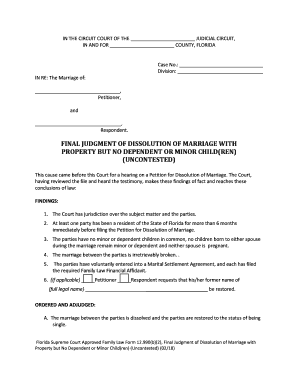
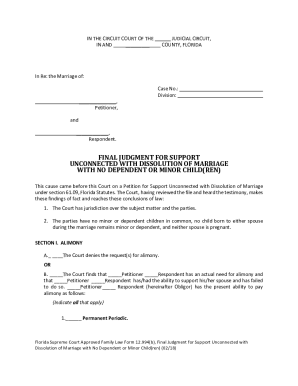
The Florida Uncontested Divorce Judgment is a legal document used by couples in Florida to finalize a divorce without disputes regarding minor children or marital assets.
pdfFiller scores top ratings on review platforms




Who needs FL 12.990(b)(3)?
Explore how professionals across industries use pdfFiller.

FL 12.990(b)(3) is needed by:
-
Individuals seeking an uncontested divorce in Florida
-
Petitioners wanting to restore a former name after divorce
-
Respondents involved in a divorce without minor children
-
Family law attorneys assisting clients with divorce filings
-
Clerks of court processing uncontested divorce documents
-
Judges approving final divorce judgments in Florida
Comprehensive Guide to FL 12.990(b)(3)
What is the Florida Uncontested Divorce Judgment?
The Florida Uncontested Divorce Judgment refers to the Florida Supreme Court Approved Family Law Form 12.990(b)(3). This legal document is specifically designed for cases where couples do not have minor children or disputes regarding marital assets. The primary purpose of this form is to facilitate the dissolution of marriage. Additionally, it provides an avenue for individuals to restore their former names if desired.
Purpose and Benefits of the Florida Uncontested Divorce Judgment
This form streamlines the divorce process for couples who agree on the terms and thus have no disputes. By utilizing the Florida Uncontested Divorce Judgment, users gain legal assurance that their dissolution of marriage will be recognized by Florida courts. Another significant benefit is the option to restore a former name upon request, which can simplify the post-divorce transition for individuals.
Who Needs the Florida Uncontested Divorce Judgment?
The Florida Uncontested Divorce Judgment is intended for individuals who meet certain eligibility criteria. To use this form, the parties involved must not have any minor children or property disputes. The person initiating the divorce is known as the petitioner, while the other spouse is the respondent. Additional parties involved in the process include the Circuit Judge and the Clerk of Court, both of whom must sign the completed document for it to be valid.
Key Features of the Florida Uncontested Divorce Judgment
The Florida Uncontested Divorce Judgment includes several important elements to ensure proper completion. Among its features are fillable fields and checkboxes that guide users through the necessary information. Accurate signatures from all parties involved are crucial for the document's validity. It is essential to fill out the form correctly, as any mistakes could jeopardize its acceptance by the court.
How to Fill Out the Florida Uncontested Divorce Judgment Online
To complete the Florida Uncontested Divorce Judgment online, follow these step-by-step instructions:
-
Access the form using pdfFiller's platform.
-
Fill in each field carefully, ensuring all information is accurate.
-
Watch for common errors such as missing signatures or incorrect names.
-
Utilize pdfFiller's features, like auto-fill or templates, to enhance your experience.
-
Review the final document for any mistakes before saving and submitting the form.
Submission Methods for the Florida Uncontested Divorce Judgment
Once the Florida Uncontested Divorce Judgment is filled out, the next step is submission. Users should submit the completed form to the appropriate court where the divorce is being processed. Be aware of any associated filing fees, as well as potential fee waivers for qualifying individuals. Timely submission is essential to avoid complications in the divorce process.
What Happens After You Submit the Florida Uncontested Divorce Judgment?
After filing the Florida Uncontested Divorce Judgment, individuals can expect several steps in the processing phase. Typically, there is a designated processing time during which the court will review the submitted form. Users may track their application status online, providing transparency throughout the process. If the court finds any issues with the form, users will be informed of the required corrections.
Security and Compliance with the Florida Uncontested Divorce Judgment
When handling sensitive documents like the Florida Uncontested Divorce Judgment, security is paramount. pdfFiller implements several security features to safeguard personal information, ensuring that all data remains confidential. Compliance with regulations such as HIPAA and GDPR further underscores the importance of secure online processing for legal documents, providing peace of mind to users.
Leverage pdfFiller for Your Florida Uncontested Divorce Judgment
pdfFiller offers numerous features that simplify the process of managing the Florida Uncontested Divorce Judgment. Users can take advantage of capabilities such as eSignatures, document editing, and cloud storage, all accessible without needing downloads. By using pdfFiller, individuals can efficiently create, fill, and file their divorce forms, making legal documentation more convenient than ever.
How to fill out the FL 12.990(b)(3)
-
1.To access the Florida Uncontested Divorce Judgment form on pdfFiller, visit the pdfFiller website and log in to your account or create a new one if necessary.
-
2.Use the search function to locate the form by typing 'Florida Uncontested Divorce Judgment' in the search bar. Click on the correct form to open it in the pdfFiller editor.
-
3.Before beginning to fill out the form, gather essential information such as both parties' names, any previous legal names, dates of marriage, and the request to restore a former name if applicable.
-
4.Start filling in the fields on the form, ensuring to follow the prompts and instructions for each section. Use pdfFiller's tools to complete blank fields, checkboxes, and any required information conveniently.
-
5.As you complete the form, review each entry carefully to ensure accuracy and compliance with all requirements outlined in the instructions provided within the template.
-
6.Once the form is filled out, use pdfFiller's review tools to double-check your work, ensuring all necessary signatures are noted for the petitioner, respondent, circuit judge, and clerk of court or designee.
-
7.After finalizing edits, you can save your document directly to your pdfFiller account. To download or submit the form, click on the download icon or the submit option available, following any prompts provided by pdfFiller.

Who is eligible to use the Florida Uncontested Divorce Judgment form?
This form is suitable for couples in Florida seeking an uncontested divorce without minor children or marital assets. Both parties must agree on the divorce terms.
Are there deadlines for submitting the divorce judgment form?
While there are no specific deadlines for submitting this form, it is essential to file it promptly to ensure the divorce process is completed efficiently. Delays may impact finalization.
Where do I submit the completed form?
You must file the completed Florida Uncontested Divorce Judgment form with the appropriate circuit court in Florida. Check local court requirements for exact submission methods.
What supporting documents do I need to provide?
Typically, no additional supporting documents are required for an uncontested divorce judgment. However, ensure both parties provide accurate information and signatures on the form.
What are common mistakes to avoid when completing this form?
Common mistakes include missing signatures, incorrect party information, and failing to follow instructions on restoring a former name. Double-check each field for accuracy.
How long does it take to process the divorce judgment once submitted?
Processing times can vary by court, but typically, you can expect a few weeks for the court to process and return a finalized judgment. Check with local court for specifics.
Can I edit the form after saving it on pdfFiller?
Yes, you can edit the Florida Uncontested Divorce Judgment form after saving it on pdfFiller. Simply access your saved documents, open the form, and make any necessary changes.
FL 12.990(b)(3) Form Versions
Related Forms





Get the latest insights from our blog


If you believe that this page should be taken down, please follow our DMCA take down process
here
.
This form may include fields for payment information. Data entered in these fields is not covered by PCI DSS compliance.