
Last updated on
Oct 31, 2026

Get the free Supplement Form to Seasonal Work Application
We are not affiliated with any brand or entity on this form

Fill out
Complete the form online in a simple drag-and-drop editor.

eSign
Add your legally binding signature or send the form for signing.

Share
Share the form via a link, letting anyone fill it out from any device.

Export
Download, print, email, or move the form to your cloud storage.
Why pdfFiller is the best tool for your documents and forms


End-to-end document management
From editing and signing to collaboration and tracking, pdfFiller has everything you need to get your documents done quickly and efficiently.
Accessible from anywhere
pdfFiller is fully cloud-based. This means you can edit, sign, and share documents from anywhere using your computer, smartphone, or tablet.
Secure and compliant
pdfFiller lets you securely manage documents following global laws like ESIGN, CCPA, and GDPR. It's also HIPAA and SOC 2 compliant.
What is Seasonal Work Supplement
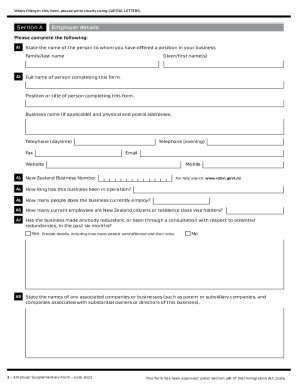
The Supplement Form to Seasonal Work Application is a document used by employers in Finland to provide essential details about seasonal employees and their employment conditions.
pdfFiller scores top ratings on review platforms




Who needs Seasonal Work Supplement?
Explore how professionals across industries use pdfFiller.

Seasonal Work Supplement is needed by:
-
Employers in Finland offering seasonal work
-
Seasonal employees seeking work permits
-
Immigration authorities reviewing work applications
-
Human resources personnel managing seasonal staff
-
Legal advisors assisting with work-related paperwork
-
Consultants guiding employers on immigration forms
Comprehensive Guide to Seasonal Work Supplement
What is the Supplement Form to Seasonal Work Application?
The Supplement Form to Seasonal Work Application is a crucial document used by employers in Finland to facilitate detailed employee reporting. This form plays a vital role in the residence permit application process for seasonal work. It requires an employer’s affirmation and signature, ensuring that all details provided are accurate and complete.
Employers must understand their responsibilities and the importance of this form in managing seasonal employment effectively. The Supplement Form contributes to a streamlined process for both employee and employer when applying for necessary permits.
Purpose and Benefits of the Supplement Form to Seasonal Work Application
Completing the Supplement Form accurately is essential for a smooth processing experience. Providing complete and accurate information not only helps in expediting the immigration process but is also crucial for maintaining legal compliance in seasonal employment.
Employers can prevent potential delays caused by incomplete or incorrect submissions by taking the time to fill out the form thoroughly. This adherence to protocol enhances the overall effectiveness of the application process.
Who Needs the Supplement Form to Seasonal Work Application?
The Supplement Form is specifically designed for employers in Finland who engage seasonal employees. Employers must recognize their obligations under this system and ensure they are compliant with the established rules.
This form is required in scenarios such as applying for a certificate for seasonal work, where precise information regarding the employee and job specifics is mandatory. Understanding when to utilize this form is critical for successful applications.
Key Features of the Supplement Form to Seasonal Work Application
Important components of the Supplement Form include fields such as employee information, employment terms, and employer details. Each fillable field serves a critical purpose in detailing the nature of employment and the responsibilities involved.
-
Employee name and personal details
-
Employment start and end dates
-
Working conditions and salary
-
Required affirmation from the employer
Specific instructions included with the form guide employers in accurately completing each section, which is vital for avoiding mistakes that may affect the application.
How to Fill Out the Supplement Form to Seasonal Work Application Online (Step-by-Step)
Filling out the Supplement Form can be done efficiently with the following steps:
-
Access the form using a reliable PDF editor like pdfFiller.
-
Enter the required employee information in the designated sections.
-
Fill in employment details, such as start and end dates, salary, and working hours.
-
Review all entries for accuracy before submitting.
Utilizing digital solutions like pdfFiller streamlines this process, enabling changes and corrections to be made easily. Employers should also be aware of common pitfalls, such as overlooking required signatures or incomplete sections, to ensure a successful submission.
Submission Methods and Delivery for the Supplement Form to Seasonal Work Application
Once the Supplement Form is completed, it can be submitted through various methods. Employers can choose between online submission or traditional mail, depending on preference and requirements.
-
Online submission through designated platforms
-
Traditional mail to the relevant immigration office
After submission, employers should expect a confirmation regarding the processing of the application, along with timelines that outline when to anticipate further communication or approvals.
Common Errors and How to Avoid Them When Submitting the Supplement Form to Seasonal Work Application
To prevent errors during submission, employers should consider the following common mistakes:
-
Providing incomplete employee information
-
Omitting the employer's signature
-
Neglecting to check for compliance with required fields
Best practices include thoroughly reviewing entries and utilizing checklists to validate all information before submission. Attention to detail can significantly improve the likelihood of a successful application.
Security and Compliance in Handling the Supplement Form to Seasonal Work Application
Data protection is paramount when handling the Supplement Form. Employers must be aware of the security measures in place, including 256-bit encryption, to protect sensitive information.
Compliance with GDPR and other relevant regulations is crucial to safeguard personal data. Employers should prioritize the security of this information to maintain trust and adhere to legal standards throughout the application process.
Experience Hassle-Free Form Management with pdfFiller
Utilizing pdfFiller for managing the Supplement Form offers numerous advantages. This cloud-based platform simplifies the editing, filling, and signing processes, making it accessible from any browser without requiring downloads.
-
eSigning for quick approvals
-
Editing capabilities for correcting details easily
-
Secure document sharing to maintain confidentiality
Employers can rely on pdfFiller’s robust features to ensure compliance and security while managing their documentation effectively.
Final Thoughts on Using the Supplement Form to Seasonal Work Application
Accurate use of the Supplement Form is essential for employers engaging seasonal workers. Leveraging tools like pdfFiller can enhance the application process, helping to ensure that all submissions are complete and correctly filed.
The user-friendly nature of pdfFiller makes it an ideal solution for both employers and employees involved in the seasonal work application process.
How to fill out the Seasonal Work Supplement
-
1.To access the Supplement Form to Seasonal Work Application on pdfFiller, start by visiting their website or app and logging into your account.
-
2.Once logged in, use the search bar to type in the form's name and locate the document among the search results.
-
3.After opening the form, navigate through the fillable fields, starting with 'Family name', and follow the prompts to fill in all required details accurately.
-
4.Gather necessary information beforehand, including employee details such as full name, date of birth, citizenship, and employment specifics like job title, salary, and working hours.
-
5.Utilize pdfFiller's tools to input information easily by clicking on each field and typing or pasting the information from your gathered documents.
-
6.Once all fields are filled out, review the form carefully to ensure that all required information is accurate and complete, paying attention to mandatory signatures and affirmations.
-
7.After confirming everything is correct, utilize pdfFiller's features to save your work. You can download the completed form as a PDF or submit it directly through the platform as per your needs.
-
8.Ensure you keep a copy of the submitted form for your records in case of any future inquiries or follow-ups from the Finnish Immigration Service.

Who is eligible to use the Supplement Form?
Employers in Finland offering seasonal work to foreign employees must use the Supplement Form to provide detailed information about the employment terms and the seasonal worker.
What are the submission methods for this form?
The Supplement Form can be submitted electronically through the pdfFiller platform or printed and sent as required by the Finnish Immigration Service.
What information do I need to complete the form?
You will need the seasonal employee's full name, birth date, citizenship, specific employment details, and terms such as salary and working hours to complete the form effectively.
Are there any common mistakes to avoid when filling out this form?
Common mistakes include omitting required fields, providing incorrect details, or failing to obtain the necessary signatures, which could lead to application delays or rejections.
How long does it take for the application to be processed?
Processing times for the Supplement Form can vary; typically, it can take several weeks. It is advised to submit it well in advance to avoid complications.
Do I need to notarize the form?
No, the Supplement Form to Seasonal Work Application does not require notarization before submission, but ensure that all information is accurate and complete.
Is there a deadline for submitting this form?
While specific deadlines can vary, it is best to submit the Supplement Form as soon as possible after the seasonal work application to ensure timely processing.
Related Forms



Get the latest insights from our blog


If you believe that this page should be taken down, please follow our DMCA take down process
here
.
This form may include fields for payment information. Data entered in these fields is not covered by PCI DSS compliance.