
Last updated on
Oct 29, 2026

CT 403(b) Salary Reduction Agreement 2018-2026 free printable template
pdfFiller is not affiliated with any government organization

Fill out
Complete the form online in a simple drag-and-drop editor.

eSign
Add your legally binding signature or send the form for signing.

Share
Share the form via a link, letting anyone fill it out from any device.

Export
Download, print, email, or move the form to your cloud storage.
Why pdfFiller is the best tool for your documents and forms


End-to-end document management
From editing and signing to collaboration and tracking, pdfFiller has everything you need to get your documents done quickly and efficiently.
Accessible from anywhere
pdfFiller is fully cloud-based. This means you can edit, sign, and share documents from anywhere using your computer, smartphone, or tablet.
Secure and compliant
pdfFiller lets you securely manage documents following global laws like ESIGN, CCPA, and GDPR. It's also HIPAA and SOC 2 compliant.
What is CT 403(b) Salary Reduction Agreement
The 403(b) Salary Reduction Agreement is a payroll form used by employees and employers to establish, modify, or discontinue salary reduction contributions to a 403(b) retirement plan.
pdfFiller scores top ratings on review platforms




Who needs CT 403(b) Salary Reduction Agreement?
Explore how professionals across industries use pdfFiller.

CT 403(b) Salary Reduction Agreement is needed by:
-
Employees participating in a 403(b) retirement plan
-
Employers offering 403(b) plans
-
Human resources professionals managing payroll
-
Financial advisors guiding retirement planning
-
Payroll administrators processing salary reductions
-
Compliance officers ensuring IRS adherence
Comprehensive Guide to CT 403(b) Salary Reduction Agreement
What is the 403(b) Salary Reduction Agreement?
The 403(b) Salary Reduction Agreement serves to establish salary reduction contributions for employees participating in a 403(b) retirement plan. This form is crucial for both employees and employers as it clearly outlines the terms of the contribution and facilitates proper retirement planning. Properly filling out this agreement can ensure that employees are maximizing their retirement savings while employers are meeting compliance requirements.
Purpose and Benefits of the 403(b) Salary Reduction Agreement
This agreement provides several benefits, making it essential for both employees and employers. Employees can secure their financial future by participating in a 403(b) plan, which offers tax-deferred growth of their contributions. Employers, on the other hand, benefit from the ability to provide competitive retirement options that can help attract and retain talent.
-
Facilitates tax-deferred contributions for retirement
-
Offers employers a strategy to enhance employee retention
Key Features of the 403(b) Salary Reduction Agreement
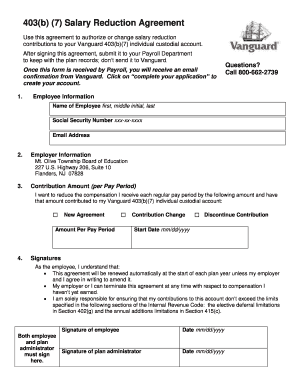
The form includes essential components that must be filled out carefully. Standard fields include Employee Name, Social Security Number, and Salary Reduction Amount. Additional options, such as investment provider selections and allocation percentages, are also included to cater to individual needs.
-
Employee Name
-
Salary Reduction Amount
-
Investment provider options
-
Allocation percentages
Who Needs the 403(b) Salary Reduction Agreement?
Both employees wishing to participate in a 403(b) retirement plan and employers sponsoring the plan are required to fill out this form. Eligibility criteria may vary based on employment status and organizational policies, making it essential to understand specific scenarios where the form applies.
-
Employees interested in retirement plan contributions
-
Employers facilitating the contributions
-
Individuals meeting specific eligibility criteria
How to Fill Out the 403(b) Salary Reduction Agreement Online (Step-by-Step)
Completing the 403(b) Salary Reduction Agreement online is straightforward, especially with tools like pdfFiller. Follow these steps to fill the form digitally:
-
Access the form through the provided platform.
-
Enter your Employee Name in the designated field.
-
Fill in your Social Security Number and Address.
-
Specify the Effective Date and Salary Reduction Amount.
-
Select your investment provider and allocation percentages.
-
Review the form for accuracy before submission.
Review and Submission of the 403(b) Salary Reduction Agreement
Before submitting the agreement, it's important to ensure all information is accurate. There are several submission methods available:
-
Online submission through your HR's designated platform
-
Mail the completed form to the HR department
Common errors include missing signatures or incorrect information, so thorough reviewing is essential.
Common Rejection Reasons and Solutions
Understanding common reasons for rejection can streamline the submission process. Here are frequent issues and suggested remedies:
-
Incomplete fields, such as missing Employee Name or Salary Reduction Amount.
-
Incorrect Social Security Number format.
To prevent rejection, double-check all entries and ensure compliance with eligibility requirements.
Security and Compliance for the 403(b) Salary Reduction Agreement
When handling sensitive documents like the 403(b) Salary Reduction Agreement, data protection is essential. pdfFiller ensures compliance with strict security measures, including 256-bit encryption, HIPAA, and GDPR compliance, safeguarding your information during the document processing.
Sample or Example of a Completed 403(b) Salary Reduction Agreement
A visual example of a completed 403(b) Salary Reduction Agreement can provide clarity. Each filled section is significant, as it determines contributions and settings for the retirement plan. Annotations explaining the purpose of each field can enhance understanding.
Empowering You to Manage Your 403(b) Salary Reduction Agreement Easily with pdfFiller
Utilizing pdfFiller’s features simplifies managing your 403(b) Salary Reduction Agreement. Users can effortlessly create, edit, and eSign the document online. The platform also prioritizes security while providing robust editing and sharing capabilities, ensuring a user-friendly experience.
How to fill out the CT 403(b) Salary Reduction Agreement
-
1.Access pdfFiller and search for the '403(b) Salary Reduction Agreement' form in the template library.
-
2.Open the form by clicking on it to begin customizing it for your needs.
-
3.Gather the necessary information before you start filling out the form. This includes your name, Social Security Number, address, effective date, and desired salary reduction amount.
-
4.Using pdfFiller, navigate through the form fields by clicking on each area that requires input. Use the text boxes to enter your employee information, as directed.
-
5.Complete the employee section first, ensuring accuracy in the entered data. Then, move to the employer section to fill in the required fields.
-
6.Ensure you review all checkboxes for options relevant to your situation, such as investment provider and allocation percentages.
-
7.Once all information is correctly filled in, take the time to carefully review the entire document for any errors or omissions.
-
8.When you are satisfied with the completed form, click on the save button to keep a copy, and use the download option to save it to your device.
-
9.If you need to send the form, utilize the submission options available on pdfFiller or follow your organization's submission protocols.

Who is eligible to use the 403(b) Salary Reduction Agreement?
Both employees wishing to contribute to a 403(b) retirement plan and employers offering such plans are eligible to use the 403(b) Salary Reduction Agreement.
What is the deadline for submitting the 403(b) Salary Reduction Agreement?
The deadline typically aligns with your payroll processing schedule. Ensure that you submit the form before the cutoff date to affect the current pay period.
How do I submit the completed 403(b) Salary Reduction Agreement?
The completed form should be submitted to your employer's HR or payroll department, either in person, via email, or through designated online submission portals as specified by your employer.
Are any supporting documents required with the 403(b) Salary Reduction Agreement?
Generally, supporting documents are not required to be submitted with the form, but verify with your employer if any specific documentation is needed to accompany your agreement.
What are common mistakes to avoid when completing this form?
Common mistakes include omitting important information, failing to sign the document, or not reviewing the allocation percentages and investment options before submission.
How long does it take to process the 403(b) Salary Reduction Agreement?
Processing times vary by organization, but it typically takes a few days after submission for the changes to reflect in payroll. Confirm with your HR department for specifics.
Do I need to notarize the 403(b) Salary Reduction Agreement?
No, this form does not require notarization; however, it must be signed by both the employee and employer to be valid.
Related Forms



Get the latest insights from our blog


If you believe that this page should be taken down, please follow our DMCA take down process
here
.
This form may include fields for payment information. Data entered in these fields is not covered by PCI DSS compliance.