
Last updated on
Nov 6, 2026

Canada Paternity Testing Centers Client Consent Form for the Non-Legal Paternity Test 2015-2026 ...
We are not affiliated with any brand or entity on this form

Fill out
Complete the form online in a simple drag-and-drop editor.

eSign
Add your legally binding signature or send the form for signing.

Share
Share the form via a link, letting anyone fill it out from any device.

Export
Download, print, email, or move the form to your cloud storage.
Why pdfFiller is the best tool for your documents and forms


End-to-end document management
From editing and signing to collaboration and tracking, pdfFiller has everything you need to get your documents done quickly and efficiently.
Accessible from anywhere
pdfFiller is fully cloud-based. This means you can edit, sign, and share documents from anywhere using your computer, smartphone, or tablet.
Secure and compliant
pdfFiller lets you securely manage documents following global laws like ESIGN, CCPA, and GDPR. It's also HIPAA and SOC 2 compliant.
What is Canada Paternity Testing Centers Client Consent Form for the Non-Legal Paternity Test
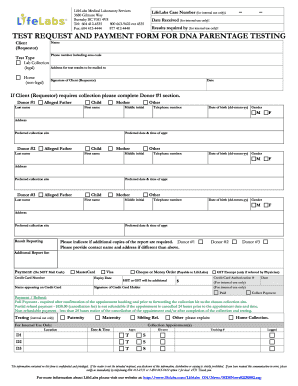
The Client Consent Form for Non-Legal Paternity Test is a healthcare document used by potential fathers and children to obtain consent for DNA analysis in Canada.
pdfFiller scores top ratings on review platforms




Who needs Canada Paternity Testing Centers Client Consent Form for the Non-Legal Paternity Test?
Explore how professionals across industries use pdfFiller.

Canada Paternity Testing Centers Client Consent Form for the Non-Legal Paternity Test is needed by:
-
Potential fathers seeking paternity testing.
-
Parents needing legal clarity on child parentage.
-
Healthcare professionals involved in paternity tests.
-
DNA testing centers in Canada processing samples.
-
Individuals requiring paternity verification for personal reasons.
Comprehensive Guide to Canada Paternity Testing Centers Client Consent Form for the Non-Legal Paternity Test
What is the Client Consent Form for Non-Legal Paternity Test?
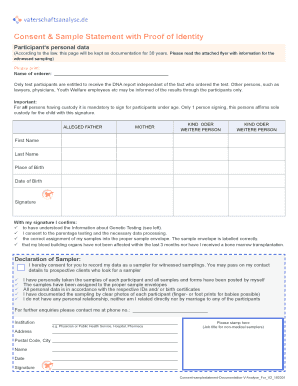
The Client Consent Form for Non-Legal Paternity Test is crucial in Canada, as it lays the groundwork for obtaining DNA analysis consent from both the potential father and child. This form includes various components: names, ethnic backgrounds, signatures, and consents necessary to initiate the testing process.
Potential fathers and children use this form to ensure their participation is legally recognized and ethically sound. By completing this form, parties confirm their willingness to proceed with testing while safeguarding their rights.
Purpose and Benefits of the Client Consent Form for Non-Legal Paternity Test
Utilizing the Client Consent Form is essential for several reasons. Foremost, it ensures that consent is obtained before any DNA tests are conducted. This preliminary step is key to maintaining transparency and trust among participants.
Completing the form offers numerous benefits, such as confidentiality for all parties involved. The structure of the document also protects individual rights, making it essential for anyone considering a paternity test in Canada.
Key Features of the Client Consent Form for Non-Legal Paternity Test
The Client Consent Form is designed with several important attributes that users should be aware of. Noteworthy features include:
-
Fillable fields for the potential father’s name, child’s name, and ethnicity.
-
Signature requirements for both parties, validating their consent.
-
Clearly outlined terms and conditions regarding confidentiality.
This comprehensive structure ensures that users understand their obligations and the scope of consent provided.
Who Needs the Client Consent Form for Non-Legal Paternity Test?
The primary audience for this form includes potential fathers and children. These specific roles must complete and submit the form to proceed with a non-legal paternity test. Situations where this form may be necessary include:
-
When a potential father seeks to confirm paternity amicably.
-
When a child is involved in testing for verification of parentage.
Understanding who needs this document helps facilitate the testing process for everyone involved.
When and How to Fill Out the Client Consent Form for Non-Legal Paternity Test Online
Filling out the Client Consent Form online is straightforward. To do so effectively, follow these step-by-step instructions:
-
Access the online form on a reliable platform.
-
Enter the required information, including names and ethnic backgrounds.
-
Ensure all fields are filled out accurately before submission.
After completing the form, it is advisable to review it with a validation checklist to ensure accuracy and compliance with all requirements.
How to Submit the Client Consent Form for Non-Legal Paternity Test
Submission methods for the Client Consent Form can vary. Users may choose to submit the completed form either online or in person. Key points about the submission process include:
-
Online submissions typically offer the quickest processing times.
-
In-person submissions may require an appointment at designated locations.
Once submitted, users should be aware of how to track their submissions and what confirmation processes are in place to confirm receipt.
Common Errors and How to Avoid Them
Filling out the Client Consent Form may lead to several common mistakes. To ensure a smooth process, consider these tips:
-
Double-check all fields to confirm they are correctly populated.
-
Verify the completeness of signatures and required data points.
By paying attention to potential pitfalls, users can help ensure their submission is valid and accepted without issues.
Security and Compliance for the Client Consent Form for Non-Legal Paternity Test
Data protection is of utmost importance when handling sensitive information like paternity test results. pdfFiller offers robust security measures, including:
-
256-bit encryption to protect data during transmission.
-
Compliance with privacy standards such as HIPAA and GDPR.
These measures ensure that users can handle their forms with confidence, knowing that their data is secure and managed according to stringent privacy standards.
Sample or Example of a Completed Client Consent Form for Non-Legal Paternity Test
To assist users, a sample completed Client Consent Form is available for reference. This example highlights:
-
The correct placement of names and signatures.
-
A breakdown of various sections to illustrate how to fill out the form properly.
Having a visual representation can be beneficial for ensuring accuracy when completing the form.
Your Next Steps with pdfFiller
Utilizing pdfFiller for your Client Consent Form sample ensures a seamless experience. With the platform, users can fill out, eSign, and manage their forms securely and efficiently. The user-friendly features of pdfFiller aim to make the form completion process as straightforward as possible, allowing you to focus on what matters.
Consider taking your next steps with pdfFiller today and enjoy the ease and security of working with your forms.
How to fill out the Canada Paternity Testing Centers Client Consent Form for the Non-Legal Paternity Test
-
1.Access the Client Consent Form for Non-Legal Paternity Test on pdfFiller by visiting their website and using the search function to find the specific form.
-
2.Open the form and familiarize yourself with the layout. Look for fillable fields such as 'Potential Father’s Name', 'Child’s Name', and others indicating required information.
-
3.Before filling out the form, gather necessary details including both parties' full names, ethnicity options you wish to select, and the preferred delivery method for test results.
-
4.Click into each fillable field on pdfFiller and type in the required information. Use the provided boxes to check off applicable ethnicities.
-
5.Ensure both the potential father and child have provided their names and that the appropriate signature fields are signed. Make sure to include the date beside each signature.
-
6.Review the entire form on pdfFiller for any missing information or signatures. Ensure that all parts are complete as this is critical for submission.
-
7.Once satisfied with the completed form, choose the option to save your work within pdfFiller. You can download a copy or directly submit the form electronically depending on your choice.

Who is eligible to sign this form?
The form must be signed by both the potential father and the child, making them the primary eligible signatories. Ensure that the child is of an appropriate age to provide consent.
Is there a deadline for submitting the consent form?
There is no specified deadline for submitting the form; however, timely completion is recommended to ensure quick processing of paternity tests. Check with your testing center for specific timelines.
How do I submit the Client Consent Form?
The completed form can be submitted either electronically through the testing center’s online portal or as a printed copy mailed or delivered in person. Be sure to confirm submission methods with your provider.
What information do I need to provide with the form?
Along with the completed consent form, make sure to include identification or other supporting documents if required by the testing center. This often involves personal identification of both signatories.
What common mistakes should I avoid when filling out the form?
Common mistakes include missing signatures, incorrect information in the fillable fields, and failing to check the required consent options. Double-check each section before finalizing.
What is the processing time after submission?
Processing times for the paternity test can vary based on the laboratory's workload. Contact your testing center for an estimated turnaround time once the form has been submitted.
Can this form be notarized?
This form does not require notarization for its validity; however, verify with your specific testing center if any special requirements apply.
Related Forms




Get the latest insights from our blog



If you believe that this page should be taken down, please follow our DMCA take down process
here
.
This form may include fields for payment information. Data entered in these fields is not covered by PCI DSS compliance.