
Last updated on
Oct 30, 2026

CMS-855O 2017-2026 free printable template
pdfFiller is not affiliated with any government organization

Fill out
Complete the form online in a simple drag-and-drop editor.

eSign
Add your legally binding signature or send the form for signing.

Share
Share the form via a link, letting anyone fill it out from any device.

Export
Download, print, email, or move the form to your cloud storage.
Why pdfFiller is the best tool for your documents and forms


End-to-end document management
From editing and signing to collaboration and tracking, pdfFiller has everything you need to get your documents done quickly and efficiently.
Accessible from anywhere
pdfFiller is fully cloud-based. This means you can edit, sign, and share documents from anywhere using your computer, smartphone, or tablet.
Secure and compliant
pdfFiller lets you securely manage documents following global laws like ESIGN, CCPA, and GDPR. It's also HIPAA and SOC 2 compliant.
What is CMS-855O
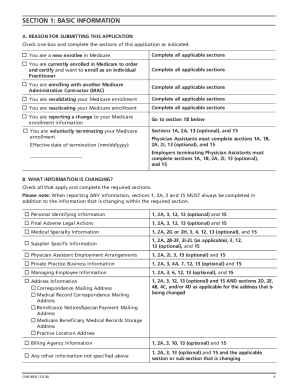
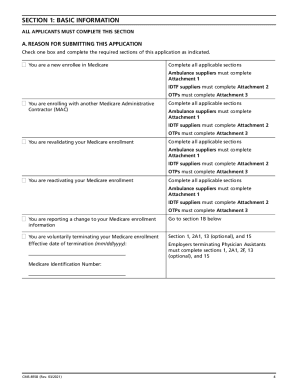
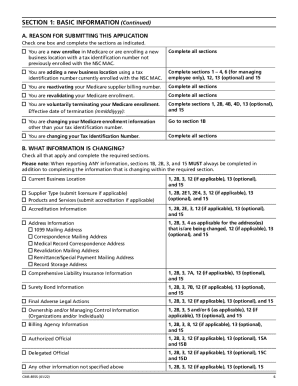
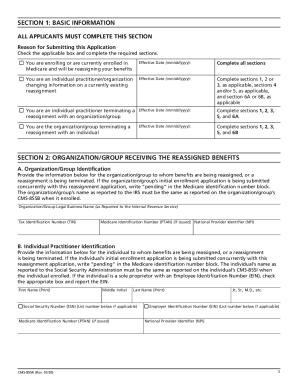
The Medicare Enrollment Application CMS-855O is a government form used by eligible physicians and professionals to enroll in the Medicare program for ordering and certifying items or services for beneficiaries.
pdfFiller scores top ratings on review platforms




Who needs CMS-855O?
Explore how professionals across industries use pdfFiller.

CMS-855O is needed by:
-
Physicians seeking to enroll in Medicare.
-
Eligible professionals who order or certify services for Medicare patients.
-
Healthcare administrators managing Medicare enrollments.
-
Billing specialists processing Medicare claims.
-
New healthcare providers wanting to offer services to Medicare beneficiaries.
Comprehensive Guide to CMS-855O
What is the Medicare Enrollment Application CMS-855O?
The Medicare Enrollment Application CMS-855O is designed specifically for eligible physicians and professionals who intend to enroll in the Medicare program. This form serves the purpose of ordering and certifying items or services for Medicare beneficiaries, ensuring they receive necessary care. Professionals such as healthcare providers should utilize this form to certify medical services that require Medicare coverage. Relevant identification details, including the National Provider Identifier (NPI), are essential for successful completion.
Purpose and Benefits of the Medicare Enrollment Application CMS-855O
This form plays a critical role in the Medicare enrollment process. By using the CMS-855O, healthcare providers can streamline enrollment, helping them efficiently certify services for Medicare beneficiaries. The benefits include improved order processing and access to Medicare reimbursement for the recommended services.
-
Facilitates enrollment for immediate service certification
-
Supports timely access to care for beneficiaries
-
Ensures proper documentation of services
Who Needs the Medicare Enrollment Application CMS-855O?
Eligible professionals, including physicians and specific other healthcare practitioners, are required to complete the CMS-855O form. Situations necessitating the use of this form often involve the need for compliance with Medicare requirements, particularly for those who are newly enrolling or updating their information. To effectively fill out this form, healthcare providers must include certain identifiers such as their NPI.
Eligibility Criteria for Completing the Medicare Enrollment Application CMS-855O
To qualify for filling out the CMS-855O, applicants must meet specific requirements, including being a certified healthcare provider capable of ordering services. Limitations may apply based on professional credentials or the types of services offered. The term "eligible professional" indicates those who possess the proper licenses and certifications necessary to participate in the Medicare system.
How to Fill Out the Medicare Enrollment Application CMS-855O Online (Step-by-Step)
Filling out the CMS-855O form online involves a straightforward process. Follow these steps to ensure accurate completion:
-
Access the online form interface provided by pdfFiller.
-
Enter the required personal and professional information, ensuring accurate entries, especially your NPI.
-
Review each field carefully as you proceed through the application.
-
Check all entries for errors or omissions before finalizing.
-
Submit your application using the designated button, ensuring to confirm the transmission.
Common Errors and How to Avoid Them While Submitting the CMS-855O Form
When completing the CMS-855O form, several common errors can hinder submission. Prospective applicants should especially pay attention to the following:
-
Providing incorrect information in the NPI field
-
Omitting required signatures or dates
-
Failing to double-check all entries for accuracy
Thoroughly reviewing the filled form can prevent these issues, ensuring a smoother submission process.
Submission Methods for the Medicare Enrollment Application CMS-855O
The completed CMS-855O form can be submitted through various methods. Providers can choose between online submission via the Medicare portal or traditional mail. Ensure familiarity with the appropriate jurisdictional details regarding where to send your completed form. If applicable, payment methods for processing fees should also be confirmed before submission.
What Happens After You Submit the CMS-855O Form?
After the submission of the CMS-855O form, applicants can expect a defined processing timeline, typically outlined by the Medicare Administrative Contractor. Tracking the status of your application is crucial for understanding potential rejections. Common reasons for rejection include missing information or unverified provider details, which can often be remedied by promptly submitting corrected information.
Security and Compliance for Submitting the Medicare Enrollment Application CMS-855O
When using pdfFiller for the CMS-855O form, security measures play a significant role in protecting personal data. Compliance with laws such as HIPAA and GDPR is essential when handling sensitive documents. Furthermore, maintaining privacy during the Medicare enrollment process helps ensure that personal information is safeguarded throughout the submission process.
Why Choose pdfFiller for Your Medicare Enrollment Application CMS-855O?
Utilizing pdfFiller for your CMS-855O form offers numerous advantages. Users benefit from features such as the ability to eSign, edit, and securely store documents. The platform promotes ease of use, allowing access from any device, making the Medicare enrollment process not only achievable but also efficient.
How to fill out the CMS-855O
-
1.To access the Medicare Enrollment Application CMS-855O on pdfFiller, start by visiting the pdfFiller website and use the search bar to locate the form. Once found, click on the form's link to open it.
-
2.Navigate through the form's fields using your mouse or keyboard. Click on each blank field to enter your personal and professional information accurately, including your National Provider Identifier (NPI).
-
3.Before starting, ensure you have all necessary documents and information ready. This includes your NPI number, professional credentials, and any relevant patient information required for the application.
-
4.As you fill out the form, carefully review each section. Make sure all information is correct, and pay special attention to mandatory fields marked with an asterisk.
-
5.Once all fields are completed, check the form for any missing information or errors. Use pdfFiller's spell check feature for an additional review.
-
6.Finalize your application by signing the form digitally within pdfFiller. Look for the signature field and follow prompts to add your electronic signature.
-
7.Lastly, save your completed form by clicking the 'Save' option. You can also choose to download it or submit it directly to the appropriate Medicare Administrative Contractor through pdfFiller’s submission options.

Who is eligible to fill out the Medicare Enrollment Application CMS-855O?
Eligible physicians and professionals who intend to order or certify services for Medicare beneficiaries can complete this form. This includes licensed practitioners who provide Medicare-covered services.
Are there any deadlines for submitting the CMS-855O form?
While there may not be specific deadlines for the CMS-855O form, it is advisable to submit the application as soon as you decide to start participation in the Medicare program to avoid processing delays.
How do I submit the CMS-855O form after filling it out?
After completing the form on pdfFiller, you can submit it electronically through the platform, or download and print it to mail to your designated Medicare Administrative Contractor as per the submission guidelines.
What supporting documents do I need to submit with the CMS-855O form?
Generally, you will need to include proof of your identity and credentials. Check your local Medicare Administrative Contractor's guidelines for specific requirements that may apply to your situation.
What are some common mistakes to avoid when completing the CMS-855O form?
Avoid missing mandatory fields and ensure all your information is accurate. Double-check the signature section, as failing to sign can result in application delays or denials.
How long does it take to process the CMS-855O form?
Processing times for the CMS-855O form can vary, but it typically takes anywhere from 30 to 90 days. Delays may occur if additional information is required or if there are errors on the submitted form.
Can I amend my application after submitting the CMS-855O form?
Yes, if you need to make changes after submission, you may need to complete and submit a new CMS-855O form or follow specific instructions provided by your Medicare Administrative Contractor for amendments.
CMS-855O Form Versions
Related Content
Related Forms





Get the latest insights from our blog


If you believe that this page should be taken down, please follow our DMCA take down process
here
.
This form may include fields for payment information. Data entered in these fields is not covered by PCI DSS compliance.